
 SolaarLinux
vs
Logitech G HubWindows
SolaarLinux
vs
Logitech G HubWindows
Solaar como alternativa Linux ao Logitech G Hub
Atualizado em
Nossa avaliação
Solaar is a decent Linux replacement for basic Logitech gear management, but it falls short of the full feature set of Logitech G Hub. It works well for users who only need device pairing, battery monitoring, and simple button or scroll adjustments on keyboards, mice, and trackpads. Advanced users wanting macro recording, detailed DPI profiles, RGB lighting control, or firmware updates will find Solaar lacking and may need to stick with G Hub on Windows or look for other tools.
- Licença
- GPL-2.0-only
- Preço
- Grátis
- Versão mais recente
- 1.1.20 (28 de junho de 2026)
- Avaliação
- —
O que funciona igual
- Both manage Logitech peripherals and support wireless (Lightspeed, Nano) and Bluetooth connections
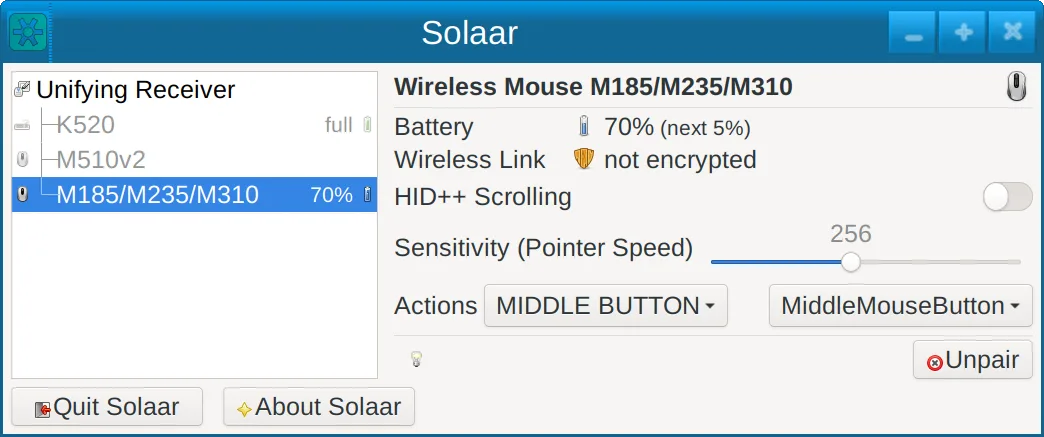
- Both provide a GUI that shows connected devices and basic status
- Both allow pairing/unpairing of devices
- Both offer battery level display for rechargeable devices
- Both run natively on Linux (Solaar) and Windows/macOS (G Hub)
O que muda
- Solaar does not support macro recording or playback, while G Hub does
- RGB lighting control is absent in Solaar, G Hub offers full RGB customization
- Firmware updates are only available in G Hub, Solaar cannot flash firmware
- Solaar lacks detailed DPI and profile management; G Hub provides per‑profile DPI settings
- Solaar does not export or import configuration files from G Hub; it only manages current device settings
Abrindo seus arquivos do Logitech G Hub
Solaar cannot open or import Logitech G Hub configuration files (.lgh or similar). Users must manually reconfigure devices in Solaar or continue using G Hub on Windows for those settings. There is no known export function from G Hub that Solaar can read.
Trocando o Logitech G Hub pelo Solaar, passo a passo
- 1. Install Solaar from your distribution’s package manager or Flathub.
- 2. Launch Solaar and pair your Logitech devices via the GUI or CLI.
- 3. Use the device panel to adjust button mapping, smooth scrolling, and function‑key behavior where supported.
- 4. For DPI and RGB settings, reconfigure manually in G Hub or use alternative tools like OpenRGB for lighting.
- 5. Keep G Hub installed on a Windows machine if you need firmware updates or advanced macros.
- 6. Test each device to ensure all desired functions work; adjust settings in Solaar as needed.
Principais recursos do Solaar
- Suporte a interface gráfica e linha de comando
- Exibição do status da bateria
- Pareamento/despareamento de dispositivos
- Rodação suave ajustável
- Controle do comportamento das teclas de função
- Ícone na área de notificação
- Funciona com USB, Lightspeed, Nano, Bluetooth
Como instalar o Solaar no Linux
flatpak install flathub io.github.pwr_solaar.solaarsudo apt install solaarsudo apt install solaarsudo dnf install solaarsudo pacman -S solaarsudo zypper install solaarPerguntas frequentes
Does Solaar support macro recording?
No, Solaar does not provide macro recording or playback features.
Can I update firmware with Solaar?
Firmware updates are not supported; you need G Hub or another tool for that.
Is Solaar compatible with all Logitech gaming mice?
Solaar works with most Logitech keyboards, mice, and trackpads that use USB, Lightspeed, Nano, or Bluetooth, but some newer gaming models may lack full feature support.
Outras 5 alternativas ao Logitech G Hub
 OpenRGBOpenRGB permite controlar a iluminação RGB no Linux sem aplicativos de fabricante.Código abertoGrátisFlatpakOpenRGB vs Logitech G Hublibratbaglibratbag is a Linux library and CLI tool that manages gaming mice profiles, replacing Logitech G Hub.Código abertoGrátislibratbag vs Logitech G Hub
 PiperPiper é uma interface gráfica leve para configurar mouses de jogos via ratbagd.Código abertoGrátisFlatpakPiper vs Logitech G HubKeydKeyd é um daemon leve de remapeamento de teclas para Linux, com objetivo semelhante ao AutoHotkey no Windows.Código abertoGrátisKeyd vs Logitech G HubInput RemapperInput Remapper lets you map keyboard and mouse inputs to other actions on Linux, replacing Logitech G Hub's…Código abertoGrátisInput Remapper vs Logitech G Hub