
 SpeedCrunchLinux
vs
SpeedCrunchLinux
vs
 Windows CalculatorWindows
SpeedCrunch como alternativa Linux ao Windows Calculator
Atualizado em
Nossa avaliação
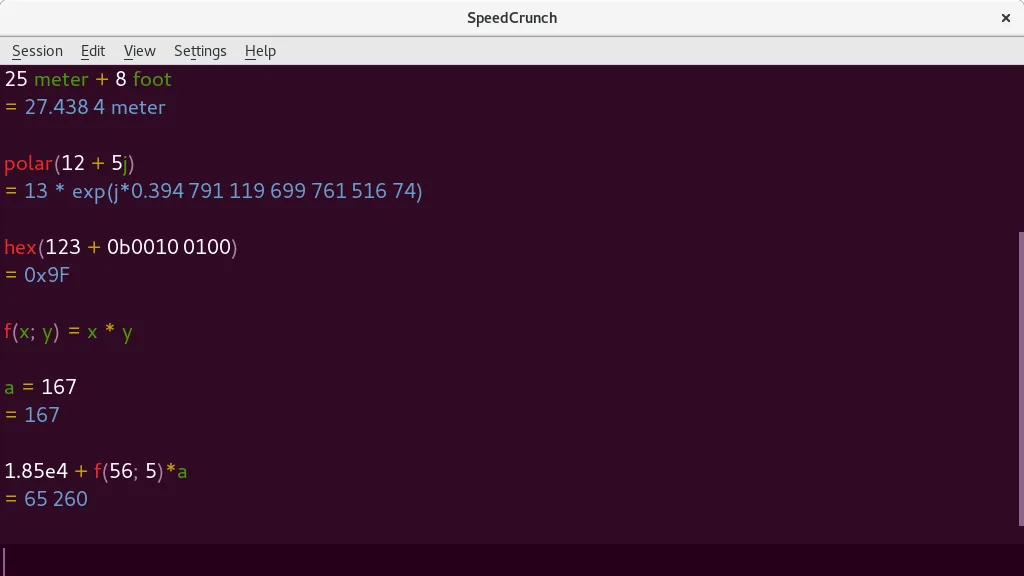
SpeedCrunch is a strong replacement for the scientific and programmer aspects of Windows Calculator, especially for users who prefer keyboard-driven workflows. It handles trigonometry, exponents, and unit conversions well, with high precision that exceeds standard Windows Calculator capabilities. However, it lacks a dedicated graphing mode and date calculation features found in the Windows version. If you rely heavily on visual graphing or specific date arithmetic, you will miss those tools. For pure calculation speed, syntax checking, and complex number support, SpeedCrunch is a superior, more flexible choice for technical users.
- Licença
- GPL-2.0+
- Preço
- Grátis
- Versão mais recente
- 0.12 (29 de novembro de 2016)
- Avaliação
- —
O que funciona igual
- Supports standard arithmetic and scientific functions like trig and exponents
- Includes unit conversion capabilities
- Fully operable via keyboard with hotkey support
- Offers a scrollable history of previous calculations
O que muda
Abrindo seus arquivos do Windows Calculator
SpeedCrunch does not natively open or export Windows Calculator history files or specific project formats. It maintains its own internal session history. If you need to preserve calculation logs from Windows Calculator, you would need to manually copy the text or use a third-party converter, as there is no direct import feature for Windows Calculator data.
Trocando o Windows Calculator pelo SpeedCrunch, passo a passo
- Install SpeedCrunch from your distribution's package manager or Flathub
- Familiarize yourself with the keyboard-centric input method, as there are no clickable number pads
- Learn the syntax for unit conversions and complex numbers, which differ from Windows Calculator's button logic
- Set up any frequently used constants or user-defined variables to replace common Windows Calculator shortcuts
- Test your typical scientific workflows to ensure the real-time preview meets your accuracy needs
Principais recursos do SpeedCrunch
- Cálculos de alta precisão (até 50 casas decimais)
- Exibição de entrada com realce de sintaxe e pré‑visualização em tempo real
- Navegação completa pelo teclado e suporte a atalhos
- Constantes embutidas e mais de 80 funções matemáticas
- Suporte a números complexos e conversões de unidades
- Variáveis e funções definidas pelo usuário
- Histórico de cálculos rolável
- Autocompletar funções e verificação de sintaxe
Como instalar o SpeedCrunch no Linux
flatpak install flathub org.speedcrunch.SpeedCrunchsudo apt install speedcrunchsudo dnf install speedcrunchsudo pacman -S speedcrunchsudo zypper install speedcrunchPerguntas frequentes
Does SpeedCrunch have a graphing calculator mode?
No, SpeedCrunch is a high-precision scientific calculator and does not include a visual graphing interface for plotting functions.
Can I use SpeedCrunch for hex or binary calculations?
Yes, you can perform calculations involving numbers, but it does not have a dedicated 'Programmer' mode with base switching toggles like Windows Calculator. You must input values using standard syntax.
Is SpeedCrunch suitable for basic everyday arithmetic?
It is suitable, but the interface is optimized for complex, keyboard-driven input. For simple addition or subtraction, it may feel less intuitive than a traditional button-based calculator.
Outras 2 alternativas ao Windows Calculator
 KCalcKCalc é a calculadora científica do KDE com funções trigonométricas, operações lógicas e pilha de resultados.Código abertoGrátisFlatpakKCalc vs Windows Calculator
 gcalctoolGNOME Calculator é o calculador científico leve e padrão para o ambiente de desktop GNOME.Código abertoGrátisgcalctool vs Windows Calculator