
 StremioLinux
vs
StremioLinux
vs
 VLC media playerWindows
Stremio como alternativa Linux ao VLC media player
Atualizado em
Nossa avaliação
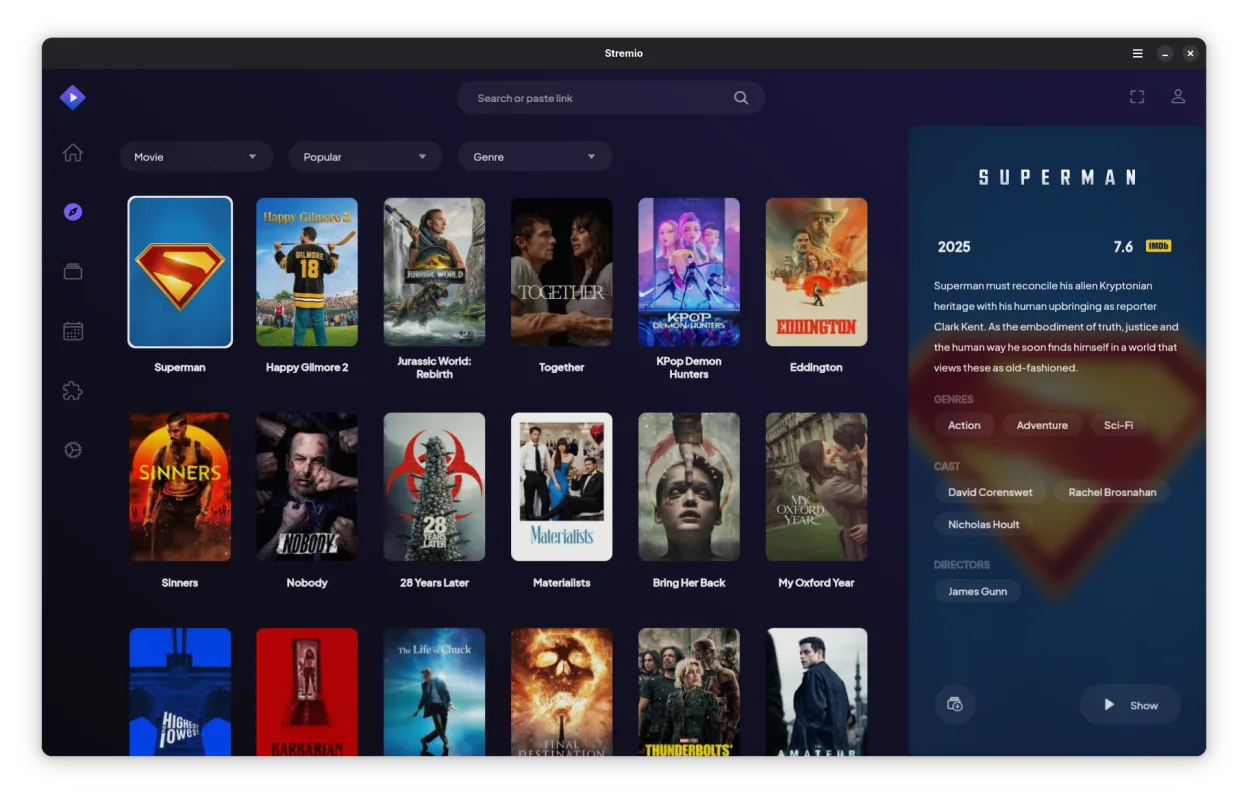
Stremio is not a direct drop-in replacement for VLC media player. While both play video, VLC is a general-purpose codec monster that handles obscure formats and raw streams without fuss. Stremio is a media center interface focused on library management and streaming addons. If you just need to open a random MKV file or stream a live RTSP feed with zero configuration, VLC is still the right tool. If you want a Netflix-style interface for your local files and online content, Stremio is excellent, but you will likely keep VLC installed as a fallback for tricky files.
- Licença
- GPL-3.0-only
- Preço
- Grátis
- Versão mais recente
- 1.2.2 (7 de outubro de 2026)
- Avaliação
- —
O que funciona igual
- Open-source and free to use
- Supports standard video containers like MP4 and MKV
- Available natively on Linux
- Handles local file playback
O que muda
- Lacks the extensive codec coverage of VLC for obscure or corrupted files
- No native support for raw network streams like RTSP or direct YouTube playback without addons
- Focuses on library management and metadata rather than raw media decoding
- Requires addon configuration for online streaming, unlike VLC's direct URL input
- Does not support hardware acceleration in the same granular, low-level way VLC does
Abrindo seus arquivos do VLC media player
Stremio does not use a proprietary playlist format that conflicts with VLC. You can open standard playlist files (M3U, M3U8) in both applications without conversion. However, Stremio primarily indexes your local file system rather than importing specific VLC library databases. If you have complex VLC playlist configurations with specific stream URLs, you may need to recreate those as M3U files or use addons in Stremio, as it does not directly import VLC's internal configuration or history.
Trocando o VLC media player pelo Stremio, passo a passo
- Install Stremio via your package manager or Flathub
- Configure your local media library paths in Stremio settings
- Install necessary addons for any online streaming sources you used in VLC
- Test playback of your most common video files to ensure codec support
- Keep VLC installed for handling obscure formats or direct RTSP streams
Principais recursos do Stremio
- Biblioteca de mídia local com busca automática de metadados
- Sistema de addons para acessar fontes de streaming online
- Suporte a conteúdo 4K HDR
- Disponibilidade multiplataforma incluindo Linux, Windows e mobile
- Interface limpa e minimalista focada na descoberta
- Integração com sistemas de arquivos locais para reprodução direta
Como instalar o Stremio no Linux
flatpak install flathub com.stremio.StremioPerguntas frequentes
Can Stremio play any video file VLC can?
No. Stremio relies on standard codecs and may struggle with obscure, corrupted, or highly specialized formats that VLC handles effortlessly. For general MP4/MKV files, it works fine.
Does Stremio support RTSP streams directly?
Not natively. Stremio is designed for VOD and library-based content. For live RTSP streams, you should use VLC or a dedicated stream player.
Is Stremio better for watching movies?
If you want a curated library with metadata and poster art, yes. If you just want to double-click a file and watch it immediately without a UI, VLC is faster and simpler.
Outras 3 alternativas ao VLC media player
 TotemTotem (GNOME Vídeos) é o player de vídeo padrão do GNOME baseado no GStreamer.Código abertoGrátisTotem vs VLC media player
 MplayerMPlayer é um reprodutor de mídia gratuito e de linha de comando que suporta uma ampla variedade de formatos e…Código abertoGrátisMplayer vs VLC media player
 Gnome MPlayerGnome MPlayer é um frontend GUI leve para o MPlayer, projetado para desktops GNOME.Código abertoGrátisDescontinuadoGnome MPlayer vs VLC media player