
 Xournal++Linux
vs
Foxit PDF EditorWindows
Xournal++Linux
vs
Foxit PDF EditorWindows
Xournal++ como alternativa Linux ao Foxit PDF Editor
Atualizado em
Nossa avaliação
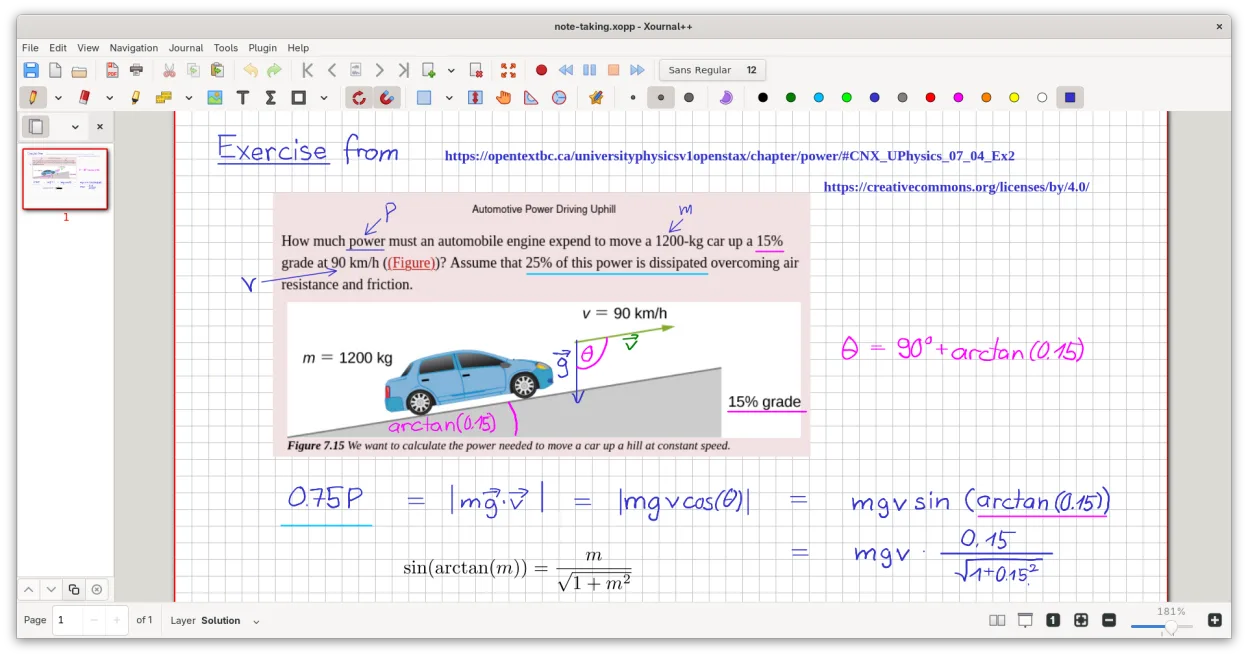
Xournal++ is not a direct replacement for Foxit PDF Editor if you need to edit existing PDF text or manage complex forms. It is a specialized annotation tool, not a full PDF editor. It excels for users who primarily need to mark up PDFs with handwritten notes, highlights, and shapes. If your workflow involves creating new PDFs from scratch or altering the underlying text content of documents, you will find Xournal++ lacking. It is best suited for students, researchers, or professionals who use a stylus to annotate existing documents rather than edit them structurally.
- Licença
- GPL-2.0
- Preço
- Grátis
- Versão mais recente
- 1.3.8 (25 de setembro de 2026)
- Avaliação
- —
O que funciona igual
- Both allow you to open and view PDF files.
- Both support adding annotations such as highlights, underlines, and strikethroughs.
- Both can export annotated documents back to PDF format.
- Both support adding text boxes and images on top of PDF pages.
O que muda
- Xournal++ cannot edit existing text or images within a PDF; it only overlays new content.
- Xournal++ lacks digital signature capabilities and certificate management features.
- Xournal++ does not support creating PDFs from scratch or converting other formats like DOCX.
- Xournal++ has limited form handling; it cannot fill out or manage FDF data for interactive PDF forms.
- Xournal++ is focused on handwriting and stylus input, whereas Foxit is a general-purpose document editor.
Abrindo seus arquivos do Foxit PDF Editor
Xournal++ opens standard PDF files created by Foxit PDF Editor without issue. However, it does not preserve Foxit-specific metadata or complex form structures. When exporting, Xournal++ flattens your annotations onto the PDF page. If you have heavily edited PDFs with form fields or digital signatures from Foxit, those specific elements will not be editable or preserved in Xournal++; you will only see the visual output of the document.
Trocando o Foxit PDF Editor pelo Xournal++, passo a passo
- Install Xournal++ via your package manager or Flathub.
- Connect your stylus or tablet and configure input settings in the preferences.
- Open a test PDF from your Foxit library to verify rendering.
- Practice adding highlights and handwritten notes to ensure they align correctly.
- Export a test file to PDF and verify that annotations appear as expected.
- Keep Foxit installed for tasks requiring text editing or digital signatures.
Principais recursos do Xournal++
- Suporte a caneta sensível à pressão para tablets Wacom, Huion e XP-Pen
- Anotar, destacar e riscar texto em cima de arquivos PDF
- Exportar anotações para PDF, PNG e SVG pela interface ou linha de comando
- Ferramentas de desenho incluindo caneta, marcador, formas e suporte a LaTeX
- Estabilização de entrada para escrita mais suave
- Barra de ferramentas personalizável e mapeamento de ferramentas para botões da caneta
- Barra lateral com pré-visualizações de páginas, marcadores de PDF e gerenciamento de camadas
Como instalar o Xournal++ no Linux
flatpak install flathub com.github.xournalpp.xournalppsudo apt install xournalppsudo apt install xournalppsudo dnf install xournalppsudo pacman -S xournalppsudo zypper install xournalppPerguntas frequentes
Can I edit the text inside a PDF with Xournal++?
No. Xournal++ allows you to add new text boxes on top of the PDF, but you cannot select, change, or delete the original text embedded in the document.
Does Xournal++ support digital signatures?
No. It does not have built-in support for creating, applying, or verifying digital signatures. You would need to use a separate tool for that.
Can I create a new blank PDF in Xournal++?
Yes. You can create a new document with a blank background or a paper-like texture, add content, and then export it as a PDF.
