
 Claws MailLinux
vs
Mozilla ThunderbirdWindows
Claws Mail als Linux-Alternative zu Mozilla Thunderbird
Aktualisiert am
Unser Fazit
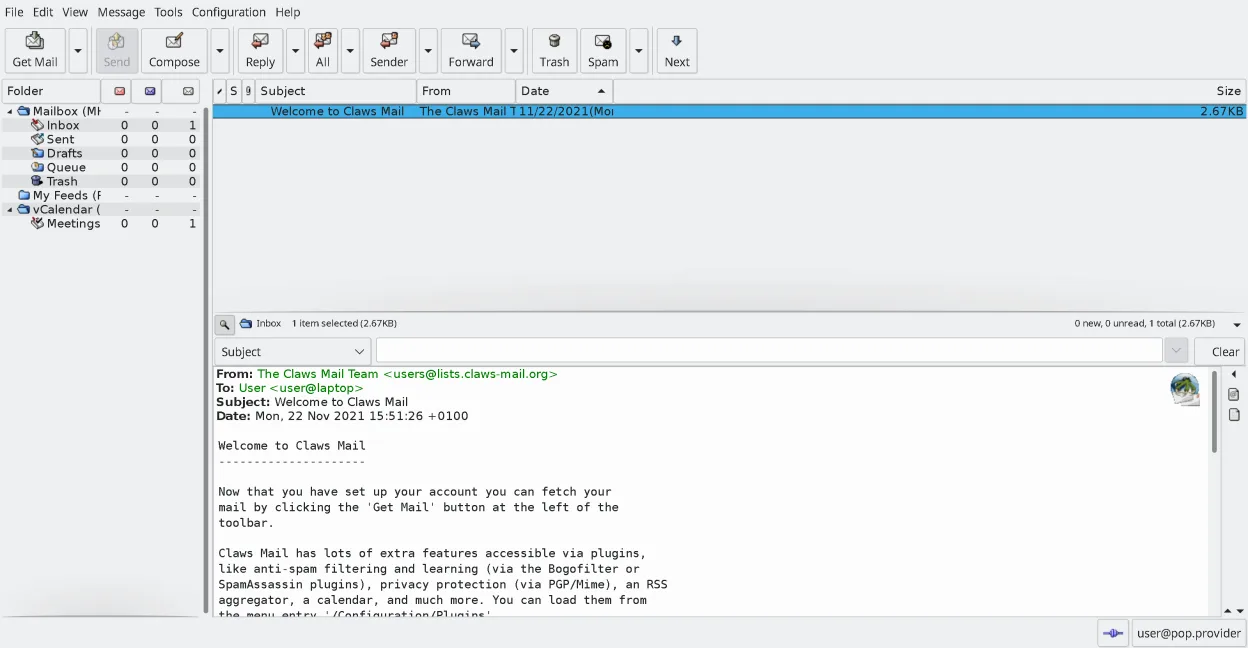
Claws Mail can replace Thunderbird for users who need a lightweight, keyboard‑centric client that handles multiple accounts, IMAP/POP, and local storage efficiently. It lacks a native calendar and contact integration, and composing HTML mail requires plugins. It suits power users and those who prefer a fast, scriptable interface, but may feel limited for people who rely on Thunderbird’s built‑in calendar, address book, and rich add‑on ecosystem.
- Lizenz
- GPL-3.0-only
- Preis
- Kostenlos
- Aktuelle Version
- 4.4.0 (9. März 2026)
- Bewertung
- —
Was gleich funktioniert
- Both support multiple email accounts and IMAP/POP
- Both use plugins/extensions to add functionality
- Both provide powerful search and filtering
- Both store messages locally
- Both can read RSS feeds via plugins
Was anders ist
- Claws Mail uses MH mailbox format, not MBOX like Thunderbird
- No built‑in calendar or address book in Claws Mail
- HTML composition requires plugins, Thunderbird handles it natively
- Claws Mail is keyboard‑centric; Thunderbird is more mouse‑friendly
- Claws Mail lacks native support for calendar events and contact sync
Ihre Mozilla Thunderbird-Dateien öffnen
Thunderbird stores mail in MBOX files and its configuration in SQLite databases. Claws Mail can import MBOX and MH formats, but it does not read Thunderbird’s internal database directly. Exporting from Thunderbird to Claws requires converting mail to MBOX and moving configuration manually.
Von Mozilla Thunderbird zu Claws Mail wechseln – Schritt für Schritt
- Export Thunderbird mail to MBOX using the Export feature or by copying the profile folder
- Install Claws Mail via your distribution’s package manager
- Launch Claws and use the Import wizard to load the MBOX files into MH folders
- Configure IMAP/POP accounts in Claws using the Account Settings dialog
- Install needed plugins (e.g., calendar, RSS) via the Plugin Manager
- Verify message threading and search work as expected
Wichtige Funktionen von Claws Mail
- MH-Mailbox-Speicherung für schnellen Zugriff
- Tastaturzentrierte Bedienung mit voller Unterstützung für Shortcuts
- Plugin-System für RSS, Kalender und zusätzliche Protokolle
- Mehrere Konten und Ordnerbäume
- Integrierte Spam-Filterung (SpamAssassin-Integration)
- Nachrichten-Thread-Ansicht und leistungsstarke Suche
- Unterstützung externer Editoren für die Erstellung von Klartext-E-Mails
- Import/Export aus den meisten anderen Mail-Clients
Claws Mail unter Linux installieren
flatpak install flathub org.claws_mail.Claws-Mailsudo apt install claws-mailsudo apt install claws-mailsudo dnf install claws-mailsudo pacman -S claws-mailsudo zypper install claws-mailHäufige Fragen
Can I use Claws Mail to read my Thunderbird calendar?
No. Claws Mail has no native calendar integration; you would need a separate calendar app.
Will Claws Mail display my Thunderbird contacts?
No. Claws Mail does not import Thunderbird’s address book; you must use another address book application.
Does Claws Mail support HTML emails?
Claws can display HTML emails with the HTML plugin, but composing HTML requires installing the appropriate plugin.
5 weitere Alternativen zu Mozilla Thunderbird
 EvolutionEvolution ist ein vollwertiger persönlicher Informationsmanager, der E‑Mail, Kalender, Kontakte und Aufgaben…Open SourceKostenlosFlatpakEvolution vs. Mozilla Thunderbird
 KMailKMail ist der funktionsreiche E-Mail-Client von KDE und Teil der Kontact-Suite. Er unterstützt IMAP, POP3 und…Open SourceKostenlosKMail vs. Mozilla Thunderbird
 GearyGeary ist ein auf GNOME basierender E-Mail-Client für Linux, mit dem Sie E-Mails senden, empfangen und in der…Open SourceKostenlosFlatpakGeary vs. Mozilla Thunderbird
 MailspringEin schneller, funktionsreicher Desktop-E-Mail-Client für Linux mit einer C++-Synchronisierungseinheit und…Open SourceKostenlosFlatpakMailspring vs. Mozilla Thunderbird
 Proton MailProton Mail ist ein kostenloser, Ende‑zu‑Ende verschlüsselter E‑Mail‑Client für Linux, verfügbar als…Open SourceKostenlosFlatpakProton Mail vs. Mozilla Thunderbird