
 Claws MailLinux
vs
Mozilla ThunderbirdWindows
Claws Mail as a Linux alternative to Mozilla Thunderbird
Updated
Our verdict
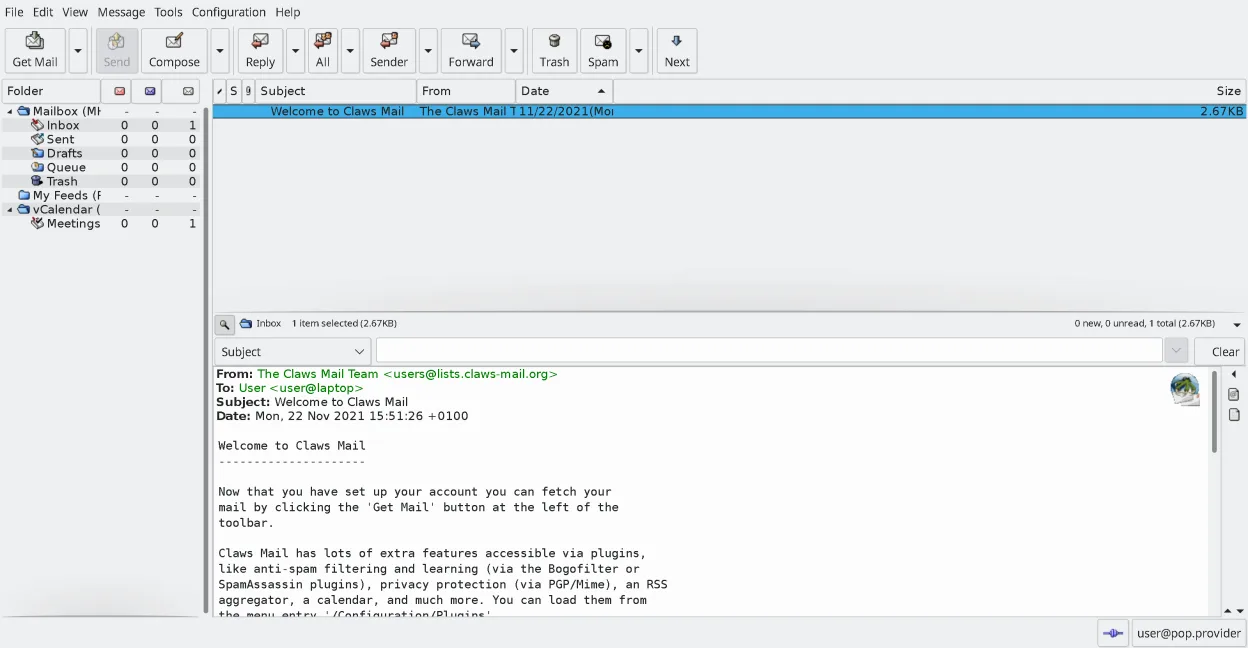
Claws Mail can replace Thunderbird for users who need a lightweight, keyboard‑centric client that handles multiple accounts, IMAP/POP, and local storage efficiently. It lacks a native calendar and contact integration, and composing HTML mail requires plugins. It suits power users and those who prefer a fast, scriptable interface, but may feel limited for people who rely on Thunderbird’s built‑in calendar, address book, and rich add‑on ecosystem.
- License
- GPL-3.0-only
- Price
- Free
- Latest version
- 4.4.0 (March 9, 2026)
- Rating
- —
What works the same
- Both support multiple email accounts and IMAP/POP
- Both use plugins/extensions to add functionality
- Both provide powerful search and filtering
- Both store messages locally
- Both can read RSS feeds via plugins
What is different
- Claws Mail uses MH mailbox format, not MBOX like Thunderbird
- No built‑in calendar or address book in Claws Mail
- HTML composition requires plugins, Thunderbird handles it natively
- Claws Mail is keyboard‑centric; Thunderbird is more mouse‑friendly
- Claws Mail lacks native support for calendar events and contact sync
Opening your Mozilla Thunderbird files
Thunderbird stores mail in MBOX files and its configuration in SQLite databases. Claws Mail can import MBOX and MH formats, but it does not read Thunderbird’s internal database directly. Exporting from Thunderbird to Claws requires converting mail to MBOX and moving configuration manually.
Switching from Mozilla Thunderbird to Claws Mail, step by step
- Export Thunderbird mail to MBOX using the Export feature or by copying the profile folder
- Install Claws Mail via your distribution’s package manager
- Launch Claws and use the Import wizard to load the MBOX files into MH folders
- Configure IMAP/POP accounts in Claws using the Account Settings dialog
- Install needed plugins (e.g., calendar, RSS) via the Plugin Manager
- Verify message threading and search work as expected
Key features of Claws Mail
- MH mailbox storage for fast access
- Keyboard‑centric operation with full shortcut support
- Plugin system for RSS, calendar, and extra protocols
- Multiple accounts and folder trees
- Built‑in spam filtering (SpamAssassin integration)
- Message threading and powerful search
- External editor support for composing plain‑text mail
- Import/export from most other mail clients
How to install Claws Mail on Linux
flatpak install flathub org.claws_mail.Claws-Mailsudo apt install claws-mailsudo apt install claws-mailsudo dnf install claws-mailsudo pacman -S claws-mailsudo zypper install claws-mailFrequently asked questions
Can I use Claws Mail to read my Thunderbird calendar?
No. Claws Mail has no native calendar integration; you would need a separate calendar app.
Will Claws Mail display my Thunderbird contacts?
No. Claws Mail does not import Thunderbird’s address book; you must use another address book application.
Does Claws Mail support HTML emails?
Claws can display HTML emails with the HTML plugin, but composing HTML requires installing the appropriate plugin.
5 other alternatives to Mozilla Thunderbird
 EvolutionEvolution is a full‑featured personal information manager that combines email, calendar, contacts and tasks…Open sourceFreeFlatpakEvolution vs Mozilla Thunderbird
 KMailKMail is KDE's full-featured email client, part of the Kontact suite, supporting IMAP, POP3, and local…Open sourceFreeKMail vs Mozilla Thunderbird
 GearyGeary is a GNOME‑based email client for Linux that lets you send, receive, and organize mail in conversation…Open sourceFreeFlatpakGeary vs Mozilla Thunderbird
 MailspringA fast, feature-rich desktop email client for Linux with a C++ sync engine and unified inbox.Open sourceFreeFlatpakMailspring vs Mozilla Thunderbird
 Proton MailProton Mail is a free, end‑to‑end encrypted email client for Linux, available as a Flathub app.Open sourceFreeFlatpakProton Mail vs Mozilla Thunderbird