
 Delta ChatLinux
vs
Microsoft Teams (consumer version)Windows
Delta ChatLinux
vs
Microsoft Teams (consumer version)Windows
Delta Chat als Linux-Alternative zu Microsoft Teams (consumer version)
Aktualisiert am
Unser Fazit
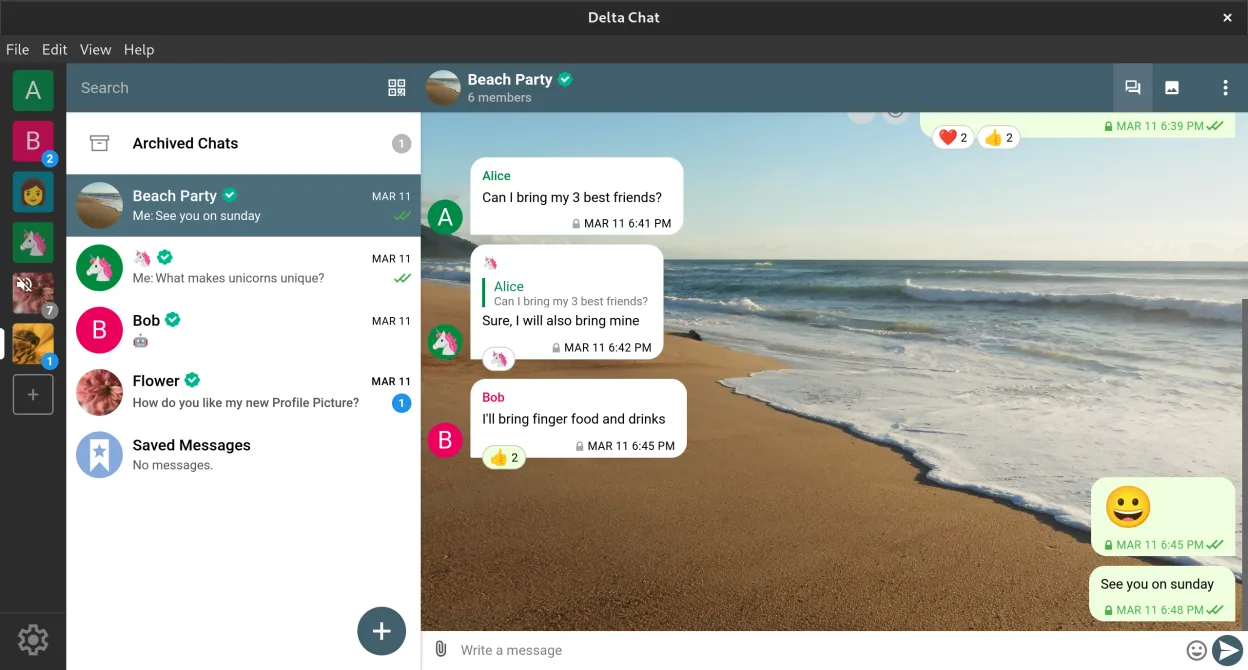
Delta Chat is not a direct replacement for Microsoft Teams (consumer version) for most team collaboration use cases. It works well for decentralized, privacy-focused messaging with end-to-end encryption and supports group chats, file transfers, and voice messages. However, it lacks built-in video conferencing, real-time screen sharing, and calendar integration. It suits individuals or small groups prioritizing autonomy and security over feature-rich collaboration tools. If your workflow depends on live meetings or integrated task management, Delta Chat will fall short.
- Lizenz
- GPL-3.0+
- Preis
- Kostenlos
- Aktuelle Version
- v2.62.0 (27. September 2026)
- Bewertung
- —
Was gleich funktioniert
- Both support group messaging with persistent chat history
- File sharing is available in both applications
- Cross-platform sync allows use on multiple devices
- No central account registration required — Delta Chat uses email, Teams allows guest access
- Supports informal and team-based communication
Was anders ist
- Delta Chat lacks native voice and video calling; Microsoft Teams has full AV support
- Screen sharing is not available in Delta Chat
- Microsoft Teams integrates with calendars and task tools; Delta Chat offers only bot-based extensions
- Teams relies on centralized infrastructure; Delta Chat is decentralized and email-based
- Delta Chat does not support persistent online presence or real-time collaboration features
Ihre Microsoft Teams (consumer version)-Dateien öffnen
Delta Chat can receive and open files sent from Microsoft Teams, as it supports standard file types. However, there is no direct import of Teams chat history, messages, or meeting artifacts. Files shared in Teams can be manually forwarded to Delta Chat contacts, but formatting or context may be lost. Delta Chat does not integrate with Microsoft 365 document formats or cloud storage, so accessing .pptx, .docx, or OneNote files requires external apps.
Von Microsoft Teams (consumer version) zu Delta Chat wechseln – Schritt für Schritt
- Install Delta Chat from Flathub or official site on your Linux system
- Use your existing email address to set up the account
- Enable Autocrypt in settings for end-to-end encryption
- Invite contacts to Delta Chat by sending a message to their email
- Set up bots for polls or calendars if needed
- Transfer important files manually and share via Delta Chat
Wichtige Funktionen von Delta Chat
- Ende-zu-Ende-Verschlüsselung über Autocrypt
- Funktioniert mit jeder E-Mail-Adresse, kein zentraler Account erforderlich
- Unterstützt Gruppenchats, Dateiübertragungen und Sprachnachrichten
- Erweiterbar mit Bots für Umfragen, Kalender und Spiele
- Synchronisation über mehrere Geräte mit mehreren Profilen
- Offline-Nachrichten und zuverlässige Zustellung auch bei schlechten Netzwerken
- Keine Telefonnummer für die Einrichtung erforderlich
- Offene Standards: IMAP, SMTP, Autocrypt
Delta Chat unter Linux installieren
flatpak install flathub chat.delta.desktopHäufige Fragen
Can Delta Chat do video calls like Microsoft Teams?
No, Delta Chat does not support voice or video calls. It only supports text messaging, file transfers, and voice messages. For real-time audio or video communication, you’ll need a separate app like Jitsi or Matrix-based clients.
Do I need a special email provider for Delta Chat?
No, Delta Chat works with most standard email providers. However, some providers may block IMAP IDLE or have strict rate limits. Providers like ProtonMail (via bridge) or Fastmail work better than Gmail or Outlook.com.
Can I use Delta Chat alongside Microsoft Teams?
Yes, you can run both apps simultaneously. Delta Chat can handle private, encrypted messaging while using Teams for meetings and team collaboration. This hybrid setup works if you value privacy but must comply with workplace tools.
4 weitere Alternativen zu Microsoft Teams (consumer version)
 JamiJami ist ein kostenloser, Peer‑to‑Peer-Chat- und Videoanruf-Client, der ohne zentrale Server funktioniert.Open SourceKostenlosFlatpakJami vs. Microsoft Teams (consumer version)
 ElementElement ist ein Open‑Source, matrixbasierter Chat- und Videokonferenz-Client für Linux.Open SourceKostenlosFlatpakElement vs. Microsoft Teams (consumer version)
 FranzFranz ist ein Desktop-Messenger, der mehrere Chat-Dienste in einer Oberfläche kombiniert.Open SourceKostenlosFlatpakFranz vs. Microsoft Teams (consumer version)
 Signal DesktopSignal Desktop ist ein kostenloser, quelloffener privater Messenger für Linux, der Nachrichten und Anrufe mit…Open SourceKostenlosFlatpakSignal Desktop vs. Microsoft Teams (consumer version)