
 GearyLinux
vs
ThunderbirdWindows
GearyLinux
vs
ThunderbirdWindows
Geary als Linux-Alternative zu Thunderbird
Aktualisiert am
Unser Fazit
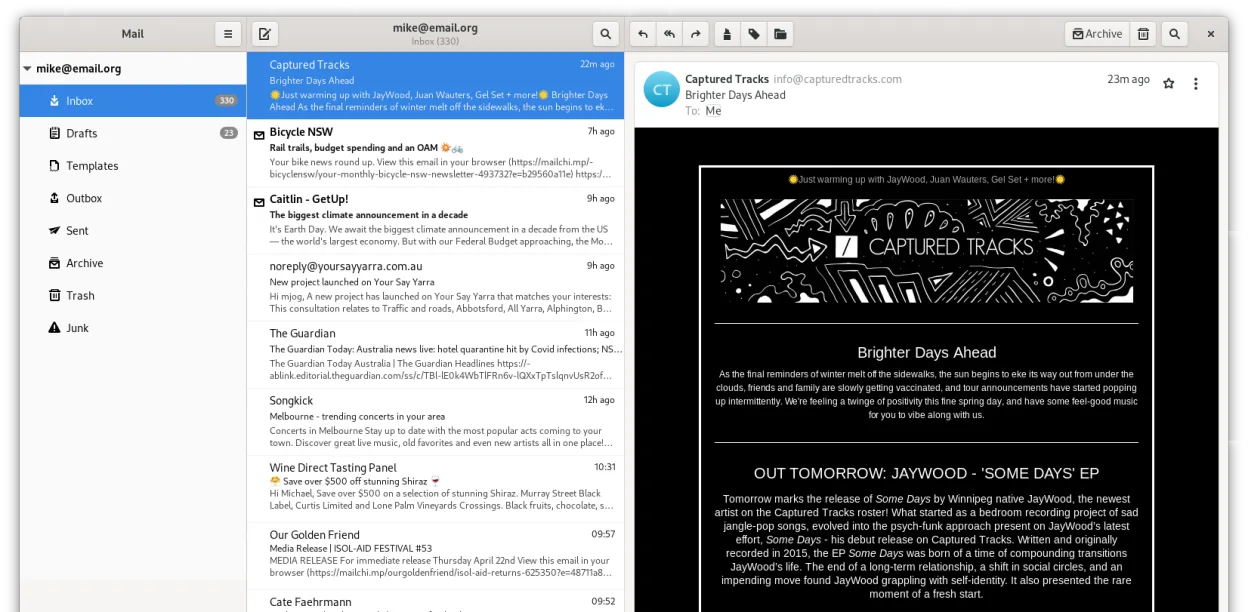
Geary is a solid, lightweight replacement for users who primarily need clean email management on GNOME. It handles IMAP/POP3, multiple accounts, and conversation views well. However, it is not a full drop-in replacement for heavy Thunderbird users. If you rely on Thunderbird’s built-in calendar, contact manager, RSS reader, or chat features, Geary will leave you short. It is best for those who prefer a simple, native-feeling mail client and are willing to use separate apps for calendar and contacts.
- Lizenz
- LGPL-2.1+
- Preis
- Kostenlos
- Aktuelle Version
- 46.0 (20. Mai 2024)
- Bewertung
- —
Was gleich funktioniert
- Both support multiple email accounts via IMAP and POP3 protocols.
- Both are free, open-source applications available on major Linux distributions.
- Both offer full-text search capabilities to find specific messages quickly.
- Both support HTML and plain-text message composition.
Was anders ist
Ihre Thunderbird-Dateien öffnen
Geary does not directly import Thunderbird’s mbox or maildir file structures. You cannot simply point Geary at your existing Thunderbird profile folder. However, since both use standard IMAP/POP3 protocols, your email history remains on the server. If you use local storage (POP3), you would need to manually export messages or re-download them, as there is no native 'import from Thunderbird' feature in Geary.
Von Thunderbird zu Geary wechseln – Schritt für Schritt
- Back up your Thunderbird profile to ensure no local data is lost.
- Install Geary via your distribution’s package manager or Flathub.
- Launch Geary and add your email accounts using the quick setup wizard.
- Verify that IMAP sync is working by checking recent folders.
- Install separate GNOME applications for Calendar (GNOME Calendar) and Contacts (GNOME Contacts) to replace Thunderbird’s modules.
- Configure desktop notifications in Geary settings to match your previous workflow.
Wichtige Funktionen von Geary
- Gesprächsansicht gruppiert zusammenhängende Nachrichten
- Schnelle Kontoeinrichtung für IMAP-Anbieter
- Volltext- und Stichwortsuche
- HTML- und Klartext-Editor
- Desktop-Benachrichtigungen für neue E-Mails
- GNOME-Integration und Thematisierung
- Tastaturfreundliche Navigation
- Unterstützung für mehrere Konten
Geary unter Linux installieren
flatpak install flathub org.gnome.Gearysudo apt install gearysudo apt install gearysudo dnf install gearysudo pacman -S gearysudo zypper install gearyHäufige Fragen
Can I use Geary with Gmail or Outlook.com?
Yes, Geary supports standard IMAP servers, including Gmail, Yahoo, and Outlook.com. You may need to enable less secure app passwords or OAuth2 if your provider requires it, though Geary’s OAuth2 support can be less integrated than Thunderbird’s.
Does Geary have a built-in calendar?
No. Geary is strictly an email client. For calendar functionality on GNOME, you should use GNOME Calendar, which can sync with your email account’s CalDAV server if available.
Is Geary suitable for users who need chat or RSS?
No. Geary does not include chat or RSS readers. If these are core parts of your daily workflow, sticking with Thunderbird or using a combination of Geary and separate apps (like Fractal for Matrix or gPodder for RSS) is necessary.
5 weitere Alternativen zu Thunderbird
 MailspringEin schneller, funktionsreicher Desktop-E-Mail-Client für Linux mit einer C++-Synchronisierungseinheit und…Open SourceKostenlosFlatpakMailspring vs. Thunderbird
 Claws MailClaws Mail ist ein schlanker, schneller E-Mail-Client für Linux auf Basis von GTK.Open SourceKostenlosFlatpakClaws Mail vs. Thunderbird
 EvolutionEvolution ist ein vollwertiger persönlicher Informationsmanager, der E‑Mail, Kalender, Kontakte und Aufgaben…Open SourceKostenlosFlatpakEvolution vs. Thunderbird
 KMailKMail ist der funktionsreiche E-Mail-Client von KDE und Teil der Kontact-Suite. Er unterstützt IMAP, POP3 und…Open SourceKostenlosKMail vs. Thunderbird
 SylpheedSylpheed ist ein leichtgewichtiger, GTK‑basierter E‑Mail- und News-Client für Linux, Windows und macOS.Open SourceKostenlosSylpheed vs. Thunderbird