
 GPartedLinux
vs
Macrium ReflectWindows
GPartedLinux
vs
Macrium ReflectWindows
GParted als Linux-Alternative zu Macrium Reflect
Aktualisiert am
Unser Fazit
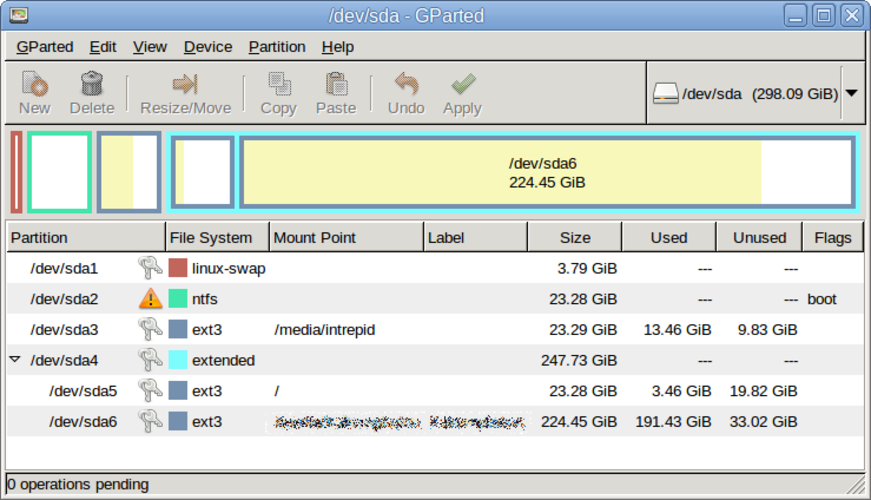
GParted is not a drop‑in replacement for Macrium Reflect. It can copy and resize partitions, but it lacks full disk imaging, scheduled backups, boot‑loader handling, and the ability to restore images to bare metal. It is useful for users who only need partition manipulation or quick copy of a single partition, such as system administrators or advanced Linux users who prefer live‑USB editing.
Funktionsabdeckung
- Lizenz
- GPL-3.0
- Preis
- Kostenlos
- Aktuelle Version
- 1.8.1
- Bewertung
- —
Was gleich funktioniert
- Both can copy disk partitions
- Both support ext4 and other Linux file systems
- Both run on Linux
- Both have GUI interfaces
Was anders ist
- GParted does not create full disk or partition images; it only copies partitions
- No scheduling or automated backups in GParted
- No boot‑loader or MBR/EFI handling in GParted
- No image restore to bare metal in GParted
- GParted lacks support for creating incremental or differential backups
Ihre Macrium Reflect-Dateien öffnen
There is no documented way to open or import Macrium Reflect image files (.mrimg) in GParted. The two formats are incompatible; you would need to use Macrium Reflect on Windows or a compatible tool that can read its image format.
Von Macrium Reflect zu GParted wechseln – Schritt für Schritt
- 1. Back up your data with Macrium Reflect on Windows. 2. Export the image to a standard format (e.g., ISO or raw) if possible. 3. Boot a GParted live USB on the target Linux machine. 4. Use GParted to create the necessary partitions. 5. Restore the exported image using a tool like dd or partclone. 6. Reinstall the boot loader (GRUB or systemd‑boot) on the new system.
- faq
- :
- Array — Array — Array
Wichtige Funktionen von GParted
- GTK-Oberfläche für GNU Parted
- Unterstützt Vergrößerung, Verschiebung, Kopieren und Löschen von Partitionen
- Unabhängig vom Dateisystem: ext4, NTFS, FAT32, XFS, Btrfs usw.
- Unterstützung von Live-USB für Änderungen vor dem Systemstart
- Rückgängig-Wiederherstellung für Partitionsvorgänge
- Prüfsummenverifizierung zur Sicherstellung der Datenintegrität
- Batch-Modus über die Befehlszeile für Skripte
GParted unter Linux installieren
Ubuntu / Mint
sudo apt install gpartedDebian
sudo apt install gpartedFedora
sudo dnf install gpartedArch / Manjaro
sudo pacman -S gpartedopenSUSE
sudo zypper install gparted2 weitere Alternativen zu Macrium Reflect
ClonezillaClonezilla ist ein kostenloses, quelloffenes Tool zur Datenträgerabbildung und Klonung unter Linux.Open SourceKostenlosClonezilla vs. Macrium ReflectTimeshiftTimeshift ist ein Systemwiederherstellungstool für Linux, das Btrfs-Schnappschüsse oder rsync-Sicherungen…Open SourceKostenlosTimeshift vs. Macrium Reflect
GParted bewerten
Als Erste(r) bewerten
Guter Ersatz für Macrium Reflect?
8