
 KrusaderLinux
vs
WinSCP ProWindows
KrusaderLinux
vs
WinSCP ProWindows
Krusader als Linux-Alternative zu WinSCP Pro
Aktualisiert am
Unser Fazit
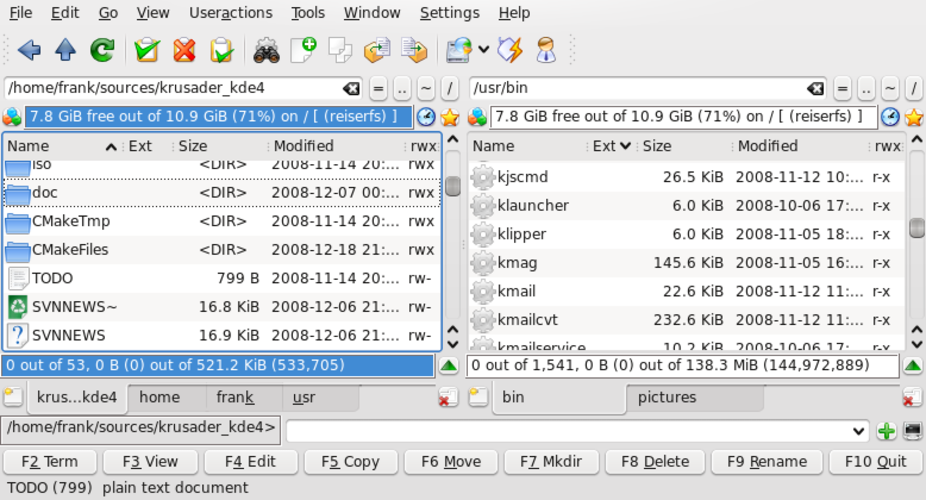
Krusader can replace WinSCP Pro for users who prefer a full‑featured file manager with built‑in FTP/SFTP support. It offers a graphical dual‑pane view, drag‑and‑drop, directory sync and remote editing, which covers most everyday WinSCP tasks. Power users who rely heavily on scripted transfers or need a dedicated, lightweight client may find Krusader bulkier, but for typical file‑browsing, sync and occasional uploads/downloads it is a solid Linux alternative.
- Lizenz
- GPL-3.0
- Preis
- Kostenlos
- Aktuelle Version
- 2.9.0
- Bewertung
- —
Was gleich funktioniert
- Both provide graphical SFTP/FTP access
- Drag‑and‑drop file transfer between local and remote panes
- Support for directory synchronization
- Remote file editing with external editors
- Resumeable transfers with integrity checks
Was anders ist
- Krusader is a full file manager, not a dedicated transfer client, so the UI is more complex
- WinSCP includes a built‑in scripting language and command‑line interface; Krusader relies on external scripts or its own limited batch actions
- WinSCP offers explicit session logging and detailed transfer reports; Krusader’s logging is minimal
- Krusader’s FTP/SFTP support is provided via KDE libraries and may lack some advanced protocol options found in WinSCP
- WinSCP integrates tightly with Windows authentication mechanisms (e.g., Pageant); Krusader uses the standard SSH agent on Linux
Ihre WinSCP Pro-Dateien öffnen
Krusader does not use a proprietary project file format, so there is nothing to import or export from WinSCP. You can simply reconnect to the same servers using the same credentials and continue transferring files. Any saved site lists from WinSCP would need to be recreated manually in Krusader’s session manager.
Von WinSCP Pro zu Krusader wechseln – Schritt für Schritt
- Install Krusader from your distribution’s repository (e.g., apt install krusader).
- Launch Krusaver and open the Network pane (F4) to add a new FTP/SFTP connection.
- Enter the same host, username, password or key file you used in WinSCP.
- Configure any required transfer options (passive mode, resume, etc.) in the connection dialog.
- Test the connection, then drag files between the local and remote panes as needed.
- If you need scripted transfers, write shell scripts that call 'krusader --copy' or use standard command‑line tools like scp/sftp.
Wichtige Funktionen von Krusader
- Dual‑pane‑Interface mit geteilter Ansicht
- Integrierte Archivverwaltung (zip, tar, rar usw.)
- FTP/SFTP‑Client‑Unterstützung
- Verzeichnissynchronisation und -vergleich
- Batch‑Umbenennung mit Regex
- Erweiterte Suche und Vorschau
- Konfigurierbare Tastenkürzel
- Plugin‑Architektur für Erweiterungen
Krusader unter Linux installieren
sudo apt install krusadersudo apt install krusadersudo dnf install krusadersudo pacman -S krusadersudo zypper install krusaderHäufige Fragen
Can Krusader run headless or be used in scripts like WinSCP?
Krusader itself is a GUI program; for headless automation you should use command‑line tools (scp, sftp, rsync) or write scripts that invoke Krusader’s DBus interface, but it is not as straightforward as WinSCP’s built‑in scripting.
Does Krusader support key‑based SSH authentication?
Yes, it uses the system SSH agent, so any keys loaded with ssh‑add are available for SFTP connections.
Is there a way to import WinSCP site profiles automatically?
No direct import exists; you need to recreate the sites manually in Krusader’s session manager.
3 weitere Alternativen zu WinSCP Pro
 FileZillaFileZilla ist ein kostenloser, quelloffener grafischer FTP/FTPS/SFTP-Client für Linux und andere Plattformen.Open SourceKostenlosFlatpakFileZilla vs. WinSCP Prolftplftp ist ein leistungsstarker Befehlszeilen‑Client für FTP, SFTP und HTTP, der zuverlässige…Open SourceKostenloslftp vs. WinSCP Pro
 NautilusNautilus (Dateien) ist der standardmäßige grafische Dateimanager von GNOME zum Durchsuchen lokaler und…Open SourceKostenlosNautilus vs. WinSCP Pro