
 LabPlotLinux
vs
LabPlotLinux
vs
 OriginLab OriginWindows
LabPlot als Linux-Alternative zu OriginLab Origin
Aktualisiert am
Unser Fazit
LabPlot is a solid free alternative for most scientists and engineers who need 2‑D plotting, basic 3‑D visualisation, curve fitting and spreadsheet‑driven data handling. It covers the core workflow of Origin—importing CSV or spreadsheet data, fitting models, customizing axes and exporting high‑quality graphics. Power users who rely on Origin’s extensive library of proprietary analysis modules, advanced scripting (LabTalk), or tight integration with Origin’s project files will find LabPlot lacking, but for typical academic or research work it is a practical replacement.
- Lizenz
- GPL-2.0+
- Preis
- Kostenlos
- Aktuelle Version
- 2.12.1 (15. August 2025)
- Bewertung
- 5/5 (2)
Was gleich funktioniert
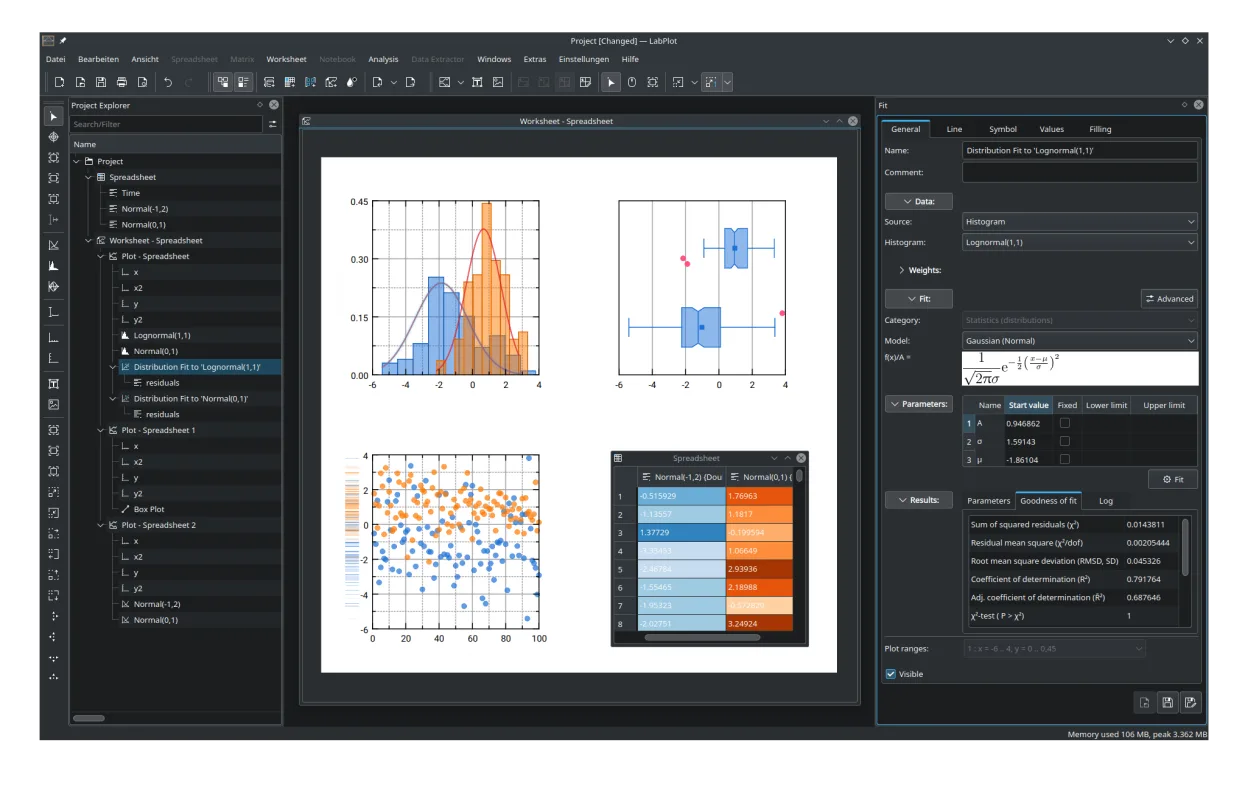
- Interactive 2D and basic 3D plotting with multiple axis types
- Integrated spreadsheet for data import from CSV, Excel‑like formats
- Curve fitting and basic statistical analysis tools
- Export to common bitmap and vector formats (PNG, PDF, SVG, EPS)
- Support for reusable chart templates and project files
Was anders ist
- No native support for Origin's proprietary .opj project files
- Limited advanced analysis modules (e.g., signal processing, custom fitting functions) compared to Origin's extensive add‑ons
- Scripting uses QML/JavaScript rather than Origin's LabTalk or Python API
- 3D capabilities are more basic; no built‑in volume rendering or complex surface plots
- No built‑in batch processing wizard comparable to Origin's batch mode
Ihre OriginLab Origin-Dateien öffnen
LabPlot cannot directly open Origin's .opj project files. It can import raw data from CSV or plain text files that you would export from Origin, and it can export plots to standard image formats that Origin also supports. If you need to migrate existing projects, export the data tables and graphics from Origin first, then rebuild the analysis in LabPlot.
Von OriginLab Origin zu LabPlot wechseln – Schritt für Schritt
- Export data tables from Origin as CSV or plain text.
- Save any custom fitting functions or scripts as plain text for reference.
- Open LabPlot and import the CSV files into its integrated spreadsheet.
- Recreate the desired plots using LabPlot's plot wizard.
- Apply curve fitting or statistical analysis using LabPlot's built‑in tools.
- Export the finished figures to PNG, PDF, or SVG for publication.
Wichtige Funktionen von LabPlot
- Interaktives 2D-Plotting mit mehreren Achsentypen
- Integrierte Tabelle für die Datenverwaltung
- Unterstützung für den Import von CSV, ASCII und anderen Datenformaten
- Werkzeuge für Kurvenanpassung und mathematische Analyse
- Export in PNG, SVG, PDF und andere Grafikformate
- Projektbasierte Dateiverwaltung mit wiederverwendbaren Vorlagen
- Visualisierung von Fehlerbalken und Unsicherheiten
- Live-Datenaktualisierungen und formelbasierte Spalten
LabPlot unter Linux installieren
flatpak install flathub org.kde.labplotsudo apt install labplotsudo apt install labplotsudo dnf install LabPlotsudo pacman -S labplotsudo zypper install labplotHäufige Fragen
Can LabPlot run on Windows?
LabPlot is primarily packaged for Linux; Windows builds exist but are not officially maintained, so Windows users typically run it via WSL or a virtual machine.
Does LabPlot support Python for advanced analysis?
LabPlot includes a built‑in scripting engine based on QML/JavaScript; it does not provide native Python integration, though you can call external Python scripts manually.
Is there a community or commercial support option?
Support is community‑driven via mailing lists, GitLab issues, and the KDE forums. No commercial support channel is offered by the developers.
