

Linux · Programming
Notepadqq
Notepadqq is a free, advanced text editor for Linux with syntax highlighting, regex search, and multi‑cursor editing.
- License
- GPL-3.0
- Latest version
- 1.4.8 (May 10, 2018)
- Developer
- The Notepadqq Team
- Installs
- 1,920 (Flathub, 30 days)
What is Notepadqq?
Notepadqq started as a fork of the original Notepad++ project, aiming to bring a familiar Windows‑style editor to Linux users. Over the years it has grown to include real‑time syntax highlighting for more than a hundred languages, a powerful regex engine, and a flexible multi‑cursor interface. The latest stable release (1.4.8) came out in 2018, and the project is still maintained in Debian, Ubuntu and openSUSE repositories.
The editor targets developers, sysadmins, and power users who need a lightweight yet feature‑rich tool for coding, scripting, and configuration file editing. It keeps the look and feel of the classic Notepad++ while adding Linux‑specific conveniences such as integration with the system file manager and support for native file encodings.
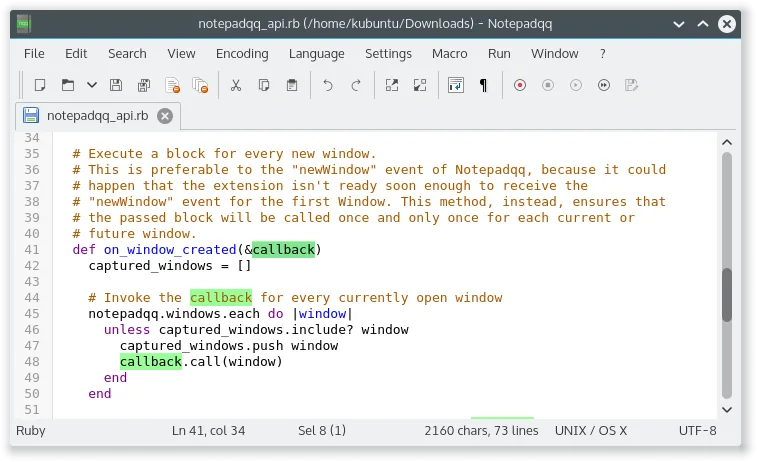
Compared to UltraEdit, Notepadqq offers a comparable set of core features—syntax coloring, find/replace with regex, and multiple cursors—but it is free and open source. The user interface is straightforward, with a classic toolbar and menu bar, and it feels more “Linux‑native” than a Windows port would. The learning curve is minimal for anyone who has used Notepad++ before.
Best for: Developers and power users who need a free, lightweight editor with robust syntax support and multi‑cursor editing.
Key features of Notepadqq
- Real‑time syntax highlighting for 100+ languages
- Regular expression search and replace
- Multi‑cursor editing
- Customizable keyboard shortcuts
- Support for UTF‑8 and other encodings
- Integrated file tree and search
- Plugin‑style extensibility via Python scripts
Pros
- Free and open source
- Large language support
- Lightweight footprint
- Good integration with Linux desktop environments
Cons
- No active development since 2018
- Limited advanced features compared to commercial editors
- Occasional bugs with very large files
Windows programs Notepadqq replaces
How to install Notepadqq on Linux
flatpak install flathub com.notepadqq.Notepadqqsudo apt install notepadqqsudo apt install notepadqqsudo zypper install notepadqqTips for Windows users
Files are opened and saved in the same way as in Notepad++—drag‑and‑drop or File → Open. Keyboard shortcuts are largely identical (e.g., Ctrl+S to save, Ctrl+F for find, Ctrl+Shift+F for regex search). The multi‑cursor feature works with Ctrl+Click or Alt+Shift+Arrow. Unlike UltraEdit, Notepadqq does not have a built‑in FTP client, so you’ll need to use an external tool or the system file manager for remote files. The editor’s settings are stored in ~/.config/notepadqq, so you can copy your configuration from a Windows machine if you export it from Notepad++.
Recent releases
- 1.4.8 —
Notepadqq: frequently asked questions
Is Notepadqq still maintained?
The last official release was in 2018, but the package remains available in major distributions and is occasionally updated for security fixes.
Can I use it for programming in Python?
Yes, it provides syntax highlighting for Python and other languages, and you can run scripts directly from the terminal.
Does it support plugins?
Not directly; however, you can extend it with Python scripts that run in the background.
How does it handle large files?
It performs well up to a few megabytes, but may lag or crash with very large files compared to commercial editors.
Updated