

Linux · Science & Education
Stellarium
Stellarium is a free, open‑source planetarium that renders realistic 3‑D skies in real time.
- Lizenz
- GPL-2.0-or-later
- Aktuelle Version
- 26.3 (28. September 2026)
- Entwickler
- Stellarium team
- Installationen
- 4,096 (Flathub, 30 Tage)


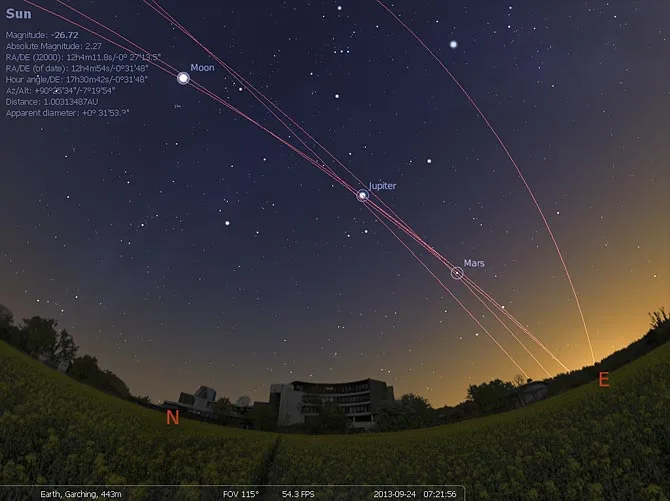

Was ist Stellarium?
Stellarium has been around since 2004, originally written for Windows and later ported to Linux. The Linux version is fully native, using OpenGL for rendering and available in major distributions’ repositories. It targets astronomers, educators, and hobbyists who want an accurate sky simulation without a paid subscription. Compared to Windows‑only planetariums, the Linux build feels just as responsive; the interface is identical, and you can use the same scripts and sky‑culture data.
Ideal für: Anyone needing a detailed, free planetarium on Linux, especially educators and amateur astronomers.
Wichtige Funktionen von Stellarium
- Real‑time 3‑D rendering with OpenGL
- ~600k star catalogue, up to 220M with downloads
- Multiple sky cultures (Greek, Chinese, Inuit, etc.)
- Fog and light‑pollution simulation
- Built‑in scripting engine
- Solar system exploration (Apollo view, rings of Saturn)
- Panoramic landscapes
- Customizable UI
Vorteile
- Free and open source
- Cross‑platform consistency
- Extensive star catalogues
- Active community and frequent updates
Nachteile
- Requires a graphics card with OpenGL support
- Learning curve for scripting
- No official support for older Linux kernels
Windows-Programme, die Stellarium ersetzt
 Stellarium
Stellarium unter Linux installieren
flatpak install flathub org.stellarium.Stellariumsudo apt install stellariumsudo apt install stellariumsudo dnf install stellariumsudo pacman -S stellariumsudo zypper install stellariumTipps für Windows-Umsteiger
Stellarium uses its own project files (.srs) and scripts; you can import/export them via the File menu. Keyboard shortcuts are the same as the Windows version, but you may need to adjust the OpenGL settings if you run into performance issues. No proprietary file formats are involved, so data transfer is straightforward.
Neueste Versionen
- 26.3 —
- 26.2 —
- 26.1 —
- 25.4 —
Stellarium: häufige Fragen
Does Stellarium run on Wayland?
Yes, it works under Wayland with the default OpenGL backend. If you encounter rendering problems, try launching with the X11 backend using the –x11 flag.
Can I use my own star catalogue?
You can download additional catalogues from the Stellarium website and place them in the data directory; the program will load them automatically.
Is there a way to script custom sky views?
Stellarium includes a Lua scripting engine; scripts can be created in the built‑in editor and run from the Tools menu.
How often is Stellarium updated on Linux?
The project releases new versions roughly every few months; the latest stable release is 26.3 (2026‑09‑28).
Aktualisiert am