
 NatronLinux
vs
iMovieWindows
NatronLinux
vs
iMovieWindows
Natron als Linux-Alternative zu iMovie
Aktualisiert am
Unser Fazit
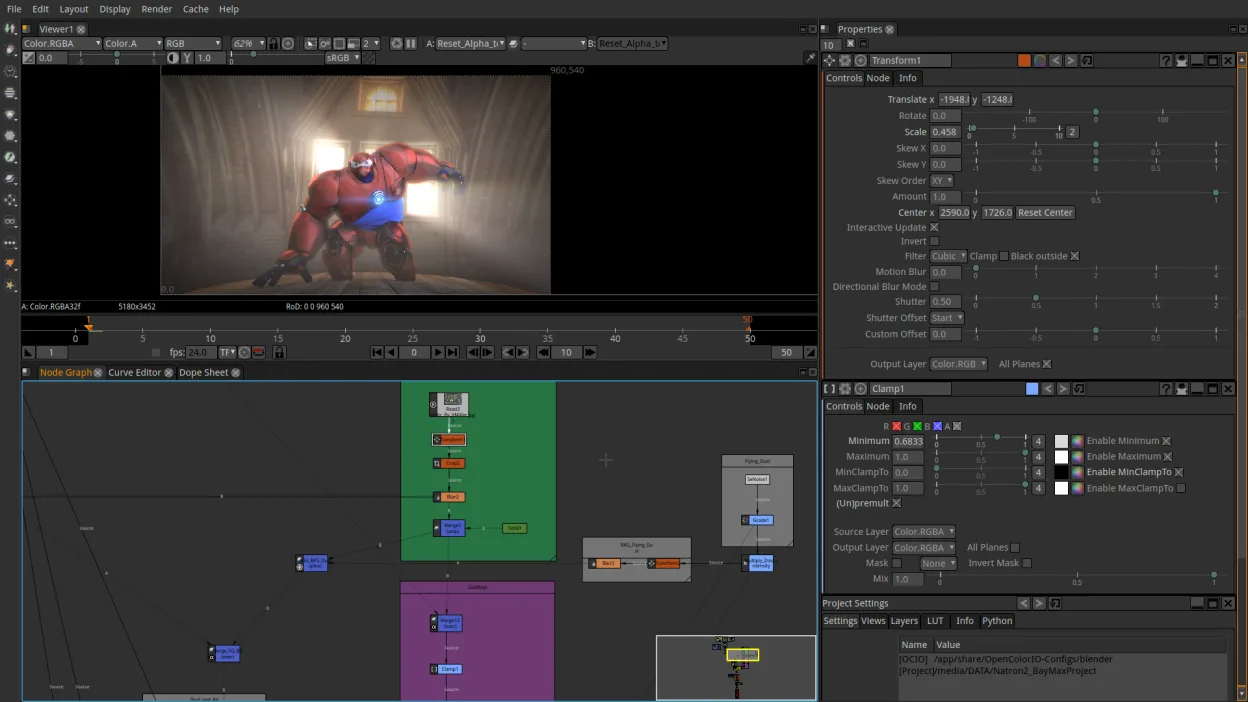
Natron is not a good replacement for most iMovie users. While both are video tools, Natron is a node-based compositing engine for VFX, whereas iMovie is a linear, template-driven editor for beginners. If you are a casual user wanting to trim clips and add titles, Natron will feel overwhelming and inefficient. It is only suitable if you specifically need advanced compositing features and are willing to learn a complex node graph. For simple editing, look for Kdenlive or Shotcut instead.
- Lizenz
- GPL-2.0-or-later
- Preis
- Kostenlos
- Aktuelle Version
- 2.5.0 (26. November 2022)
- Bewertung
- —
Was gleich funktioniert
- Both support common video formats like MP4 and MOV for input and output.
- Both offer basic color correction and grading capabilities.
- Both are free to use on Linux (Natron is open-source).
- Both allow for keyframe animation of properties.
Was anders ist
- Natron uses a node-based interface, which is significantly more complex than iMovie's linear timeline.
- Natron lacks built-in template libraries for titles, transitions, and social media presets.
- Natron is designed for professional VFX compositing, not casual storytelling or quick edits.
- Natron has a steeper learning curve and requires understanding of compositing concepts like alpha channels and blending modes.
Ihre iMovie-Dateien öffnen
Natron cannot open iMovie project files (.imovied) directly. You will need to export your finished video from iMovie as a standard format like MP4 or ProRes, then import that video file into Natron as a background layer or element. There is no direct project file conversion path between the two applications.
Von iMovie zu Natron wechseln – Schritt für Schritt
- Export your final video from iMovie on your Mac or iPhone as an MP4 or MOV file.
- Transfer the video file to your Linux machine via USB, cloud storage, or network share.
- Install Natron via your package manager or Flathub.
- Create a new project in Natron and import the video file as a Read node.
- Connect the Read node to a Write node to set up your output.
- Use the node graph to add any necessary compositing effects or color adjustments.
Wichtige Funktionen von Natron
- Node‑basierter Compositing‑Engine
- Python‑Scripting‑Unterstützung
- Native OpenFX‑Plugin‑Unterstützung
- Farbkorrektur‑Tools
- Timeline‑ und Keyframe‑Bearbeitung
- Export in gängige Videoformate
Natron unter Linux installieren
flatpak install flathub fr.natron.NatronHäufige Fragen
Can I use Natron to just trim videos and add music?
Technically yes, but it is highly inefficient. You would need to build a node graph for simple cuts and audio mixing. For basic editing, Kdenlive or Shotcut are much better choices.
Does Natron have a library of stock music or titles?
No. Natron does not include built-in asset libraries for music, titles, or transitions. You must source these assets separately and import them manually.
Is Natron suitable for older hardware?
Natron can be resource-intensive due to its real-time compositing engine. While it may run on older hardware, complex scenes with many nodes can cause lag. It is generally heavier than simple linear editors.
5 weitere Alternativen zu iMovie
 KdenliveKdenlive ist ein kostenloser, funktionsreicher nichtlinearer Videoeditor, der auf dem MLT-Framework basiert.Open SourceKostenlosFlatpakKdenlive vs. iMovie
 ShotcutShotcut ist ein kostenloser, quelloffener Videoeditor für Linux, der eine breite Palette von Formaten über…Open SourceKostenlosFlatpakShotcut vs. iMovie
 OpenShotOpenShot ist ein kostenloser, quelloffener, nichtlinearer Videoeditor für Linux und andere Plattformen…Open SourceKostenlosFlatpakOpenShot vs. iMovie
 PiTiViPiTiVi ist ein freier, quelloffener nicht-linearer Videoeditor für Linux, der auf GStreamer basiert und eine…Open SourceKostenlosFlatpakPiTiVi vs. iMovie
 BlenderBlender ist eine kostenlose, quelloffene 3D-Suite für Modellierung, Animation, Rendering und Videobearbeitung.Open SourceKostenlosFlatpakBlender vs. iMovie