
 PidginLinux
vs
PidginLinux
vs
 Yahoo! MessengerWindows
Pidgin als Linux-Alternative zu Yahoo! Messenger
Aktualisiert am
Unser Fazit
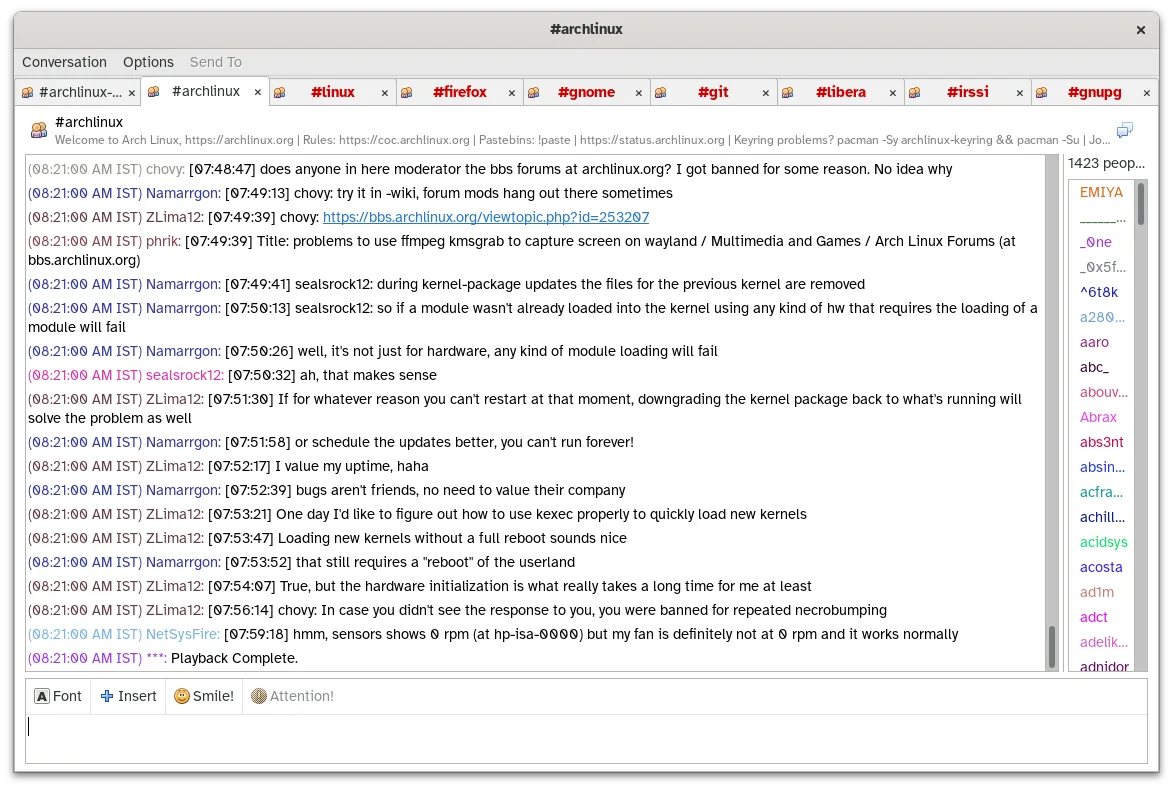
Pidgin is a functional replacement for Yahoo! Messenger, especially for users who value cross-platform messaging and protocol flexibility. It supports multiple accounts, contact lists with presence, chat logging, and file transfers where the underlying protocol allows. While it doesn’t support Yahoo!'s proprietary protocol anymore (which was dropped from Pidgin after Yahoo! shut down), it excels for users migrating to active protocols like XMPP, IRC, or Matrix. It’s best suited for technically inclined users comfortable with manual setup and limited voice calling support.
- Lizenz
- GPL-2.0
- Preis
- Kostenlos
- Aktuelle Version
- 2.14.14 (23. Januar 2025)
- Bewertung
- —
Was gleich funktioniert
- Both support instant messaging with contact lists and presence status
- Enable file transfers between users
- Allow simultaneous login to multiple accounts
- Store chat history locally
- Offer cross-platform availability (Linux, Windows, macOS)
Was anders ist
- Pidgin no longer supports the Yahoo! Messenger protocol (discontinued)
- No built-in voice calling beyond basic protocol support
- Interface is more utilitarian, less consumer-focused
- Requires plugins for advanced features like encryption
- Relies on external protocols, not a single proprietary network
Ihre Yahoo! Messenger-Dateien öffnen
Pidgin cannot directly import Yahoo! Messenger chat logs or contact lists, as there is no standard import filter for its proprietary formats. If logs were stored in plain text or HTML, they can be manually archived, but no automated migration path exists. Users should export any important data from Yahoo! Messenger backups before switching. Third-party tools may exist for conversion, but compatibility is not guaranteed.
Von Yahoo! Messenger zu Pidgin wechseln – Schritt für Schritt
- Install Pidgin from your distribution’s repository or Flathub
- Identify which modern protocols your contacts use (e.g., XMPP, IRC)
- Create accounts on supported services if needed
- Add your accounts to Pidgin via Accounts > Add
- Enable file transfer and logging in preferences
- Use plugins like OTR or spell-check if desired
Wichtige Funktionen von Pidgin
- Unterstützt über 30 Chat-Protokolle über libpurple
- Gleichzeitige Anmeldung bei mehreren Konten
- Plugin-System für Erweiterungen (z. B. OTR-Verschlüsselung, Rechtschreibprüfung)
- Gruppierung von Buddies und Statusmeldungen
- Dateiübertragung für unterstützte Protokolle
- Anpassbare Themes und Emoticons
- Protokollierung von Chats in lokale Dateien
- Portable Version über Flatpak
Pidgin unter Linux installieren
flatpak install flathub im.pidgin.Pidginsudo apt install pidginsudo apt install pidginsudo dnf install pidginsudo zypper install pidginHäufige Fragen
Can Pidgin still connect to Yahoo! Messenger?
No. Yahoo! Messenger was discontinued in 2018, and Pidgin dropped support for its protocol. You cannot log in to Yahoo! accounts in current versions.
Does Pidgin support voice calls like Yahoo! Messenger did?
Only indirectly. Some protocols like XMPP support voice calling with additional setup, but Pidgin itself does not include built-in voice calling features.
Is my chat history safe and accessible in Pidgin?
Yes. Pidgin logs all conversations to local text files by default, stored in ~/.purple/logs. You can search and archive them manually.
2 weitere Alternativen zu Yahoo! Messenger
 KopeteKopete ist ein eingestelltener Multi-Protokoll-Chat-Client, der für die KDE-Desktop-Umgebung entwickelt wurde.Open SourceKostenlosEingestelltKopete vs. Yahoo! Messenger
 EmpathyEmpathy was GNOME’s default IM and VoIP client supporting multiple protocols.Open SourceKostenlosEingestelltEmpathy vs. Yahoo! Messenger