
 PiTiViLinux
vs
Wondershare FilmoraWindows
PiTiViLinux
vs
Wondershare FilmoraWindows
PiTiVi als Linux-Alternative zu Wondershare Filmora
Aktualisiert am
Unser Fazit
PiTiVi can replace Wondershare Filmora for users who need a free, open‑source editor that works offline and supports 4K export. It offers drag‑and‑drop timeline editing, built‑in effects, transitions, and basic color grading. However, it lacks Filmora’s cloud‑based export workflow and some advanced presets. It’s best suited for hobbyists and Linux‑only users who want a GNOME‑native experience.
- Lizenz
- LGPL-2.0+
- Preis
- Kostenlos
- Aktuelle Version
- 2023.03 (26. März 2023)
- Bewertung
- —
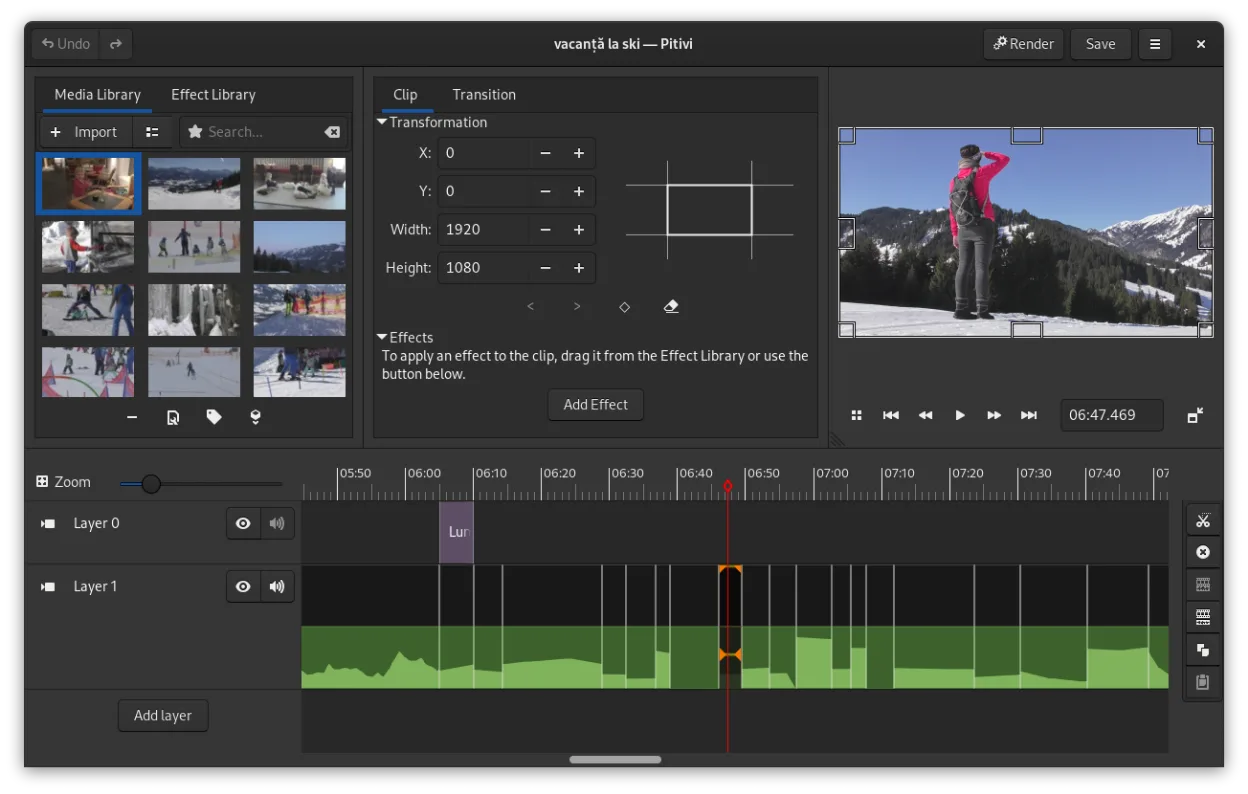
Was gleich funktioniert
- Drag‑and‑drop timeline editing
- Built‑in effects and transitions
- Export to common video formats (MP4, MOV)
- Support for 4K and higher resolutions
- Keyboard shortcuts and basic color grading
Was anders ist
- PiTiVi requires a local installation and no internet for export, while Filmora needs an online connection
- PiTiVi’s interface is GNOME‑centric and may feel less polished than Filmora’s UI
- PiTiVi lacks Filmora’s proprietary preset library and some advanced color grading tools
- PiTiVi does not offer a subscription model or cloud collaboration features
- PiTiVi’s export options are limited to GStreamer codecs, whereas Filmora supports a broader set of codecs out of the box
Ihre Wondershare Filmora-Dateien öffnen
PiTiVi cannot directly open Wondershare Filmora project files (.wfm or .filmora). Users must export their Filmora projects to a common format (e.g., MP4, MOV, or a raw timeline format) and then import that media into PiTiVi. Exporting from Filmora is straightforward, but re‑creating the exact timeline in PiTiVi will require manual re‑assembly.
Von Wondershare Filmora zu PiTiVi wechseln – Schritt für Schritt
- Export your Filmora project to an MP4 or MOV file with the desired resolution and frame rate.
- Launch PiTiVi and create a new project with the same aspect ratio and frame rate as your exported video.
- Import the exported file into PiTiVi’s media pool and drag it onto the timeline.
- Re‑apply any effects, transitions, or color grading that were used in Filmora by selecting the clip and using PiTiVi’s filter panel.
- Save the PiTiVi project for future edits and export the final video to your preferred format.
- faq
- :
Wichtige Funktionen von PiTiVi
- Nicht-lineare Bearbeitung mit einer rahmenratenunabhängigen Zeitlinie
- Unterstützt jedes Format, das von GStreamer verarbeitet wird
- Keyframe-Animation für Effekte und Filter
- Ripple- und Roll-Bearbeitung für effiziente Zeitlinienanpassungen
- Benutzerdefinierte Seitenverhältnisse, Frameraten und Render-Voreinstellungen
- Crossfades und SMPTE-konforme Übergänge
- Abtrennbare UI-Panels für Multi-Monitor-Setups
- Nicht-modaler Bearbeitungsworkflow mit playhead-zentriertem Design
PiTiVi unter Linux installieren
flatpak install flathub org.pitivi.Pitivisudo apt install pitivisudo apt install pitivisudo dnf install pitivisudo pacman -S pitivisudo zypper install pitivi5 weitere Alternativen zu Wondershare Filmora
 KdenliveKdenlive ist ein kostenloser, funktionsreicher nichtlinearer Videoeditor, der auf dem MLT-Framework basiert.Open SourceKostenlosFlatpakKdenlive vs. Wondershare Filmora
 ShotcutShotcut ist ein kostenloser, quelloffener Videoeditor für Linux, der eine breite Palette von Formaten über…Open SourceKostenlosFlatpakShotcut vs. Wondershare Filmora
 OpenShotOpenShot ist ein kostenloser, quelloffener, nichtlinearer Videoeditor für Linux und andere Plattformen…Open SourceKostenlosFlatpakOpenShot vs. Wondershare Filmora
 BlenderBlender ist eine kostenlose, quelloffene 3D-Suite für Modellierung, Animation, Rendering und Videobearbeitung.Open SourceKostenlosFlatpakBlender vs. Wondershare Filmora
 FlowbladeFlowblade ist ein schneller, stabiler, mehrspuriger nichtlinearer Videoeditor für Linux, geeignet für…Open SourceKostenlosFlatpakFlowblade vs. Wondershare Filmora