
 QCADLinux
vs
AutoCADWindows
QCADLinux
vs
AutoCADWindows
QCAD als Linux-Alternative zu AutoCAD
Aktualisiert am
Unser Fazit
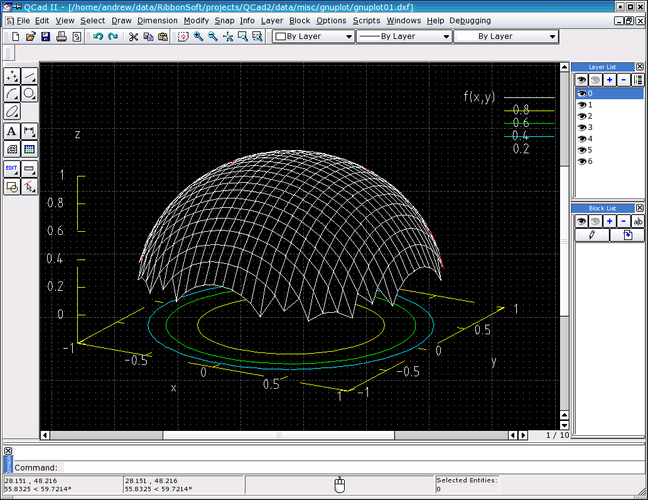
QCAD is a solid replacement for 2D drafting tasks, but it is not a full AutoCAD substitute. It handles layers, blocks, and DXF files well, making it suitable for mechanical drawings and floor plans. However, it lacks 3D solid modeling and parametric constraint solving. If your workflow relies heavily on 3D design or complex parametric constraints, QCAD will feel limiting. For pure 2D technical drawing where file compatibility with DXF is key, it is a capable, free option.
- Lizenz
- GPL-3.0
- Preis
- Kostenlos
- Aktuelle Version
- 3.33.1
- Bewertung
- —
Was gleich funktioniert
- Layer management with visibility controls
- Support for blocks and block insertion
- Dimensioning and annotation tools
- Snap and grid features for precision
Was anders ist
- No 3D solid modeling capabilities
- Lacks parametric constraint solving
- Limited scripting compared to AutoLISP
- No native DWG support (uses DXF)
Ihre AutoCAD-Dateien öffnen
QCAD does not natively support the proprietary DWG format. You must convert DWG files to DXF using external tools or online converters before opening them in QCAD. Exporting from QCAD produces DXF files, which most CAD software can open. This adds an extra step to your workflow compared to direct DWG compatibility in AutoCAD.
Von AutoCAD zu QCAD wechseln – Schritt für Schritt
- Install QCAD from your distro's package manager (Arch or Fedora).
- Convert existing DWG files to DXF format using a converter tool.
- Import the DXF files into QCAD and verify layer integrity.
- Recreate any missing blocks or custom line styles in QCAD.
- Test printing to PDF to ensure annotations scale correctly.
- Adjust your workflow to use DXF for file exchange with other users.
Wichtige Funktionen von QCAD
- Layer-Verwaltung mit Sichtbarkeits-Schaltern
- Umfassende DXF-Import-/Export-Unterstützung
- Grundlegende Bemaßungs- und Annotationswerkzeuge
- Anpassbare Linienstile und Schraffuren
- Skriptfähig über ECMAScript (JavaScript)
- Drucken in PDF- und Rasterformate
- Snap- und Gitteroptionen für präzises Zeichnen
QCAD unter Linux installieren
sudo dnf install qcadsudo pacman -S qcadHäufige Fragen
Can QCAD open DWG files directly?
No. QCAD works with DXF. You need to convert DWG to DXF first.
Does QCAD support 3D modeling?
No. QCAD is strictly a 2D CAD application.
Is QCAD free to use?
Yes, the community edition is free and open-source under GPL-3.0.
4 weitere Alternativen zu AutoCAD
 FreeCADFreeCAD ist ein Open‑Source‑parametrischer 3D‑CAD‑Modellierer für Design, Ingenieurwesen und 3D‑Druck.Open SourceKostenlosFlatpakFreeCAD vs. AutoCAD
 LibreCADLibreCAD ist ein kostenloses, quelloffenes 2D-CAD-Programm zum Erstellen präziser Zeichnungen unter Linux.Open SourceKostenlosFlatpakLibreCAD vs. AutoCAD
 OpenSCADOpenSCAD ist ein parametrischer 3D-CAD-Modeller, der feste Modelle aus textbasierten Skripten erzeugt…Open SourceKostenlosFlatpakOpenSCAD vs. AutoCAD
 BlenderBlender ist eine kostenlose, quelloffene 3D-Suite für Modellierung, Animation, Rendering und Videobearbeitung.Open SourceKostenlosFlatpakBlender vs. AutoCAD