
 QtractorLinux
vs
GarageBandWindows
QtractorLinux
vs
GarageBandWindows
Qtractor als Linux-Alternative zu GarageBand
Aktualisiert am
Unser Fazit
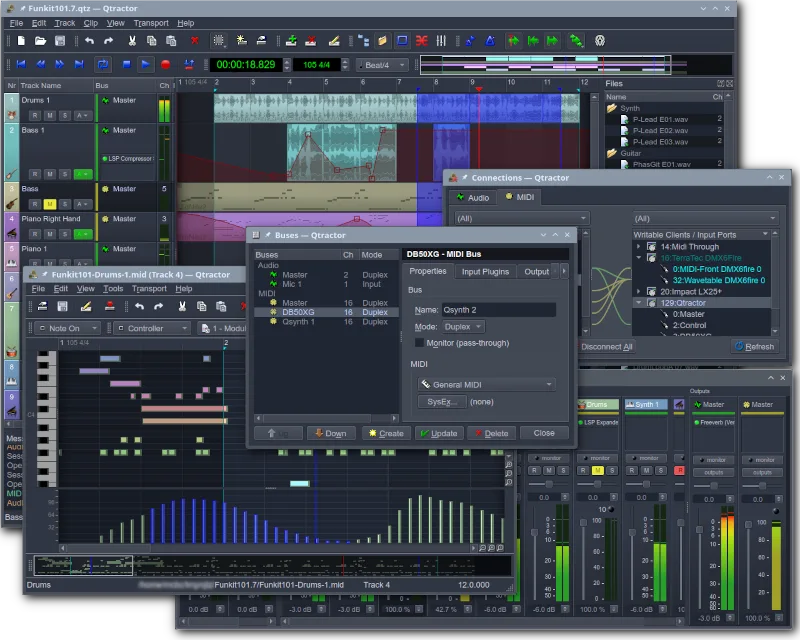
Qtractor is a solid, free replacement for GarageBand if you are comfortable with Linux audio infrastructure. It handles multitrack recording, MIDI sequencing, and mixing well, making it suitable for hobbyists who want a dedicated DAW. However, it lacks GarageBand’s intuitive, drag-and-drop simplicity. If you need a quick, visual loop-based workflow without learning JACK or plugin management, Qtractor might feel steep. For users ready to engage with a traditional Linux DAW structure, it covers the core needs of recording and producing music effectively.
- Lizenz
- GPL-2.0+
- Preis
- Kostenlos
- Aktuelle Version
- 1.6.4 (6. September 2026)
- Bewertung
- —
Was gleich funktioniert
- Multitrack audio and MIDI recording capabilities
- Support for software synthesizers and drum machines via plugins
- Basic audio editing and effects processing
- Session management and project saving
- Export options for standard audio formats
Was anders ist
- Requires JACK audio server setup for optimal performance
- Lacks a built-in, extensive library of pre-made audio loops
- Interface is more complex and less beginner-friendly than GarageBand
- No direct integration with Apple-specific hardware or ecosystem
- Plugin management relies on VST/LADSPA rather than a unified app store
Ihre GarageBand-Dateien öffnen
Qtractor does not natively open GarageBand project files (.band). You will need to export your GarageBand projects as standard audio files (WAV/AIFF) or MIDI files first. Qtractor can then import these standard formats to continue working on the tracks. Direct project file conversion is not supported.
Von GarageBand zu Qtractor wechseln – Schritt für Schritt
- Export your GarageBand project as a multitrack WAV or MIDI file.
- Install Qtractor and set up the JACK audio server.
- Create a new session in Qtractor and import the exported audio/MIDI files.
- Load your preferred VST or LADSPA plugins for synths and effects.
- Reconstruct your mix using Qtractor’s mixer and automation features.
- Save the session and test the playback to ensure all tracks are aligned.
Wichtige Funktionen von Qtractor
- Multitrack-Audio- und MIDI-Aufnahme
- Integration mit dem JACK-Audioserver
- ALSA-Unterstützung für MIDI-Geräte
- Unterstützung für VST- und LADSPA-Plugins
- Nicht-destruktives Bearbeiten und Mischen
- Integrierte Effekte und Verarbeitung
- Sitzungsverwaltung und Projekt-Speicherung
- Plattformübergreifende Kompatibilität über Qt
Qtractor unter Linux installieren
flatpak install flathub org.rncbc.qtractorsudo apt install qtractorsudo apt install qtractorsudo dnf install qtractorsudo pacman -S qtractorsudo zypper install qtractorHäufige Fragen
Does Qtractor have a built-in loop library like GarageBand?
No, Qtractor does not come with a large built-in loop library. You will need to source loops from free online repositories or create your own using the MIDI sequencer and synths.
Is Qtractor difficult to set up for a beginner?
It has a steeper learning curve than GarageBand. You need to understand basic Linux audio concepts like JACK and ALSA. However, once set up, the interface is manageable for intermediate users.
Can I use my existing VST plugins in Qtractor?
Yes, Qtractor supports VST and LADSPA plugins. You can load your favorite Windows-compatible VSTs (if they run on Linux via Wine or native Linux builds) or use Linux-specific plugins.
4 weitere Alternativen zu GarageBand
 LMMSLMMS ist ein kostenloses digitales Audio-Workstation-Programm zum Komponieren, Sequenzieren und Mischen von…Open SourceKostenlosFlatpakLMMS vs. GarageBand
 ArdourArdour ist ein professionelles, quelloffenes digitales Audio-Workstation-Programm zum Aufnehmen, Bearbeiten…Open SourceKostenlosFlatpakArdour vs. GarageBand
 AudacityAudacity ist ein kostenloser, plattformübergreifender Audio‑Editor und Recorder, der zum Bearbeiten, Mischen…Open SourceKostenlosFlatpakAudacity vs. GarageBand
 MuseScoreMuseScore ist eine kostenlose, quelloffene Notationssoftware zur Erstellung und Wiedergabe von Noten in…Open SourceKostenlosFlatpakMuseScore vs. GarageBand