
 ShotwellLinux
vs
Adobe Camera RawWindows
ShotwellLinux
vs
Adobe Camera RawWindows
Shotwell als Linux-Alternative zu Adobe Camera Raw
Aktualisiert am
Unser Fazit
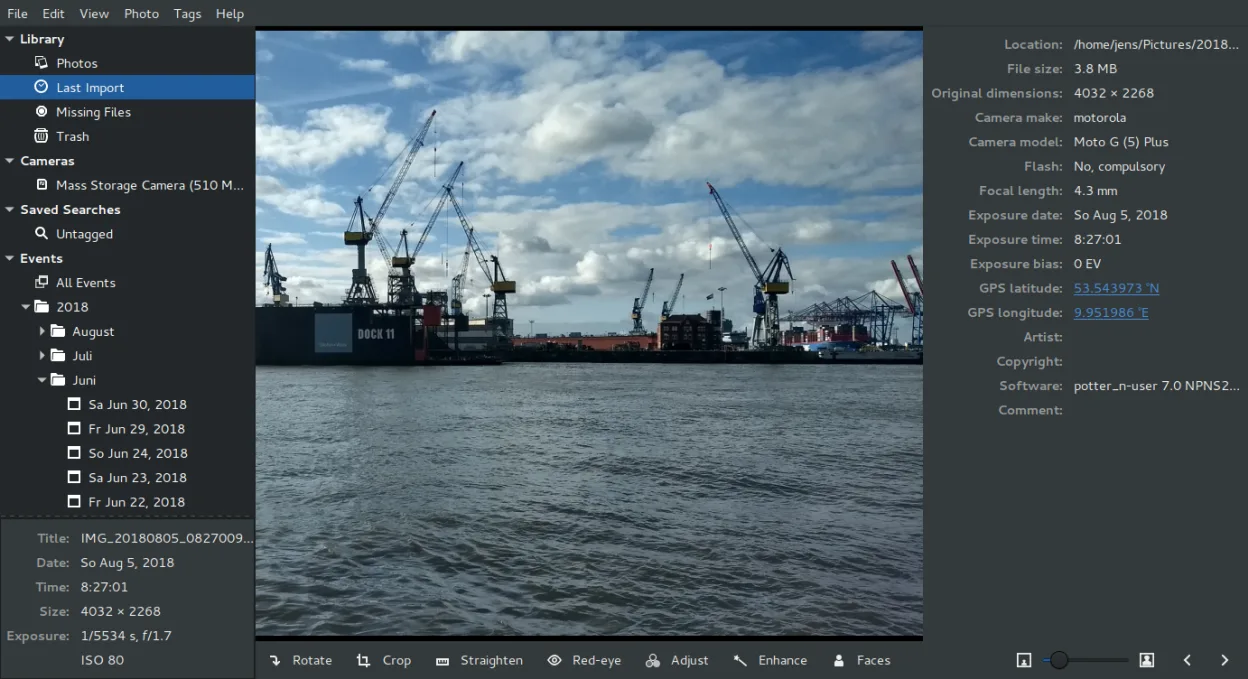
Shotwell is not a direct replacement for Adobe Camera Raw. ACR is a specialized raw converter and non-destructive editor, while Shotwell is a photo organizer with only basic editing tools. If you need deep raw processing, precise color management, or batch conversion of raw files, Shotwell will feel limiting. However, if your workflow is simple—importing, organizing, and applying light adjustments like crop or exposure—Shotwell is a solid, lightweight option for GNOME users who do not require professional-grade raw development.
- Lizenz
- LGPL-2.1+
- Preis
- Kostenlos
- Aktuelle Version
- 33.0 (13. September 2026)
- Bewertung
- —
Was gleich funktioniert
- Supports opening various RAW file formats from different camera manufacturers.
- Offers non-destructive editing capabilities that preserve the original master file.
- Includes basic adjustments such as exposure, color, and straightening.
- Allows exporting images to common formats like JPEG and PNG.
- Integrates with the Linux desktop environment for file management.
Was anders ist
- Lacks advanced raw processing controls like tone curves, HSL sliders, and detailed sharpening masks.
- Does not offer a history stack for undoing multiple complex steps in the same way ACR does.
- Missing robust ICC profile management and color space conversion tools.
- No batch processing engine for applying specific raw settings to hundreds of files at once.
- Interface is designed for organization first, not as a standalone raw converter plugin.
Ihre Adobe Camera Raw-Dateien öffnen
Shotwell can open RAW files directly, which is the core input for Adobe Camera Raw. It does not open .xmp sidecar files or .cr3/.dng files in the same way ACR processes them for editing; it treats them as source images. Exporting to JPEG, TIFF, and PNG is supported, but it does not export ACR-specific settings or PSD files. If you rely on ACR’s specific color profiles or layered PSD workflows, Shotwell cannot replicate that output format.
Von Adobe Camera Raw zu Shotwell wechseln – Schritt für Schritt
- Install Shotwell via your distribution’s package manager or Flathub.
- Import your photo library from your camera or existing folders into Shotwell.
- Review your RAW files to ensure they open correctly and display expected metadata.
- Apply basic adjustments like crop, exposure, and white balance to test the non-destructive workflow.
- Export edited images to JPEG or PNG for sharing, noting that original RAW files remain untouched.
- Keep Adobe Camera Raw on Windows for any complex raw processing needs that Shotwell cannot handle.
Wichtige Funktionen von Shotwell
- Fotos von Kamera oder Festplatte importieren
- Nach Datum, Tags und Bewertungen organisieren
- Nicht destruktives Zuschneiden, Rote-Augen-Korrektur, Farbe, Ausrichten
- Unterstützung für RAW, JPEG, PNG, TIFF
- Hochladen zu Flickr, Google Photos usw.
- Schnelle, leichte Benutzeroberfläche
- Integration in den GNOME-Dateimanager
Shotwell unter Linux installieren
flatpak install flathub org.gnome.Shotwellsudo apt install shotwellsudo apt install shotwellsudo dnf install shotwellsudo pacman -S shotwellsudo zypper install shotwellHäufige Fragen
Can Shotwell replace Photoshop and ACR for professional photography?
No. Shotwell is an organizer with light editing tools. It lacks the advanced raw processing, color management, and batch capabilities required for professional workflows. Use it for casual organizing and simple tweaks.
Does Shotwell support batch processing of RAW files?
Shotwell does not have a dedicated batch processor for applying specific raw settings to multiple files. You can organize and tag batches, but you cannot apply a set of exposure or white balance changes to hundreds of images at once.
Will my edits in Shotwell overwrite the original RAW file?
No. Shotwell uses non-destructive editing. Your original RAW file remains unchanged. Edits are stored separately, allowing you to revert or adjust them without losing the master image.
4 weitere Alternativen zu Adobe Camera Raw
 darktabledarktable ist ein kostenloser, quelloffener Bildbearbeitungsprogrammier, der Rohdateien verwaltet und einen…Open SourceKostenlosFlatpakdarktable vs. Adobe Camera Raw
 RawTherapeeRawTherapee ist ein quelloffenes, plattformübergreifendes Programm zur Entwicklung von Raw-Fotos.Open SourceKostenlosFlatpakRawTherapee vs. Adobe Camera Raw
 GIMPGIMP ist ein kostenloser, quelloffener Rastergrafik‑Editor für Fotobearbeitung, digitale Malerei und…Open SourceKostenlosFlatpakGIMP vs. Adobe Camera Raw
 KritaKrita ist ein vollwertiges Open‑Source-Programm für digitales Malen und Illustration.Open SourceKostenlosFlatpakKrita vs. Adobe Camera Raw