
 SpyderLinux
vs
Jupyter NotebookWindows
Spyder als Linux-Alternative zu Jupyter Notebook
Aktualisiert am
Unser Fazit
Spyder can replace Jupyter Notebook for users who prefer a desktop IDE with a rich console and variable explorer, but it lacks the notebook‑style cell execution and easy sharing of interactive documents. It works well for Python‑only data science workflows, especially when debugging or profiling is important. Those who need multi‑language support, web‑based sharing, or a purely notebook interface will find Spyder insufficient.
- Lizenz
- MIT
- Preis
- Kostenlos
- Aktuelle Version
- v6.1.6 (28. Juli 2026)
- Bewertung
- —
Was gleich funktioniert
- Both use IPython kernels for interactive Python execution
- Both support Markdown and LaTeX rendering in output cells
- Both can display Matplotlib plots and other rich media
- Both integrate with NumPy, Pandas, and SciPy libraries
Was anders ist
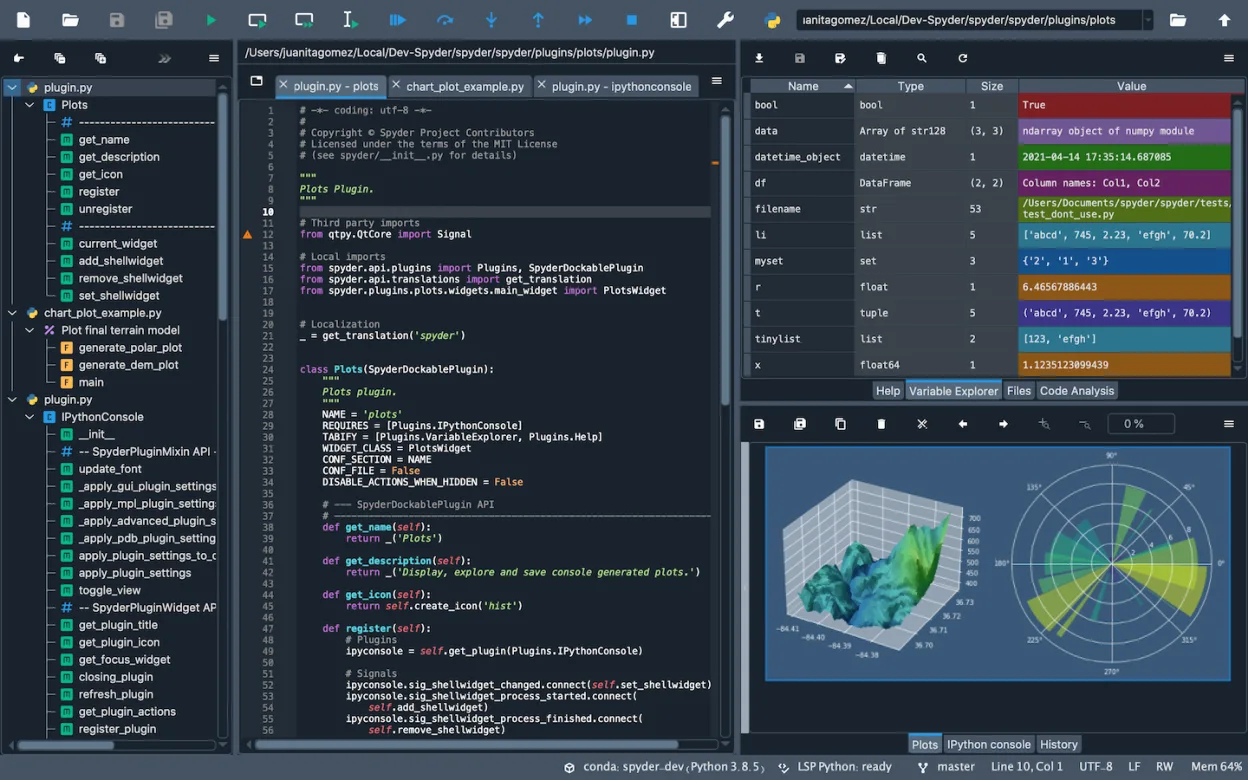
- Spyder is a full IDE, not a web app; it runs locally and has a single window with editor, console, and variable explorer
- Jupyter Notebook supports multiple languages via different kernels; Spyder is Python‑centric
- Notebook files (.ipynb) are not native to Spyder; it can open them only via a plugin or conversion
- Notebook’s cell‑based workflow and easy export to HTML/PDF are missing in Spyder
- Spyder’s debugging, profiling, and linting tools are more advanced than Notebook’s simple cell execution
Ihre Jupyter Notebook-Dateien öffnen
Spyder does not natively open .ipynb files. You can convert a notebook to a Python script (.py) using nbconvert or import the notebook as a module, but the cell structure and outputs are not preserved. Exporting from Spyder to .ipynb is not supported; you would need to copy code into a new notebook manually.
Von Jupyter Notebook zu Spyder wechseln – Schritt für Schritt
- Install Spyder from your distribution’s package manager or via pip
- Open Spyder and create a new Python project
- Copy the code cells from your Jupyter Notebook into Spyder’s editor, separating them with comments if desired
- Use the IPython console to run code interactively, and use the Variable Explorer to inspect data
Wichtige Funktionen von Spyder
- Interaktive IPython‑Konsole mit umfangreicher Ausgabe‑Darstellung
- Variablen‑Explorer zur Inspektion großer NumPy‑Arrays und Pandas‑DataFrames
- Integriertes Debugging mit Schritt‑durch‑Schritt‑Ausführung und Breakpoint‑Verwaltung
- Eingebaute Unterstützung für Matplotlib, SymPy und SciPy‑Visualisierung
- Plugin‑Architektur zur Erweiterung der Funktionalität mit eigenen Werkzeugen
- Projekt‑Manager zur Organisation mehrerer Dateien und Konfigurationen
- Code‑Analyse und Linting via Pylint und PEP8‑Integration
Spyder unter Linux installieren
flatpak install flathub org.spyder_ide.spydersudo apt install spydersudo apt install spydersudo dnf install spydersudo pacman -S spydersudo zypper install spyderHäufige Fragen
Can I share my Spyder work like a Jupyter Notebook?
No, Spyder does not generate shareable .ipynb files. You can export your script to PDF or HTML, but interactive sharing requires a notebook server.
Does Spyder support other languages besides Python?
Spyder is designed for Python only; it does not support kernels for R, Julia, etc. as Jupyter does.
Is Spyder better for debugging?
Yes, Spyder provides a full debugger with breakpoints, step‑through, and variable inspection, which Jupyter lacks.
3 weitere Alternativen zu Jupyter Notebook
 PyCharm OSSPyCharm Community Edition is a free, open‑source IDE for Python development on Linux.Open SourceKostenlosFlatpakPyCharm OSS vs. Jupyter Notebook