
 SylpheedLinux
vs
SylpheedLinux
vs
 Becky!Windows
Sylpheed als Linux-Alternative zu Becky!
Aktualisiert am
Unser Fazit
Sylpheed can replace Becky! for users who need a lightweight, open‑source client that supports POP3/IMAP, multiple accounts, local mbox/maildir storage, filtering, and address book import. It is ideal for Linux users who prefer a GTK interface and want low resource usage. The learning curve is minimal for those familiar with classic mail clients, but it lacks some of Becky!’s Japanese language support and advanced UI polish.
Funktionsabdeckung
- Lizenz
- GPL-2.0-or-later
- Preis
- Kostenlos
- Aktuelle Version
- 3.7.0
- Bewertung
- —
Was gleich funktioniert
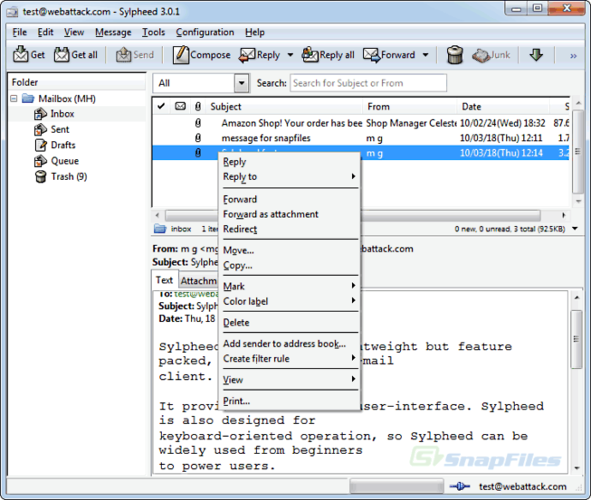
- Supports POP3, IMAP and SMTP for email retrieval and sending
- Allows multiple accounts and folder hierarchies
- Provides filtering and rule‑based mail processing
- Includes an address book with LDAP lookup
- Renders basic HTML in messages
Was anders ist
- Uses MH mailbox format instead of mbox/maildir by default
- No built‑in support for Japanese character sets or localizations beyond standard GTK
- Lacks the proprietary UI features and plugins that Becky! offers
- No direct import of Becky! configuration files
- Spell checking relies on Enchant, not integrated dictionary like Becky!
- No native support for exporting to Becky! format
Ihre Becky!-Dateien öffnen
Sylpheed does not natively read Becky!’s proprietary database files. Users can export emails from Becky! to mbox or EML, then import those into Sylpheed. Address book export from Becky! to CSV can be imported via Sylpheed’s address book import feature.
Von Becky! zu Sylpheed wechseln – Schritt für Schritt
- Export emails from Becky! to mbox or EML format using its export tool.
- Export the address book to CSV or vCard via Becky!’s export function.
- Install Sylpheed from the distribution repository (e.g., apt install sylpheed).
- Create new accounts in Sylpheed, pointing to the exported mailbox locations.
- Import the CSV/vCard into Sylpheed’s address book.
- Configure filtering rules in Sylpheed to match existing Becky! rules.
- faq
Wichtige Funktionen von Sylpheed
- MH‑Postfach‑Speicherung
- GTK+ grafische Oberfläche
- Unterstützung für SMTP, POP3, IMAP und NNTP
- Integriertes Adressbuch mit LDAP‑Suche
- Filterung und regelbasierte Mailverarbeitung
- Mehrere Konten und Ordnerhierarchie
- Rechtschreibprüfung via Enchant
- Portable Konfigurationsdateien
Sylpheed unter Linux installieren
Ubuntu / Mint
sudo apt install sylpheedDebian
sudo apt install sylpheedFedora
sudo dnf install sylpheed4 weitere Alternativen zu Becky!
 Mozilla ThunderbirdMozilla Thunderbird ist ein kostenloser, quelloffener E‑Mail‑, Kalender‑ und News‑Client für Linux und andere…Open SourceKostenlosMozilla Thunderbird vs. Becky!
 Evolution MailEvolution ist der integrierte E-Mail-, Kalender-, Kontakt- und Aufgabenmanager von GNOME.Open SourceKostenlosFlatpakEvolution Mail vs. Becky!
 Claws MailClaws Mail ist ein schlanker, schneller E-Mail-Client für Linux auf Basis von GTK.Open SourceKostenlosFlatpakClaws Mail vs. Becky!
 KMailKMail ist der funktionsreiche E-Mail-Client von KDE und Teil der Kontact-Suite. Er unterstützt IMAP, POP3 und…Open SourceKostenlosKMail vs. Becky!
Sylpheed bewerten
Als Erste(r) bewerten
Guter Ersatz für Becky!?
6