
 Xournal++Linux
vs
Autodesk SketchBookWindows
Xournal++Linux
vs
Autodesk SketchBookWindows
Xournal++ als Linux-Alternative zu Autodesk SketchBook
Aktualisiert am
Unser Fazit
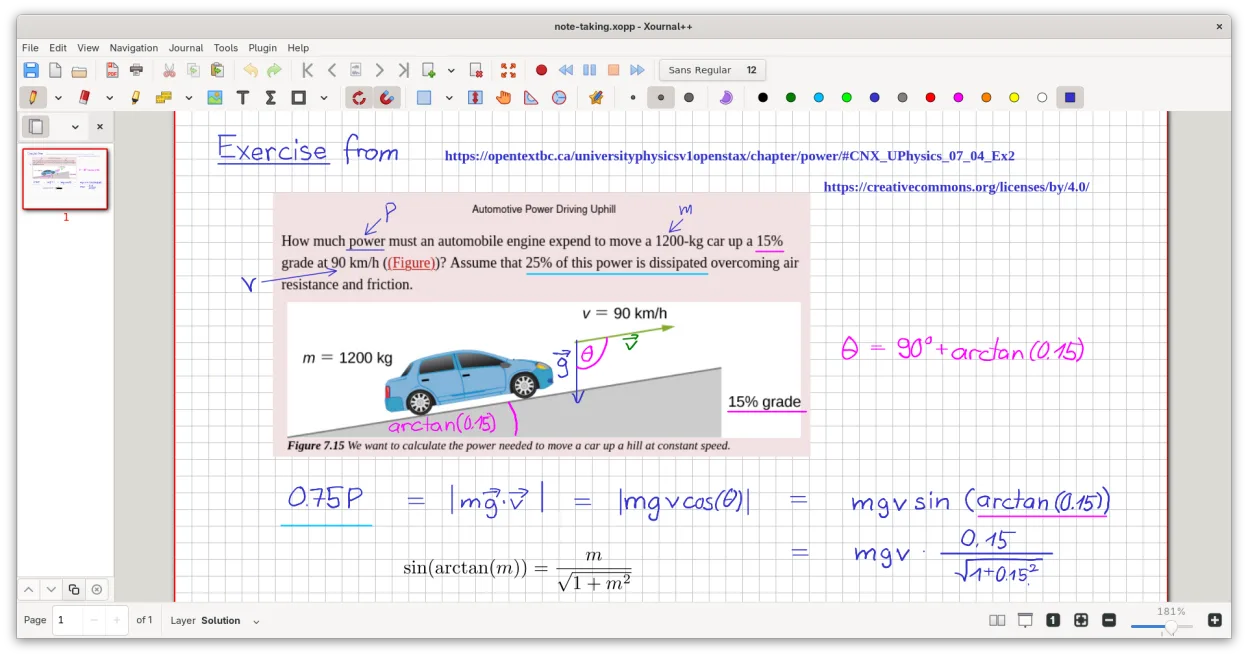
Xournal++ is not a direct replacement for Autodesk SketchBook if you need professional concept art or raster painting. It is a vector-based note-taking tool, not a raster editor. However, for quick sketching, annotating PDFs, or whiteboarding with a stylus, it is an excellent, lightweight alternative. It lacks layers for compositing and animation features. Choose Xournal++ if your workflow is primarily handwriting, diagramming, or light sketching on paper-like backgrounds. Avoid it if you rely on brush dynamics, color mixing, or frame-by-frame animation.
- Lizenz
- GPL-2.0
- Preis
- Kostenlos
- Aktuelle Version
- 1.3.8 (25. September 2026)
- Bewertung
- —
Was gleich funktioniert
- Pressure-sensitive stylus support for Wacom, Huion, and XP-Pen tablets
- Lightweight interface suitable for quick idea capture
- Export capabilities to PNG and PDF
- Customizable toolbar and tool mapping
Was anders ist
- Xournal++ is vector-based for strokes, whereas SketchBook is raster-based
- No dedicated animation or timeline features in Xournal++
- Lacks advanced raster brush engines and color mixing tools
- Layer support in Xournal++ is for note organization, not complex compositing
Ihre Autodesk SketchBook-Dateien öffnen
Xournal++ does not natively open Autodesk SketchBook (.skb) files. You must export your SketchBook work as PNG, JPG, or PDF from Windows. You can then insert these images into Xournal++ as background layers or annotations. Direct conversion of sketch layers or vector paths from SketchBook to Xournal++ is not supported.
Von Autodesk SketchBook zu Xournal++ wechseln – Schritt für Schritt
- Export your SketchBook projects as high-resolution PNG or PDF files
- Install Xournal++ via your package manager or Flathub
- Configure your tablet drivers to ensure pressure sensitivity works
- Import exported images as backgrounds in Xournal++
- Set up custom tool mappings for your stylus buttons
- Test vector drawing tools to adjust to the different stroke behavior
Wichtige Funktionen von Xournal++
- Drucksensitive Stiftunterstützung für Wacom-, Huion- und XP-Pen-Tablets
- Annotieren, Hervorheben und Durchstreichen von Text auf PDF-Dateien
- Exportieren von Notizen nach PDF, PNG und SVG über die grafische Oberfläche oder die Kommandozeile
- Zeichenwerkzeuge wie Stift, Textmarker, Formen und LaTeX-Unterstützung
- Eingabestabilisierung für gleichmäßigere Handschrift
- Anpassbare Symbolleiste und Zuweisung von Werkzeugen zu Stifttasten
- Seitenleiste mit Seitenvorschauen, PDF-Lesezeichen und Ebenenverwaltung
Xournal++ unter Linux installieren
flatpak install flathub com.github.xournalpp.xournalppsudo apt install xournalppsudo apt install xournalppsudo dnf install xournalppsudo pacman -S xournalppsudo zypper install xournalppHäufige Fragen
Can I do animation in Xournal++?
No, Xournal++ does not have a timeline or frame-by-frame animation editor. It is designed for static notes and sketches.
Does it support layers like SketchBook?
It has a layer system, but it is designed for organizing notes and annotations, not for complex raster compositing or blending modes found in art software.
Is it free?
Yes, Xournal++ is open-source under the GPL-2.0 license and completely free to use, unlike the paid desktop version of SketchBook.
5 weitere Alternativen zu Autodesk SketchBook
 KritaKrita ist ein vollwertiges Open‑Source-Programm für digitales Malen und Illustration.Open SourceKostenlosFlatpakKrita vs. Autodesk SketchBook
 MyPaintMyPaint ist ein schnelles, kostenloses Open-Source-Rasterprogramm, das sich auf Pinseldynamik und die Nutzung…Open SourceKostenlosFlatpakMyPaint vs. Autodesk SketchBook
 GIMPGIMP ist ein kostenloser, quelloffener Rastergrafik‑Editor für Fotobearbeitung, digitale Malerei und…Open SourceKostenlosFlatpakGIMP vs. Autodesk SketchBook
 PintaPinta ist ein kostenloser, quelloffener Bitmap‑Editor, der Paint.NET mit einer einfachen Oberfläche und…Open SourceKostenlosFlatpakPinta vs. Autodesk SketchBook
 KolourPaintKolourPaint ist ein schlanker KDE-Rastergrafik-Editor für schnelles Zeichnen und einfache Bildkorrekturen.Open SourceKostenlosFlatpakKolourPaint vs. Autodesk SketchBook