
 ZettlrLinux
vs
ObsidianWindows
ZettlrLinux
vs
ObsidianWindows
Zettlr als Linux-Alternative zu Obsidian
Aktualisiert am
Unser Fazit
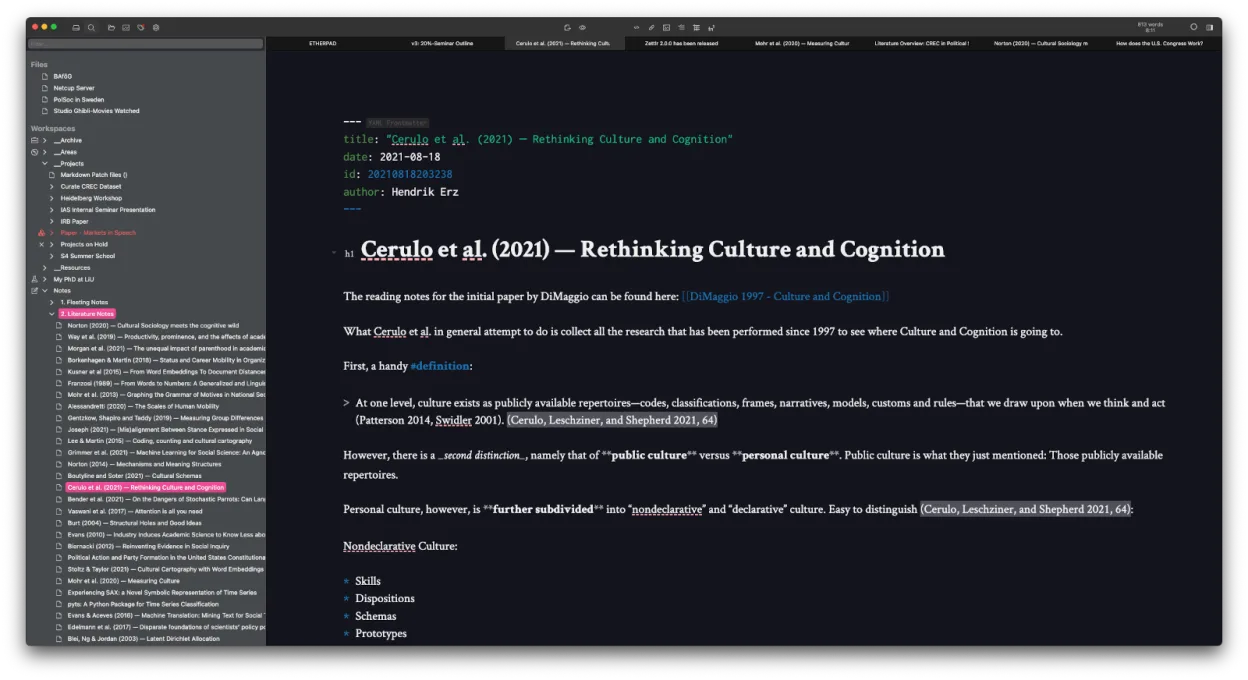
Zettlr is a solid replacement for Obsidian if you prioritize writing, citation support, and Zettelkasten workflows over flashy visual tools. It handles local Markdown files, bidirectional linking, and fast search well, and works offline with no forced cloud. While it lacks Obsidian’s interactive graph view and plugin ecosystem, it makes up for it with strong academic writing features and full file compatibility. Best for researchers, writers, or minimalists who want a lean, open-source editor without vendor lock-in.
- Lizenz
- GPL-3.0-or-later
- Preis
- Kostenlos
- Aktuelle Version
- 4.9.0 (25. Oktober 2026)
- Bewertung
- —
Was gleich funktioniert
- Both use local Markdown files with no proprietary database
- Support bidirectional linking and tagging for knowledge management
- Offer fast full-text search and quick note navigation
- Work offline and support custom themes and CSS
- Are cross-platform and support plugin-like customization
Was anders ist
- Zettlr has no interactive graph view like Obsidian’s; connections are shown in text or file structure
- No large plugin ecosystem — fewer community extensions
- Stronger built-in citation and academic writing support via Zotero/BibTeX
- Uses Zettelkasten-style file IDs by default, but less emphasis on backlinks visualization
- Heatmap search helps find frequently accessed notes, a feature Obsidian lacks
Ihre Obsidian-Dateien öffnen
Zettlr can open and edit Obsidian’s Markdown files directly since both use plain text and standard Markdown. Links using [[Wikilinks]] are supported. However, Obsidian-specific metadata like dataview fields or plugin-added frontmatter may be ignored but won’t break files. Zettlr won’t read Obsidian’s .graph folder or generate the same visual graph, but the underlying link structure remains intact. Exporting from Obsidian to Zettlr is straightforward: just copy the vault folder.
Von Obsidian zu Zettlr wechseln – Schritt für Schritt
- Close Obsidian and copy your entire vault folder to a safe location
- Open Zettlr and use 'Add Workspace' to point to the copied vault
- Enable [[Wikilinks]] in Zettlr settings if not already active
- Review internal links to ensure they resolve correctly
- Optionally, add Zettelkasten-style IDs to new notes for better integration
Wichtige Funktionen von Zettlr
- Markdown-Bearbeitung mit Live-Vorschau
- Zettelkasten-ähnliche Verknüpfungen und Tags
- Zitationsunterstützung über CSL-JSON, BibTeX, Zotero, JabRef
- Dunkelmodus und mehrere Themen, benutzerdefiniertes CSS
- Heatmap-Suche zur schnellen Notizenfindung
- Dateibasierte Speicherung – keine proprietäre Datenbank
- Export nach PDF, HTML und anderen Formaten
- Plattformübergreifend (Linux, Windows, macOS)
Zettlr unter Linux installieren
flatpak install flathub com.zettlr.Zettlrsudo pacman -S zettlrHäufige Fragen
Can Zettlr show a visual graph of my notes like Obsidian?
No, Zettlr does not have an interactive graph view. It shows connections through file links and tags, but not as a dynamic map.
Does Zettlr support Obsidian plugins or themes?
No, Zettlr doesn’t support Obsidian plugins or CSS themes directly. You can use its own themes and custom CSS, but they must be adapted.
Is Zettlr good for academic writing?
Yes, especially if you use Zotero or BibTeX. Zettlr has built-in citation support with CSL-JSON and over 9,000 citation styles.
5 weitere Alternativen zu Obsidian
 JoplinJoplin ist eine quelloffene, plattformübergreifende Notiz- und To-do-App, die Daten in Markdown speichert.Open SourceKostenlosFlatpakJoplin vs. Obsidian
 LogseqLogseq ist ein lokal ausgerichtetes, nichtlineares Wissensbasis-Tool, das Notizen als reine Markdown- oder…Open SourceKostenlosFlatpakLogseq vs. Obsidian
 CherryTreeCherryTree ist eine hierarchische Notiz-App mit Rich-Text, Code-Hervorhebung und Optionen zum Exportieren von…Open SourceKostenlosFlatpakCherryTree vs. Obsidian
 Standard NotesStandard Notes ist eine plattformübergreifende, Ende-zu-Ende-verschlüsselte Notiz-App, die Ihre Daten sicher…Open SourceKostenlosFlatpakStandard Notes vs. Obsidian
 QOwnNotesQOwnNotes ist ein einfacher Markdown-Texteditor mit Aufgabenlistenunterstützung, der mit ownCloud oder…Open SourceKostenlosFlatpakQOwnNotes vs. Obsidian