
 ZettlrLinux
vs
ObsidianWindows
ZettlrLinux
vs
ObsidianWindows
Zettlr as a Linux alternative to Obsidian
Updated
Our verdict
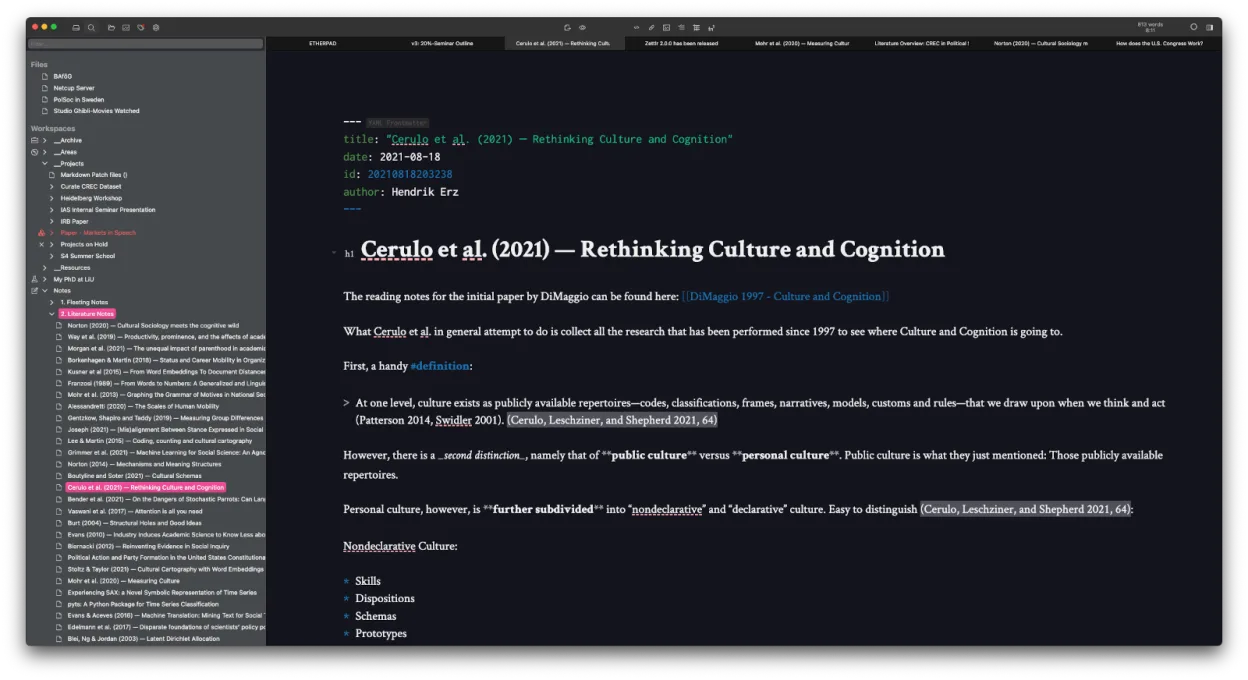
Zettlr is a solid replacement for Obsidian if you prioritize writing, citation support, and Zettelkasten workflows over flashy visual tools. It handles local Markdown files, bidirectional linking, and fast search well, and works offline with no forced cloud. While it lacks Obsidian’s interactive graph view and plugin ecosystem, it makes up for it with strong academic writing features and full file compatibility. Best for researchers, writers, or minimalists who want a lean, open-source editor without vendor lock-in.
- License
- GPL-3.0-or-later
- Price
- Free
- Latest version
- 4.9.0 (October 25, 2026)
- Rating
- —
What works the same
- Both use local Markdown files with no proprietary database
- Support bidirectional linking and tagging for knowledge management
- Offer fast full-text search and quick note navigation
- Work offline and support custom themes and CSS
- Are cross-platform and support plugin-like customization
What is different
- Zettlr has no interactive graph view like Obsidian’s; connections are shown in text or file structure
- No large plugin ecosystem — fewer community extensions
- Stronger built-in citation and academic writing support via Zotero/BibTeX
- Uses Zettelkasten-style file IDs by default, but less emphasis on backlinks visualization
- Heatmap search helps find frequently accessed notes, a feature Obsidian lacks
Opening your Obsidian files
Zettlr can open and edit Obsidian’s Markdown files directly since both use plain text and standard Markdown. Links using [[Wikilinks]] are supported. However, Obsidian-specific metadata like dataview fields or plugin-added frontmatter may be ignored but won’t break files. Zettlr won’t read Obsidian’s .graph folder or generate the same visual graph, but the underlying link structure remains intact. Exporting from Obsidian to Zettlr is straightforward: just copy the vault folder.
Switching from Obsidian to Zettlr, step by step
- Close Obsidian and copy your entire vault folder to a safe location
- Open Zettlr and use 'Add Workspace' to point to the copied vault
- Enable [[Wikilinks]] in Zettlr settings if not already active
- Review internal links to ensure they resolve correctly
- Optionally, add Zettelkasten-style IDs to new notes for better integration
Key features of Zettlr
- Markdown editing with live preview
- Zettelkasten‑style linking and tagging
- Citation support via CSL‑JSON, BibTeX, Zotero, JabRef
- Dark mode and multiple themes, custom CSS
- Heatmap search for quick note discovery
- File‑based storage – no proprietary database
- Export to PDF, HTML, and other formats
- Cross‑platform (Linux, Windows, macOS)
How to install Zettlr on Linux
flatpak install flathub com.zettlr.Zettlrsudo pacman -S zettlrFrequently asked questions
Can Zettlr show a visual graph of my notes like Obsidian?
No, Zettlr does not have an interactive graph view. It shows connections through file links and tags, but not as a dynamic map.
Does Zettlr support Obsidian plugins or themes?
No, Zettlr doesn’t support Obsidian plugins or CSS themes directly. You can use its own themes and custom CSS, but they must be adapted.
Is Zettlr good for academic writing?
Yes, especially if you use Zotero or BibTeX. Zettlr has built-in citation support with CSL-JSON and over 9,000 citation styles.
5 other alternatives to Obsidian
 JoplinJoplin is an open‑source, cross‑platform note‑taking and to‑do app that stores data in Markdown.Open sourceFreeFlatpakJoplin vs Obsidian
 LogseqLogseq is a local‑first, non‑linear knowledge base tool that stores notes as plain text Markdown or Org files.Open sourceFreeFlatpakLogseq vs Obsidian
 CherryTreeCherryTree is a hierarchical note-taking app with rich text, code highlighting, and file export options.Open sourceFreeFlatpakCherryTree vs Obsidian
 Standard NotesStandard Notes is a cross‑platform, end‑to‑end encrypted notes app that syncs securely across devices.Open sourceFreeFlatpakStandard Notes vs Obsidian
 QOwnNotesQOwnNotes is a plain‑text Markdown editor with todo list support that can sync with ownCloud or Nextcloud.Open sourceFreeFlatpakQOwnNotes vs Obsidian