
 BansheeLinux
vs
Windows Media PlayerWindows
BansheeLinux
vs
Windows Media PlayerWindows
Banshee como alternativa Linux a Windows Media Player
Actualizado el
Nuestra opinión
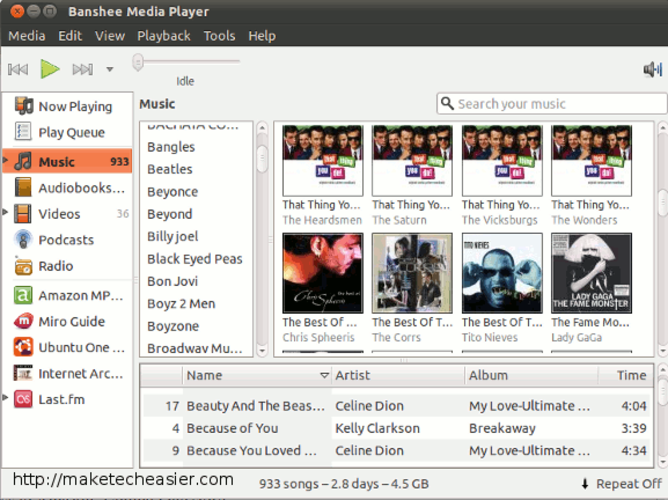
Banshee can replace Windows Media Player for local audio and basic video playback, but only for users who prioritize music library management over simplicity and active support. It handles common formats like MP3, MP4, and FLAC through GStreamer, and offers extras like podcast support and device sync. However, being discontinued means no bug fixes or security updates. For lightweight, reliable playback, VLC or mpv are better choices. Banshee suits users already in the GNOME ecosystem who want a media organizer, not just a player.
- Licencia
- GPL-3.0
- Precio
- Gratis
- Última versión
- —
- Valoración
- —
Lo que funciona igual
- Plays common audio formats like MP3, FLAC, and MP4 using GStreamer
- Supports basic playback controls: play, pause, seek
- Displays metadata and cover art for music files
- Simple playlist creation and management
- Integrates with GNOME for a native look and file handling
Lo que cambia
- Discontinued project with no ongoing maintenance or security updates
- Heavier due to Mono framework and library indexing
- Focuses more on music library management than minimal playback
- Limited video support compared to dedicated video players
- No support for WMV or other proprietary Windows formats by default
Abrir tus archivos de Windows Media Player
Banshee relies on GStreamer for decoding, so it can play MP3, MP4, AVI, and MKV if the correct plugins are installed. However, support for WMV is limited and often requires non-free or additional codecs, which may not be available or functional. FLAC and MP3 playback works well out of the box. There's no built-in tool to convert or export files, so users needing format conversion must rely on external tools. Banshee reads standard file structures but may not handle all Windows Media Player playlists (like WPL) reliably.
Pasar de Windows Media Player a Banshee, paso a paso
- Install Banshee from your distribution's repository (e.g., 'sudo apt install banshee')
- Launch Banshee and set your music folder as the library location
- Let it scan your audio files; edit metadata if needed
- Manually add video files to playlists, as video support is limited
- Install GStreamer plugins for best format compatibility (e.g., gstreamer-plugins-bad)
- Avoid relying on it for WMV or other Windows-specific formats without testing first
Funciones clave de Banshee
- Gestión de bibliotecas de música con edición de metadatos
- Soporte para podcasts y audiolibros
- Sincronización de dispositivos para hardware compatible
- Creación y gestión de listas de reproducción
- Reproducción de audio basada en GStreamer
- Integración con el entorno de escritorio GNOME
- Soporte para transmisión de radio
- Visualización de portadas y navegación por la biblioteca
Preguntas frecuentes
Can Banshee play WMV files?
Not reliably. WMV support depends on proprietary GStreamer plugins that may not be available or functional. Consider VLC for better WMV compatibility.
Is Banshee still safe to use?
It's usable but not recommended long-term. Being discontinued means no security patches, so exposure to malicious media files is a risk.
Does Banshee support playlists from Windows Media Player?
It reads M3U and some common formats, but not WPL (Windows Playlist) files directly. Convert them to M3U for compatibility.
Otras 6 alternativas a Windows Media Player
 VLC media playerVLC es un reproductor multimedia gratuito y de código abierto que funciona en Linux y maneja prácticamente…Código abiertoGratisFlatpakVLC media player vs Windows Media Player
 mpvmpv es un reproductor multimedia gratuito, de código abierto y multiplataforma que reproduce casi cualquier…Código abiertoGratisFlatpakmpv vs Windows Media Player
 CelluloidCelluloid es un reproductor multimedia ligero para Linux que utiliza el motor mpv y GTK para ofrecer una…Código abiertoGratisFlatpakCelluloid vs Windows Media Player
 Clementine Music PlayerClementine es un reproductor de música multiplataforma que reproduce archivos locales, radio por internet y…Código abiertoGratisFlatpakClementine Music Player vs Windows Media Player
 AudaciousUn reproductor de audio ligero para Linux, al estilo Winamp, que admite complementos, skins y una amplia…Código abiertoGratisFlatpakAudacious vs Windows Media PlayerParoleParole es un reproductor multimedia ligero y sencillo para archivos de audio y video, diseñado para…Código abiertoGratisParole vs Windows Media Player