
 Claws MailLinux
vs
ThunderbirdWindows
Claws MailLinux
vs
ThunderbirdWindows
Claws Mail como alternativa Linux a Thunderbird
Actualizado el
Nuestra opinión
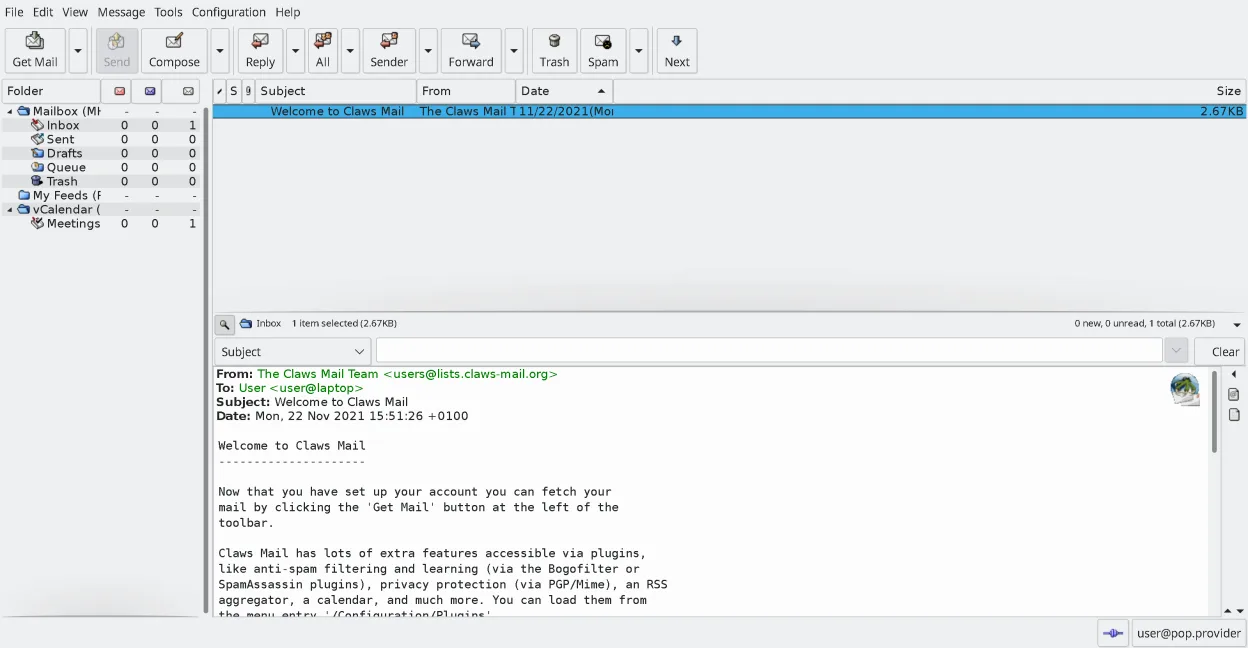
Claws Mail is a strong replacement for users who prioritize speed, keyboard control, and lightweight resource usage over graphical polish. It handles core IMAP/POP3 email, RSS, and Usenet well. However, it is not ideal for heavy calendar users or those needing built-in chat, as these require plugins or separate apps. If you want a fast, stable, text-centric workflow and do not mind configuring plugins, it is a solid choice. If you rely on Thunderbird’s integrated chat and rich calendar UI, you will feel a gap.
- Licencia
- GPL-3.0-only
- Precio
- Gratis
- Última versión
- 4.4.0 (9 de marzo de 2026)
- Valoración
- —
Lo que funciona igual
- Free, open-source (GPL-3.0-only) email client
- Supports IMAP, POP3, and Usenet protocols
- Extensible via plugins for RSS and calendar
- Supports multiple accounts and folder structures
- Includes built-in spam filtering capabilities
Lo que cambia
- No built-in chat support (IRC/XMPP/Matrix) unlike Thunderbird
- Calendar functionality is plugin-based and less integrated
- Cannot compose HTML emails, only plain text
- Uses MH mailbox format instead of Thunderbird’s internal storage
- Interface is more keyboard-centric and less visually modern
Abrir tus archivos de Thunderbird
Claws Mail supports importing emails from most other mail clients, including Thunderbird. You can typically import Thunderbird’s mbox files directly. For exporting, Claws Mail allows exporting messages to standard formats, making it easy to move data back to Thunderbird or other clients if needed.
Pasar de Thunderbird a Claws Mail, paso a paso
- Install Claws Mail via your package manager or Flathub
- Export your Thunderbird mailboxes as mbox files
- In Claws Mail, use the import tool to select the mbox files
- Configure your IMAP/POP3 accounts with existing credentials
- Install required plugins for RSS or calendar if needed
- Test sending and receiving to ensure settings are correct
Funciones clave de Claws Mail
- Almacenamiento de buzones en formato MH para acceso rápido
- Operación centrada en el teclado con soporte completo de atajos
- Sistema de complementos para RSS, calendario y protocolos adicionales
- Múltiples cuentas y árboles de carpetas
- Filtro de spam integrado (integración con SpamAssassin)
- Conversaciones temáticas y búsqueda potente
- Soporte para editores externos al redactar correos en texto plano
- Importación/exportación desde la mayoría de otros clientes de correo
Cómo instalar Claws Mail en Linux
flatpak install flathub org.claws_mail.Claws-Mailsudo apt install claws-mailsudo apt install claws-mailsudo dnf install claws-mailsudo pacman -S claws-mailsudo zypper install claws-mailPreguntas frecuentes
Can I use Claws Mail for calendar events?
Yes, but you must install the calendar plugin. It is not as integrated or feature-rich as Thunderbird’s built-in calendar, so power users may prefer a dedicated calendar app.
Does Claws Mail support HTML email composition?
No. Claws Mail can read HTML emails via plugins, but it only composes plain-text messages. This is a design choice to keep the client lightweight and fast.
Is Claws Mail good for beginners?
It has a familiar interface, but its keyboard-centric design and plugin-based extras may have a steeper learning curve than Thunderbird for users who prefer click-heavy workflows.
Otras 5 alternativas a Thunderbird
 MailspringUn cliente de correo de escritorio rápido y con muchas funciones para Linux, con un motor de sincronización…Código abiertoGratisFlatpakMailspring vs Thunderbird
 EvolutionEvolution es un gestor de información personal completo que combina correo electrónico, calendario, contactos…Código abiertoGratisFlatpakEvolution vs Thunderbird
 KMailKMail es el cliente de correo completo de KDE, parte de la suite Kontact, que admite IMAP, POP3 y buzones…Código abiertoGratisKMail vs Thunderbird
 SylpheedSylpheed es un cliente de correo y noticias ligero, basado en GTK, para Linux, Windows y macOS.Código abiertoGratisSylpheed vs Thunderbird
 GearyGeary es un cliente de correo basado en GNOME para Linux que te permite enviar, recibir y organizar correos…Código abiertoGratisFlatpakGeary vs Thunderbird