
 darktableLinux
vs
Creative CloudWindows
darktable como alternativa Linux a Creative Cloud
Actualizado el
Nuestra opinión
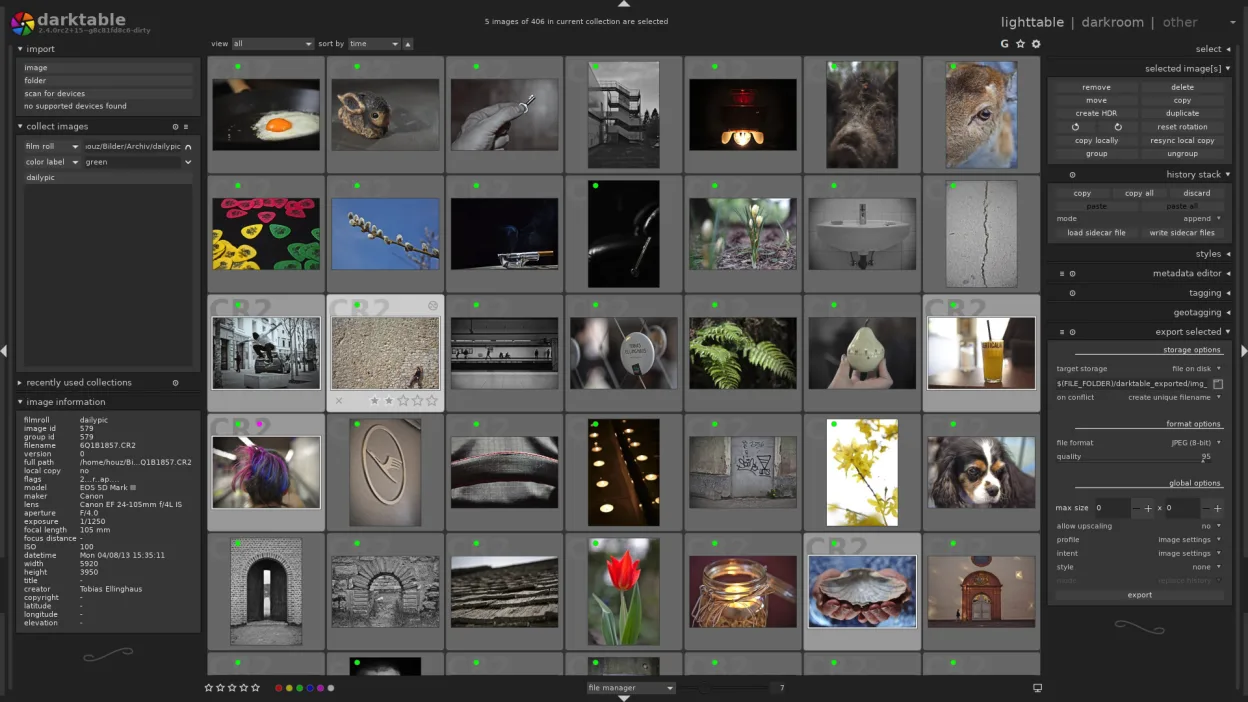
darktable is a strong replacement for Adobe Creative Cloud if your work is focused on raw photo editing and organization. It handles the core tasks of importing, developing, and managing raw images non-destructively, much like Lightroom. However, it does not replace Photoshop's pixel-level editing or Premiere's video capabilities. Photographers who rely on raw processing and want a free, open-source workflow will find darktable effective. Users needing advanced compositing, layer manipulation, or video editing will still need alternatives like GIMP or Krita alongside it.
- Licencia
- GPL-3.0+
- Precio
- Gratis
- Última versión
- 5.6.2 (4 de octubre de 2026)
- Valoración
- —
Lo que funciona igual
- Non-destructive editing with full history stack
- Raw image processing with high precision
- Library management via Lighttable mode
- Support for tethered shooting
- Geotagging with map interface
Lo que cambia
- No native support for PSD file layers or complex compositing
- No video editing (unlike Premiere Pro in Creative Cloud)
- No cloud sync or cross-device projects
- Limited typography and graphic design tools
- No integration with Adobe ecosystem or third-party plugins like Photoshop
Abrir tus archivos de Creative Cloud
darktable can import raw files from most digital cameras and common image formats like JPEG and TIFF. It opens DNG and some PSD files, but only as flattened images—layered PSD support is not available. You can export to JPEG, PNG, TIFF, and DNG, making it possible to pass files to other software. If you rely heavily on layered PSDs or XMP sidecar files, expect some loss of fidelity when moving from Creative Cloud.
Pasar de Creative Cloud a darktable, paso a paso
- Install darktable via your distro's package manager or Flathub
- Import your raw files and folders into the darktable library
- Use Lighttable to organize and tag existing photos
- Apply edits in darkroom mode using the history stack
- Export final images in standard formats for sharing
Funciones clave de darktable
- Edición no destructiva con historial
- Modos mesa de luz y cuarto oscuro
- Procesamiento raw de alta precisión
- Vista de mapa con geolocalización
- Soporte de tethering
- Modos de impresión y presentación
- Extensible mediante scripts Python
Cómo instalar darktable en Linux
flatpak install flathub org.darktable.Darktablesudo apt install darktablesudo apt install darktablesudo dnf install darktablesudo pacman -S darktablesudo zypper install darktablePreguntas frecuentes
Can darktable open my old Photoshop (.PSD) files?
Yes, but only as flattened images. Layered PSDs are not supported—use GIMP for full layer editing.
Is darktable suitable for professional photography workflows?
Yes, it's widely used by professionals for raw processing, tethering, and cataloging, especially in studio and field photography.
Does darktable require an internet connection or subscription?
No. It's free, open-source software with no subscription or activation. You own your workflow.
Otras 3 alternativas a Creative Cloud
 GIMPGIMP es un editor de gráficos rasterizados gratuito y de código abierto para edición fotográfica, pintura…Código abiertoGratisFlatpakGIMP vs Creative Cloud
 InkscapeInkscape es un editor de gráficos vectoriales gratuito y de código abierto que rivaliza con Adobe Illustrator…Código abiertoGratisFlatpakInkscape vs Creative Cloud
 KritaKrita es un programa de pintura digital e ilustración de código abierto con todas las funciones.Código abiertoGratisFlatpakKrita vs Creative Cloud