
 EvolutionLinux
vs
Windows MailWindows
EvolutionLinux
vs
Windows MailWindows
Evolution como alternativa Linux a Windows Mail
Actualizado el
Nuestra opinión
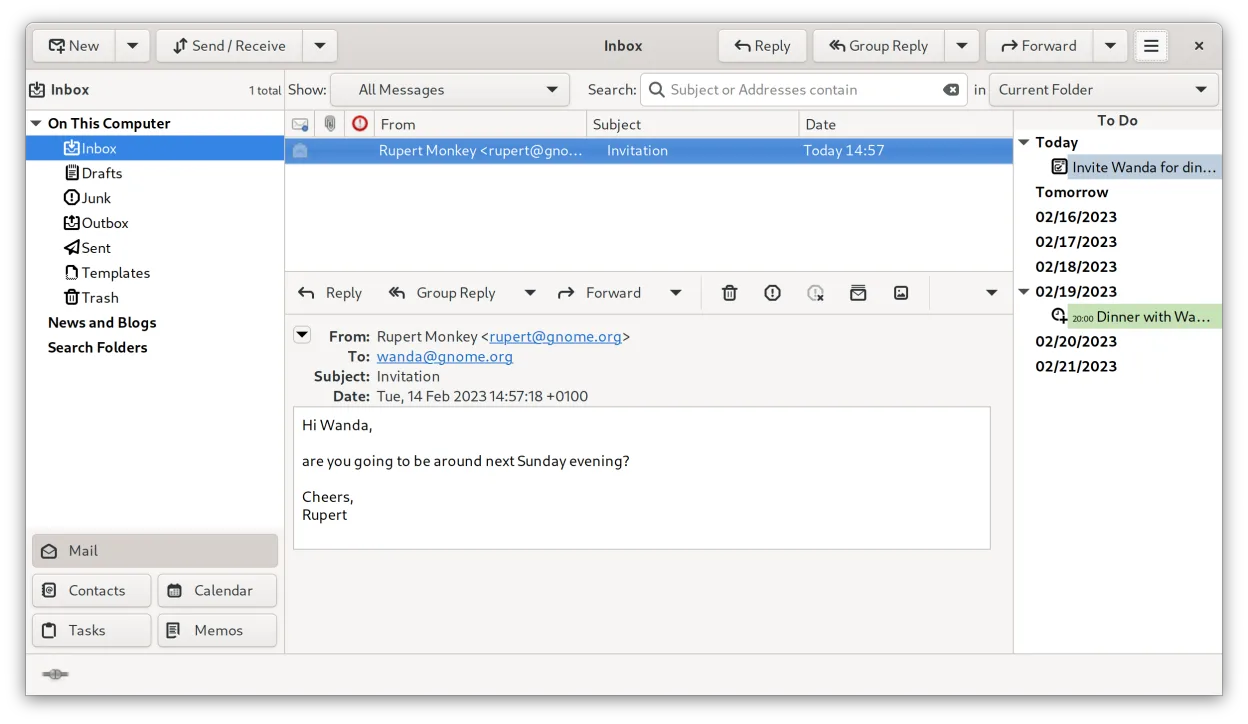
Evolution is a solid replacement for Windows Mail if you need more than just basic email. It handles multiple IMAP/POP3 accounts, offers full calendar support with iCal/ICS, and provides search and backup options. Users who prefer a single, integrated interface for mail, calendar, contacts and tasks will feel comfortable, while those who only want a very lightweight client may find it heavier than necessary.
- Licencia
- GPL-2.0+ and GFDL-1.3
- Precio
- Gratis
- Última versión
- 3.62.1 (9 de octubre de 2026)
- Valoración
- —
Lo que funciona igual
- Supports multiple email accounts (IMAP/POP3/SMTP)
- Calendar integration with iCal/ICS files
- Search across messages
- Ability to export or backup data
- Simple UI that can be hidden behind tabs
Lo que cambia
- Includes contacts and task management, which Windows Mail lacks
- Provides built‑in encryption (GnuPG/S‑MIME) not present in Windows Mail
- Offers CalDAV and Exchange Web Services support, beyond basic calendar features
- More configuration options and a larger footprint than the lightweight Windows Mail client
- No native import of Windows Mail's proprietary .eml archive format; conversion may be needed
Abrir tus archivos de Windows Mail
Evolution can import standard MIME email files (.eml) and iCalendar (.ics) files, which covers most data exported from Windows Mail. However, Windows Mail’s proprietary backup format is not directly supported, so you may need to export messages to .eml first using Windows Mail before importing them into Evolution.
Pasar de Windows Mail a Evolution, paso a paso
- Export your mail from Windows Mail to .eml files (or use the built‑in export to .pst and then convert to .eml)
- Copy any .ics calendar files to a known folder
- Install Evolution from your distribution’s repository or via Flathub
- Open Evolution, run the Import wizard, select Mail and Calendar, and point to the exported files
- Configure your accounts (IMAP/POP3/SMTP) and verify that mail syncs correctly
- Set up any desired filters or keyboard shortcuts
Funciones clave de Evolution
- Correo, calendario, contactos y tareas integrados en una ventana
- Soporte completo para IMAP, POP3, SMTP, CalDAV y EWS
- Formatos de datos estándar (MIME, iCalendar, vCard)
- Cifrado incorporado con GnuPG y S/MIME
- Libreta de direcciones con LDAP y almacenamiento local
- Compartir calendario y programación vía CalDAV
- Reglas de filtrado de correo y búsqueda
- Atajos de teclado personalizables
Cómo instalar Evolution en Linux
flatpak install flathub org.gnome.Evolutionsudo apt install evolutionsudo apt install evolutionsudo dnf install evolutionsudo pacman -S evolution-bogofiltersudo zypper install evolutionPreguntas frecuentes
Can Evolution handle Exchange accounts?
Yes, Evolution supports Exchange Web Services (EWS) and can sync mail, calendar and contacts with Microsoft Exchange servers.
Is Evolution resource‑heavy compared to Windows Mail?
It uses more memory and CPU than the very lightweight Windows Mail, but on a modern system the impact is modest.
Will my contacts from Windows Mail transfer automatically?
Only if you export them to a standard format like vCard or CSV; Evolution can then import those files.
Otras 4 alternativas a Windows Mail
 ThunderbirdThunderbird es un cliente gratuito y de código abierto para correo electrónico, noticias, chat y calendario.Código abiertoGratisFlatpakThunderbird vs Windows Mail
 MailspringUn cliente de correo de escritorio rápido y con muchas funciones para Linux, con un motor de sincronización…Código abiertoGratisFlatpakMailspring vs Windows Mail
 Claws MailClaws Mail es un cliente de correo electrónico ligero y rápido basado en GTK para Linux.Código abiertoGratisFlatpakClaws Mail vs Windows Mail
 GearyGeary es un cliente de correo basado en GNOME para Linux que te permite enviar, recibir y organizar correos…Código abiertoGratisFlatpakGeary vs Windows Mail