
 GIMPLinux
vs
Adobe FrescoWindows
GIMP como alternativa Linux a Adobe Fresco
Actualizado el
Nuestra opinión
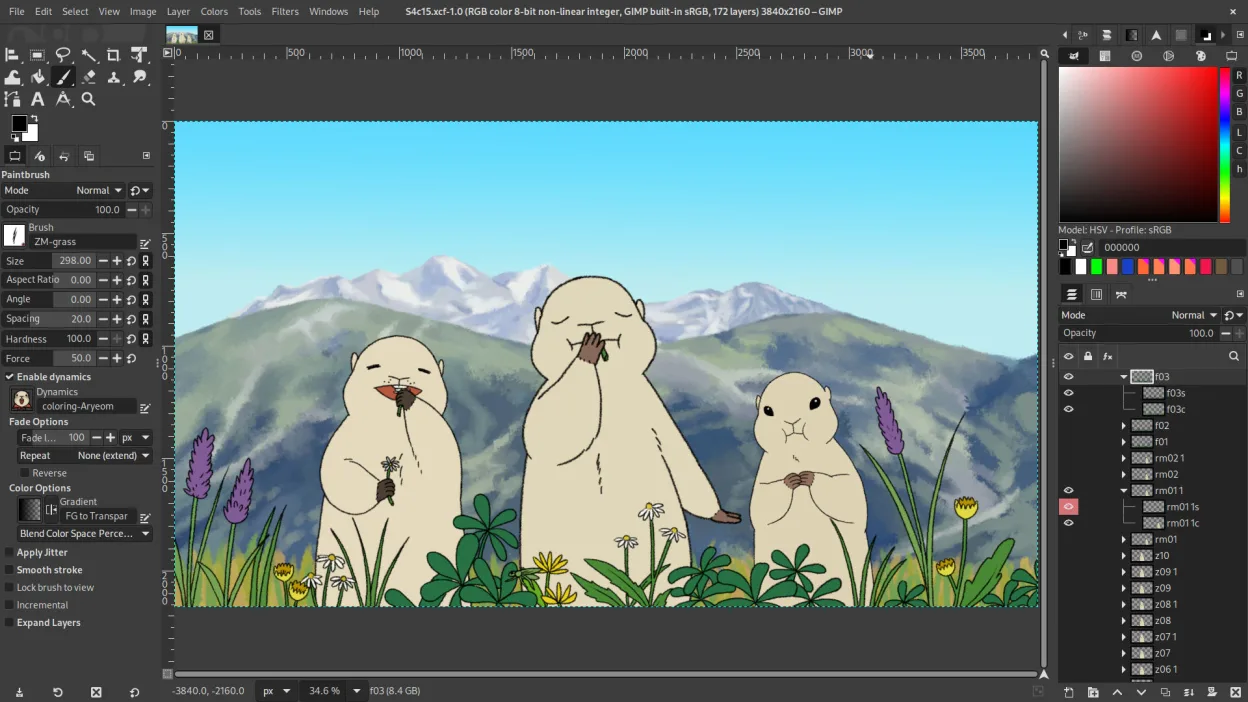
GIMP is a capable replacement for Adobe Fresco if you focus on raster painting and layered image work, but it's not designed primarily as a natural drawing experience. It supports pressure-sensitive brushes, custom brushes, layers with blending modes and masks, and exports to PSD, PNG, and JPEG. Digital painters who rely on vector tools and real-time vector-raster interplay in Fresco will miss that fluidity. GIMP suits users comfortable with a steeper learning curve and who prioritize control and scripting over tablet-first ergonomics.
- Licencia
- GPL-3.0+ AND LGPL-3.0+
- Precio
- Gratis
- Última versión
- 3.2.8 (2 de noviembre de 2026)
- Valoración
- —
Lo que funciona igual
- Supports pressure-sensitive raster brushes for digital painting
- Layer-based editing with blending modes, opacity, and layer masks
- Exports to common formats including PSD, PNG, and JPEG
- Allows creation and use of custom brushes
- Integrates with graphics tablets and stylus input (via GTK and input drivers)
Lo que cambia
- No native vector shape tools — vector work requires workarounds or external tools
- Brush engine optimized for raster, not real-time live vector brushes like Fresco
- Interface is desktop-oriented, not designed specifically for touch or tablet-first use
- No built-in non-destructive editing by default — requires plug-ins like G'MIC or careful layer management
- Lacks Fresco’s seamless integration with Adobe ecosystem and cloud sync
Abrir tus archivos de Adobe Fresco
GIMP can open and export PSD files, so you can exchange layered projects with Adobe Fresco users, but complex layer effects or smart objects created in Fresco may not translate perfectly. There is no direct support for Adobe’s native .fresco file format, and no known converter exists. You can work around this by exporting to PSD or PNG from Fresco and importing into GIMP. Any vector layers in PSDs become rasterized if they were not preserved as editable paths.
Pasar de Adobe Fresco a GIMP, paso a paso
- Install GIMP from your distribution’s repository or Flathub
- Set up tablet pressure sensitivity using system settings and GIMP’s input dynamics
- Import custom brushes by placing them in GIMP’s brush folder or using the brush manager
- Use layer groups and masks for non-destructive workflows
- Export to PSD for compatibility with Adobe users when needed
Funciones clave de GIMP
- Edición basada en capas con máscaras, modos de fusión y transparencia
- Motor de pinceles avanzado para pintura digital y retoque
- Soporte de plug‑ins compatibles con Photoshop (a través de capas de compatibilidad)
- Procesamiento por lotes y scripting con Script‑Fu, Python o GEGL
- Edición no destructiva posible mediante plug‑ins como G'MIC
- Soporte de formato extenso: PNG, JPEG, TIFF, PSD, WebP y más
- Interfaz personalizable con paneles acoplables y temas
- Gestión de color con soporte de perfiles ICC
Cómo instalar GIMP en Linux
flatpak install flathub org.gimp.GIMPsudo apt install gimpsudo apt install gimpsudo dnf install gimpsudo pacman -S gimpsudo zypper install gimpPreguntas frecuentes
Can GIMP handle both painting and photo editing like Adobe Fresco?
Yes, GIMP excels at raster painting and photo editing, but it doesn’t blend vector and raster as fluidly as Fresco. It’s strong in control and precision, but less intuitive for stylus-first illustrators.
Does GIMP support Wacom and other graphics tablets?
Yes, GIMP supports Wacom, Huion, XP-Pen, and other tablets via the operating system’s input drivers. Pressure sensitivity works out of the box on most Linux setups.
Can I create and save custom brushes in GIMP?
Yes, GIMP allows full custom brush creation using images or parameters. You can define spacing, shape, dynamics, and pressure response, making it suitable for digital painters.
Otras 5 alternativas a Adobe Fresco
 KritaKrita es un programa de pintura digital e ilustración de código abierto con todas las funciones.Código abiertoGratisFlatpakKrita vs Adobe Fresco
 MyPaintMyPaint es un programa de pintura raster rápido, gratuito y de código abierto centrado en la dinámica de…Código abiertoGratisFlatpakMyPaint vs Adobe Fresco
 InkscapeInkscape es un editor de gráficos vectoriales gratuito y de código abierto que rivaliza con Adobe Illustrator…Código abiertoGratisFlatpakInkscape vs Adobe Fresco
 Pencil2DPencil2D es una herramienta de animación 2D de código abierto para gráficos vectoriales y de mapa de bits…Código abiertoGratisFlatpakPencil2D vs Adobe Fresco
 PixeloramaPixelorama is a free, open-source pixel art editor and animation tool for Linux, suitable for sprites and…Código abiertoGratisFlatpakPixelorama vs Adobe Fresco