
 OpenSCADLinux
vs
Paint 3DWindows
OpenSCADLinux
vs
Paint 3DWindows
OpenSCAD como alternativa Linux a Paint 3D
Actualizado el
Nuestra opinión
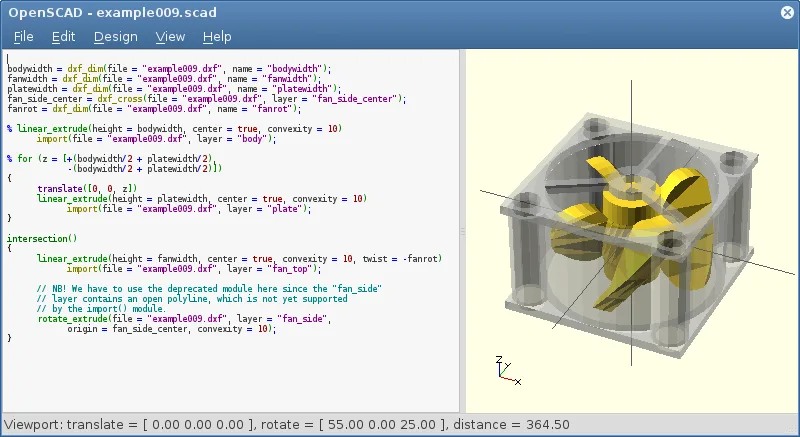
OpenSCAD is not a suitable replacement for Paint 3D. It is a script‑based parametric CAD tool that focuses on solid modeling, not on quick raster drawing or simple 3‑D object creation. Paint 3D users who need a touch‑and‑drag interface, brush tools, and layer compositing will find OpenSCAD too complex and lacking those features. It may serve advanced users who want precise, parameter‑driven models, but it does not match Paint 3D’s casual workflow.
- Licencia
- GPL-3.0+
- Precio
- Gratis
- Última versión
- 2021.01 (31 de enero de 2021)
- Valoración
- —
Lo que funciona igual
- Both can export to STL and OBJ formats
- Both run natively on Linux
- Both support basic 3‑D geometry creation
- Both are free and open source
- Both allow creation of low‑poly 3‑D objects
Lo que cambia
- OpenSCAD requires writing code; Paint 3D uses a GUI
- OpenSCAD has no raster drawing or brush tools; Paint 3D does
- OpenSCAD lacks layers and compositing; Paint 3D supports them
- OpenSCAD is non‑interactive; Paint 3D is real‑time interactive
- OpenSCAD does not support PNG/JPEG export; Paint 3D does
Abrir tus archivos de Paint 3D
Paint 3D saves projects in a proprietary .mspaint3d format that OpenSCAD cannot read. OpenSCAD can import STL, OFF, and DXF files, but there is no direct path to open a Paint 3D file. Exporting from Paint 3D to STL or OBJ would allow OpenSCAD to read the geometry, but the original paint layers and 2‑D drawings would be lost.
Pasar de Paint 3D a OpenSCAD, paso a paso
- Export your Paint 3D model to STL or OBJ.
- Open the exported file in OpenSCAD using the "import()" command.
- If you need 2‑D sketches, export them as DXF and import them with "import()".
- Adjust parameters or add CSG operations in the script.
- Render the model with the Render button to confirm geometry.
- Export the final model as STL for 3‑D printing or further use.
Funciones clave de OpenSCAD
- Modelado paramétrico vía diseño basado en guion
- Operaciones de Geometría Sólida Constructiva (CSG)
- Extrusión de contornos 2D DXF
- Soporte para formatos de archivo STL y OFF
- Importación de archivos DXF para rutas 2D y parámetros
- Proceso de renderizado no interactivo
- Disponible en Arch, Debian, Fedora, openSUSE y Ubuntu
Cómo instalar OpenSCAD en Linux
flatpak install flathub org.openscad.OpenSCADsudo apt install openscadsudo apt install openscadsudo dnf install openscadsudo pacman -S openscadsudo zypper install openscadPreguntas frecuentes
Can I use OpenSCAD for quick sketches like Paint 3D?
No. OpenSCAD is designed for precise, script‑based modeling and has no quick‑draw tools.
Does OpenSCAD support PNG or JPEG export?
No, it only exports 3‑D formats such as STL, OFF, and DXF.
Is OpenSCAD suitable for beginners?
It is more suitable for users comfortable with coding and parametric design; beginners may find it steep.
Otras 6 alternativas a Paint 3D
 KritaKrita es un programa de pintura digital e ilustración de código abierto con todas las funciones.Código abiertoGratisFlatpakKrita vs Paint 3D
 GIMPGIMP es un editor de gráficos rasterizados gratuito y de código abierto para edición fotográfica, pintura…Código abiertoGratisFlatpakGIMP vs Paint 3D
 InkscapeInkscape es un editor de gráficos vectoriales gratuito y de código abierto que rivaliza con Adobe Illustrator…Código abiertoGratisFlatpakInkscape vs Paint 3D
 BlenderBlender es una suite 3D gratuita y de código abierto para modelado, animación, renderizado y edición de video.Código abiertoGratisFlatpakBlender vs Paint 3D
 FreeCADFreeCAD es un modelador CAD 3D paramétrico de código abierto para diseño, ingeniería e impresión 3D.Código abiertoGratisFlatpakFreeCAD vs Paint 3D
 Tux PaintTux Paint es un programa de dibujo gratuito y apto para niños, con una interfaz sencilla, efectos de sonido y…Código abiertoGratisFlatpakTux Paint vs Paint 3D