
 OpenSCADLinux
vs
Paint 3DWindows
OpenSCADLinux
vs
Paint 3DWindows
OpenSCAD as a Linux alternative to Paint 3D
Updated
Our verdict
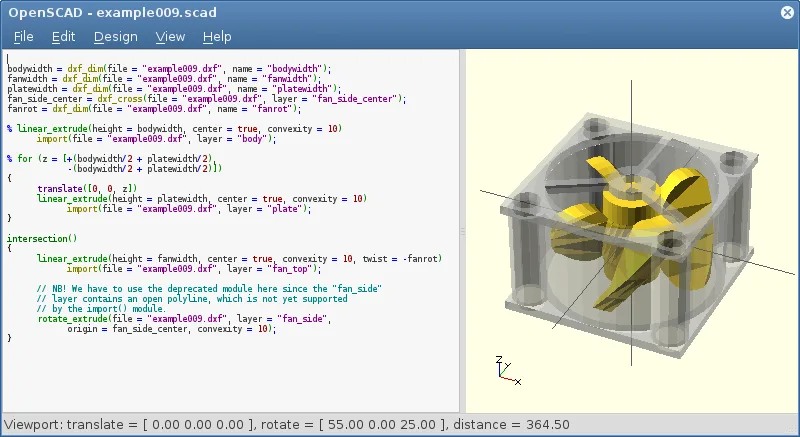
OpenSCAD is not a suitable replacement for Paint 3D. It is a script‑based parametric CAD tool that focuses on solid modeling, not on quick raster drawing or simple 3‑D object creation. Paint 3D users who need a touch‑and‑drag interface, brush tools, and layer compositing will find OpenSCAD too complex and lacking those features. It may serve advanced users who want precise, parameter‑driven models, but it does not match Paint 3D’s casual workflow.
- License
- GPL-3.0+
- Price
- Free
- Latest version
- 2021.01 (January 31, 2021)
- Rating
- —
What works the same
- Both can export to STL and OBJ formats
- Both run natively on Linux
- Both support basic 3‑D geometry creation
- Both are free and open source
- Both allow creation of low‑poly 3‑D objects
What is different
- OpenSCAD requires writing code; Paint 3D uses a GUI
- OpenSCAD has no raster drawing or brush tools; Paint 3D does
- OpenSCAD lacks layers and compositing; Paint 3D supports them
- OpenSCAD is non‑interactive; Paint 3D is real‑time interactive
- OpenSCAD does not support PNG/JPEG export; Paint 3D does
Opening your Paint 3D files
Paint 3D saves projects in a proprietary .mspaint3d format that OpenSCAD cannot read. OpenSCAD can import STL, OFF, and DXF files, but there is no direct path to open a Paint 3D file. Exporting from Paint 3D to STL or OBJ would allow OpenSCAD to read the geometry, but the original paint layers and 2‑D drawings would be lost.
Switching from Paint 3D to OpenSCAD, step by step
- Export your Paint 3D model to STL or OBJ.
- Open the exported file in OpenSCAD using the "import()" command.
- If you need 2‑D sketches, export them as DXF and import them with "import()".
- Adjust parameters or add CSG operations in the script.
- Render the model with the Render button to confirm geometry.
- Export the final model as STL for 3‑D printing or further use.
Key features of OpenSCAD
- Parametric modeling via script-based design
- Constructive Solid Geometry (CSG) operations
- Extrusion of 2D DXF outlines
- Support for STL and OFF file formats
- Import of DXF files for 2D paths and parameters
- Non-interactive rendering process
- Available on Arch, Debian, Fedora, openSUSE, and Ubuntu
How to install OpenSCAD on Linux
flatpak install flathub org.openscad.OpenSCADsudo apt install openscadsudo apt install openscadsudo dnf install openscadsudo pacman -S openscadsudo zypper install openscadFrequently asked questions
Can I use OpenSCAD for quick sketches like Paint 3D?
No. OpenSCAD is designed for precise, script‑based modeling and has no quick‑draw tools.
Does OpenSCAD support PNG or JPEG export?
No, it only exports 3‑D formats such as STL, OFF, and DXF.
Is OpenSCAD suitable for beginners?
It is more suitable for users comfortable with coding and parametric design; beginners may find it steep.
6 other alternatives to Paint 3D
 KritaKrita is a full‑featured open‑source digital painting and illustration program.Open sourceFreeFlatpakKrita vs Paint 3D
 GIMPGIMP is a free, open-source raster graphics editor for photo editing, digital painting, and image composition.Open sourceFreeFlatpakGIMP vs Paint 3D
 InkscapeInkscape is a free, open‑source vector graphics editor that rivals Adobe Illustrator and CorelDRAW.Open sourceFreeFlatpakInkscape vs Paint 3D
 BlenderBlender is a free, open-source 3D suite for modeling, animation, rendering, and video editing.Open sourceFreeFlatpakBlender vs Paint 3D
 FreeCADFreeCAD is an open‑source parametric 3D CAD modeler for design, engineering and 3D printing.Open sourceFreeFlatpakFreeCAD vs Paint 3D
 Tux PaintTux Paint is a free, kid-friendly drawing program with a simple interface, sound effects, and a guiding…Open sourceFreeFlatpakTux Paint vs Paint 3D