QtiPlotLinux
vs
QtiPlotLinux
vs
 OriginLab OriginWindows
QtiPlot como alternativa Linux a OriginLab Origin
Actualizado el
Nuestra opinión
QtiPlot can serve as a practical Linux replacement for Origin, especially for users who need standard 2‑D/3‑D plotting, basic statistical tests and curve fitting without the cost of a commercial licence. It covers the core workflow of importing CSV or Excel data, creating publication‑quality graphs and exporting them to common formats. Power users who rely on Origin’s extensive library of built‑in functions, advanced batch processing, or tight integration with Origin C will find QtiPlot limited, but for most academic and engineering tasks it is a solid, free alternative.
- Licencia
- GPL-3.0
- Precio
- Gratis
- Última versión
- —
- Valoración
- —
Lo que funciona igual
- Worksheet‑style data editor for tabular data
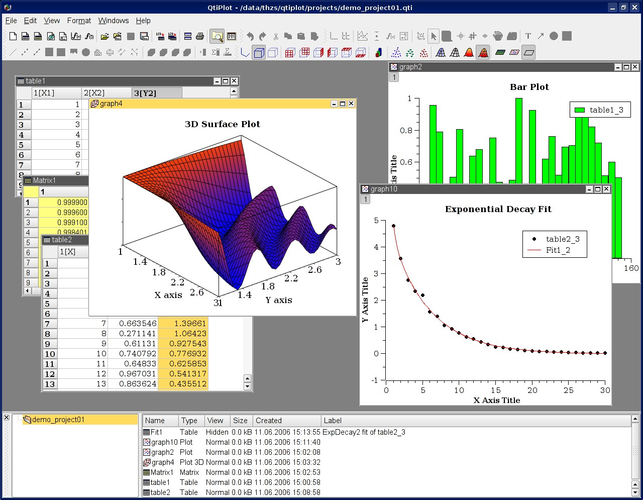
- Interactive 2‑D and 3‑D plotting with export to PDF, PNG, SVG
- Non‑linear curve fitting and basic statistical tests (ANOVA, t‑test)
- Import from CSV, TXT and Excel files
- Python scripting for automation
Lo que cambia
- No native support for Origin’s .opj project files
- Lacks Origin C language and the extensive built‑in function library
- Limited batch‑processing and macro recording compared to Origin
- Fewer advanced fitting models and custom fitting plugins
- No proprietary chart templates or theme manager found in Origin
Abrir tus archivos de OriginLab Origin
QtiPlot cannot directly open Origin’s native .opj project files; you would need to export data from Origin to a common format such as CSV or Excel first. Exported graphs can be saved as PDF, EPS or PNG, which QtiPlot can read for further editing. For full fidelity, manual recreation of complex Origin layouts may be required.
Pasar de OriginLab Origin a QtiPlot, paso a paso
- Export your Origin worksheets to CSV or Excel files
- Copy any custom scripts to Python files for reuse in QtiPlot
- Open the exported files in QtiPlot’s data editor
- Recreate the desired plots using QtiPlot’s interactive tools
- Apply Python scripts for batch fitting or automation if needed
- Export the final figures to PDF or SVG for publication
Funciones clave de QtiPlot
- Worksheet‑style data editor
- Interactive 2‑D and 3‑D plots
- Non‑linear curve fitting
- Statistical tests (ANOVA, t‑test)
- Python scripting support
- Export to PDF, PostScript, SVG, PNG
- Import CSV, TXT, Excel, Gnuplot
Preguntas frecuentes
Can QtiPlot run on Windows as well?
Yes, QtiPlot is cross‑platform and provides binaries for Windows, macOS and Linux.
Is there a free version of QtiPlot?
QtiPlot is released under GPL‑3.0, so the source code is free; pre‑compiled binaries are available at no charge.
How does QtiPlot handle large data sets compared to Origin?
QtiPlot can handle moderately large tables, but it may become slower than Origin when working with very large data sets or complex batch analyses.