
 QtractorLinux
vs
GarageBandWindows
QtractorLinux
vs
GarageBandWindows
Qtractor como alternativa Linux a GarageBand
Actualizado el
Nuestra opinión
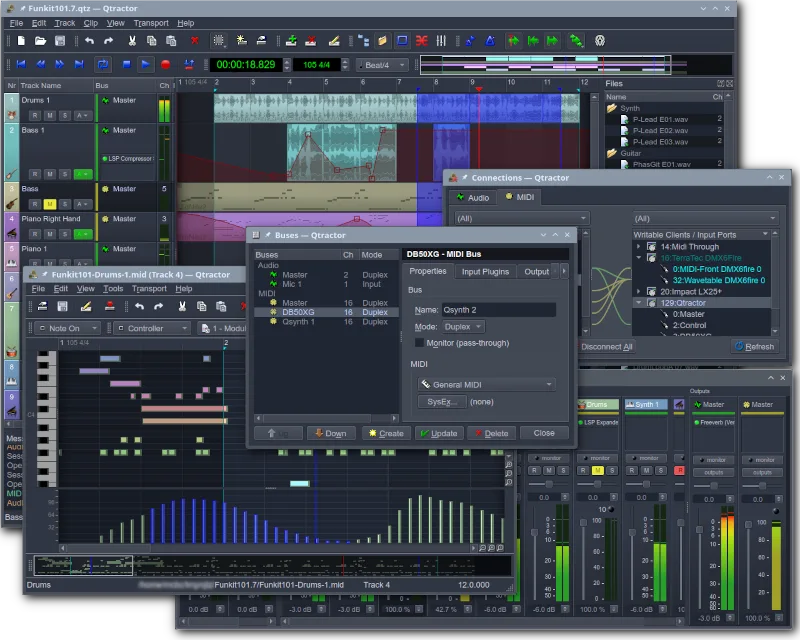
Qtractor is a solid, free replacement for GarageBand if you are comfortable with Linux audio infrastructure. It handles multitrack recording, MIDI sequencing, and mixing well, making it suitable for hobbyists who want a dedicated DAW. However, it lacks GarageBand’s intuitive, drag-and-drop simplicity. If you need a quick, visual loop-based workflow without learning JACK or plugin management, Qtractor might feel steep. For users ready to engage with a traditional Linux DAW structure, it covers the core needs of recording and producing music effectively.
- Licencia
- GPL-2.0+
- Precio
- Gratis
- Última versión
- 1.6.4 (6 de septiembre de 2026)
- Valoración
- —
Lo que funciona igual
- Multitrack audio and MIDI recording capabilities
- Support for software synthesizers and drum machines via plugins
- Basic audio editing and effects processing
- Session management and project saving
- Export options for standard audio formats
Lo que cambia
- Requires JACK audio server setup for optimal performance
- Lacks a built-in, extensive library of pre-made audio loops
- Interface is more complex and less beginner-friendly than GarageBand
- No direct integration with Apple-specific hardware or ecosystem
- Plugin management relies on VST/LADSPA rather than a unified app store
Abrir tus archivos de GarageBand
Qtractor does not natively open GarageBand project files (.band). You will need to export your GarageBand projects as standard audio files (WAV/AIFF) or MIDI files first. Qtractor can then import these standard formats to continue working on the tracks. Direct project file conversion is not supported.
Pasar de GarageBand a Qtractor, paso a paso
- Export your GarageBand project as a multitrack WAV or MIDI file.
- Install Qtractor and set up the JACK audio server.
- Create a new session in Qtractor and import the exported audio/MIDI files.
- Load your preferred VST or LADSPA plugins for synths and effects.
- Reconstruct your mix using Qtractor’s mixer and automation features.
- Save the session and test the playback to ensure all tracks are aligned.
Funciones clave de Qtractor
- Grabación de audio y MIDI multicanal
- Integración con el servidor de audio JACK
- Soporte para dispositivos MIDI mediante ALSA
- Soporte para plugins VST y LADSPA
- Edición y mezcla no destructivas
- Efectos y procesamiento integrados
- Gestión de sesiones y guardado de proyectos
- Compatibilidad multiplataforma mediante Qt
Cómo instalar Qtractor en Linux
flatpak install flathub org.rncbc.qtractorsudo apt install qtractorsudo apt install qtractorsudo dnf install qtractorsudo pacman -S qtractorsudo zypper install qtractorPreguntas frecuentes
Does Qtractor have a built-in loop library like GarageBand?
No, Qtractor does not come with a large built-in loop library. You will need to source loops from free online repositories or create your own using the MIDI sequencer and synths.
Is Qtractor difficult to set up for a beginner?
It has a steeper learning curve than GarageBand. You need to understand basic Linux audio concepts like JACK and ALSA. However, once set up, the interface is manageable for intermediate users.
Can I use my existing VST plugins in Qtractor?
Yes, Qtractor supports VST and LADSPA plugins. You can load your favorite Windows-compatible VSTs (if they run on Linux via Wine or native Linux builds) or use Linux-specific plugins.
Otras 4 alternativas a GarageBand
 LMMSLMMS es una estación de trabajo de audio digital gratuita para componer, secuenciar y mezclar música usando…Código abiertoGratisFlatpakLMMS vs GarageBand
 ArdourArdour es una estación de trabajo de audio digital de código abierto y profesional para grabar, editar y…Código abiertoGratisFlatpakArdour vs GarageBand
 AudacityAudacity es un editor y grabador de audio gratuito y multiplataforma, utilizado para editar, mezclar y…Código abiertoGratisFlatpakAudacity vs GarageBand
 MuseScoreMuseScore es un software gratuito y de código abierto para notación musical, que permite crear y reproducir…Código abiertoGratisFlatpakMuseScore vs GarageBand