
 DBeaver CommunityLinux
vs
Microsoft SQL Server Management StudioWindows
DBeaver Community, alternative Linux à Microsoft SQL Server Management Studio
Mis à jour le
Notre avis
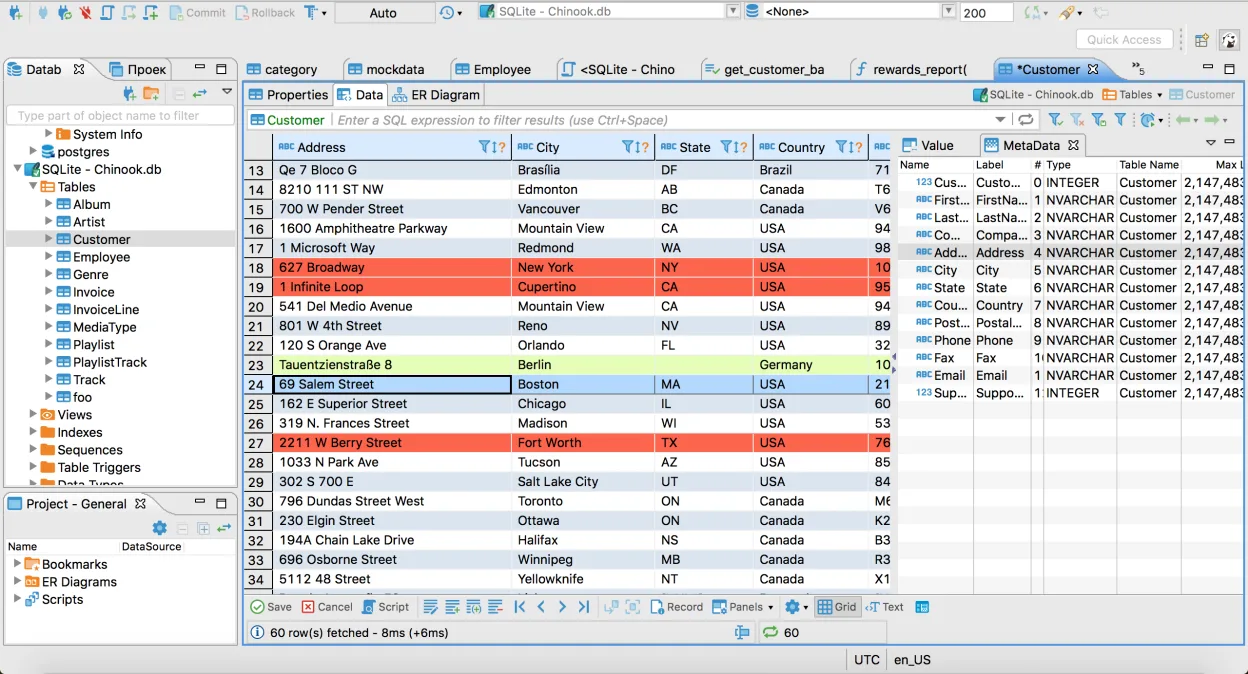
DBeaver Community is a solid replacement for Microsoft SQL Server Management Studio for developers and DBAs who need a cross‑platform tool. It supports SQL Server connections, T‑SQL editing, table design, and data import/export. It also offers multi‑database connectivity and an ER diagram generator. The UI is slightly different and some SSMS‑specific features such as the Activity Monitor or the native query plan visualizer are missing, but for most day‑to‑day tasks DBeaver covers the essentials.
- Licence
- Apache-2.0
- Prix
- Gratuit
- Dernière version
- 26.2.3 (18 octobre 2026)
- Note
- —
Ce qui fonctionne pareil
- Connects to SQL Server and runs T‑SQL scripts
- Provides a visual editor for tables, views and stored procedures
- Allows multiple server connections in one workspace
- Supports data import/export via CSV, XML, JSON
- Offers a SQL editor with syntax highlighting and autocompletion
Ce qui change
- No native Activity Monitor or performance dashboard
- Lacks the SSMS query plan visualizer and extended profiler
- Does not support native SSMS project/solution files
- UI is more generic, not tailored to SQL Server
- Plugin architecture requires manual driver installation for some databases
Ouvrir vos fichiers Microsoft SQL Server Management Studio
DBeaver can read and write standard database objects, but it does not open SSMS project files (*.sqlproj) or solution files. You can still execute the same T‑SQL scripts and export data to formats that SSMS can import, but there is no direct conversion of SSMS‑specific project structures.
Passer de Microsoft SQL Server Management Studio à DBeaver Community, étape par étape
- Install DBeaver Community from your distro’s package manager or Flathub.
- Add a new SQL Server connection via the Connection Wizard and provide server name, authentication, and database name.
- Open existing .sql scripts in the editor and run them; adjust any SSMS‑specific syntax if needed.
- Use the Data Export/Import wizards to move data between SQL Server and other formats.
- Create ER diagrams from the database navigator if you need visual schema views.
- Set up multiple connections in the workspace to mirror your SSMS server list.
Fonctionnalités clés de DBeaver Community
- Prise en charge de MySQL, PostgreSQL, Oracle, SQL Server, SQLite et de nombreuses autres bases de données
- Éditeur SQL universel avec coloration syntaxique et autocomplétion
- Grille de données visuelle pour visualiser et éditer le contenu des tables
- Génération de diagrammes ER pour la visualisation du schéma de la base de données
- Outils d’import/export de données prenant en charge CSV, XML et JSON
- Navigateur de métadonnées intégré pour tables, vues et procédures
- Support de plusieurs connexions de bases de données dans un même espace de travail
- Architecture de plugins pour étendre les fonctionnalités avec des pilotes supplémentaires
Installer DBeaver Community sous Linux
flatpak install flathub io.dbeaver.DBeaverCommunitysudo pacman -S dbeaverQuestions fréquentes
Does DBeaver support the same T‑SQL syntax as SSMS?
Yes, it uses the Microsoft JDBC driver for SQL Server, so standard T‑SQL works. Minor differences may appear with SSMS‑only extensions, but overall compatibility is high.
Can I use DBeaver to monitor SQL Server performance?
DBeaver offers basic monitoring via the Activity Monitor tab, but it lacks the detailed performance dashboard and extended profiler that SSMS provides.
Is there a cost for using DBeaver Community?
No. DBeaver Community is free under the Apache‑2.0 license and can be installed on any Linux distribution.
1 autres alternatives à Microsoft SQL Server Management Studio

Toutes les alternatives à Microsoft SQL Server Management Studio