DBeaver CommunityLinux
vs
SQL Server Management StudioWindows
DBeaver CommunityLinux
vs
SQL Server Management StudioWindows
DBeaver Community, alternative Linux à SQL Server Management Studio
Mis à jour le
Notre avis
DBeaver Community is a solid Linux alternative for most day‑to‑day tasks performed in SQL Server Management Studio. It can connect to Microsoft SQL Server, run and edit T‑SQL, browse objects, and export results. It lacks the deep, Microsoft‑specific performance dashboards and some of the integrated Azure tooling that SSMS provides, so power users who rely on those features will miss them. For developers and DBAs who need a capable, cross‑platform SQL editor and basic administration, DBeaver works well.
- Licence
- Apache-2.0
- Prix
- Gratuit
- Dernière version
- 26.2.3 (18 octobre 2026)
- Note
- —
Ce qui fonctionne pareil
- Connect to Microsoft SQL Server using Windows, SQL, or Azure authentication
- Edit and execute T‑SQL scripts with syntax highlighting and autocompletion
- Browse database objects such as tables, views, and stored procedures
- Export query results to CSV, JSON, XML, etc.
Ce qui change
- No built‑in SQL Server Profiler or detailed performance monitoring dashboards
- Limited integration with Azure services compared to SSMS
- No native support for SQL Server Agent job management
- Visual query builder is less feature‑rich than SSMS diagram view
Ouvrir vos fichiers SQL Server Management Studio
DBeaver can open plain .sql script files exported from SSMS without issue. It does not understand SSMS project files (.ssmssln) or solution files, so those cannot be imported directly. Exported results (CSV, Excel) are readable, but any SSMS‑specific report formats are unsupported.
Passer de SQL Server Management Studio à DBeaver Community, étape par étape
- Install DBeaver Community from your distribution's package manager or Flathub.
- Add a new connection and select Microsoft SQL Server; enter the same server name and credentials used in SSMS.
- Import existing .sql scripts into DBeaver by opening them via File → Open.
- Recreate any scheduled jobs manually using SQL Server Agent or a third‑party scheduler.
- Test queries and adjust any T‑SQL that relied on SSMS‑only features.
Fonctionnalités clés de DBeaver Community
- Prise en charge de MySQL, PostgreSQL, Oracle, SQL Server, SQLite et de nombreuses autres bases de données
- Éditeur SQL universel avec coloration syntaxique et autocomplétion
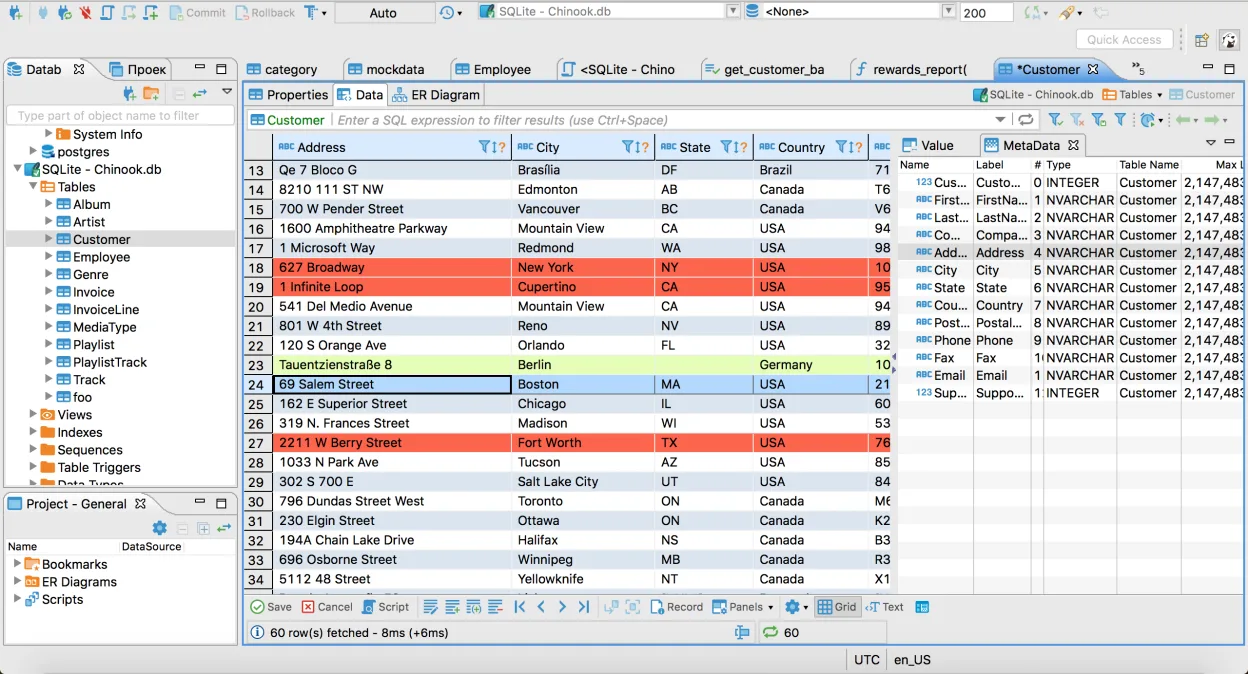
- Grille de données visuelle pour visualiser et éditer le contenu des tables
- Génération de diagrammes ER pour la visualisation du schéma de la base de données
- Outils d’import/export de données prenant en charge CSV, XML et JSON
- Navigateur de métadonnées intégré pour tables, vues et procédures
- Support de plusieurs connexions de bases de données dans un même espace de travail
- Architecture de plugins pour étendre les fonctionnalités avec des pilotes supplémentaires
Installer DBeaver Community sous Linux
flatpak install flathub io.dbeaver.DBeaverCommunitysudo pacman -S dbeaverQuestions fréquentes
Can DBeaver replace SSMS for managing Azure SQL databases?
It can connect and run queries, but it lacks the Azure portal integration and some Azure‑specific wizards that SSMS provides.
Is there a way to view execution plans in DBeaver?
Yes, DBeaver can display basic execution plans, but the depth and visual detail are not as extensive as SSMS's graphical execution plan viewer.
Do I need to install additional drivers to connect to SQL Server?
DBeaver bundles the Microsoft JDBC driver for SQL Server, so no extra installation is required for standard connections.