
 GeanyLinux
vs
Sublime TextWindows
GeanyLinux
vs
Sublime TextWindows
Geany, alternative Linux à Sublime Text
Mis à jour le
Notre avis
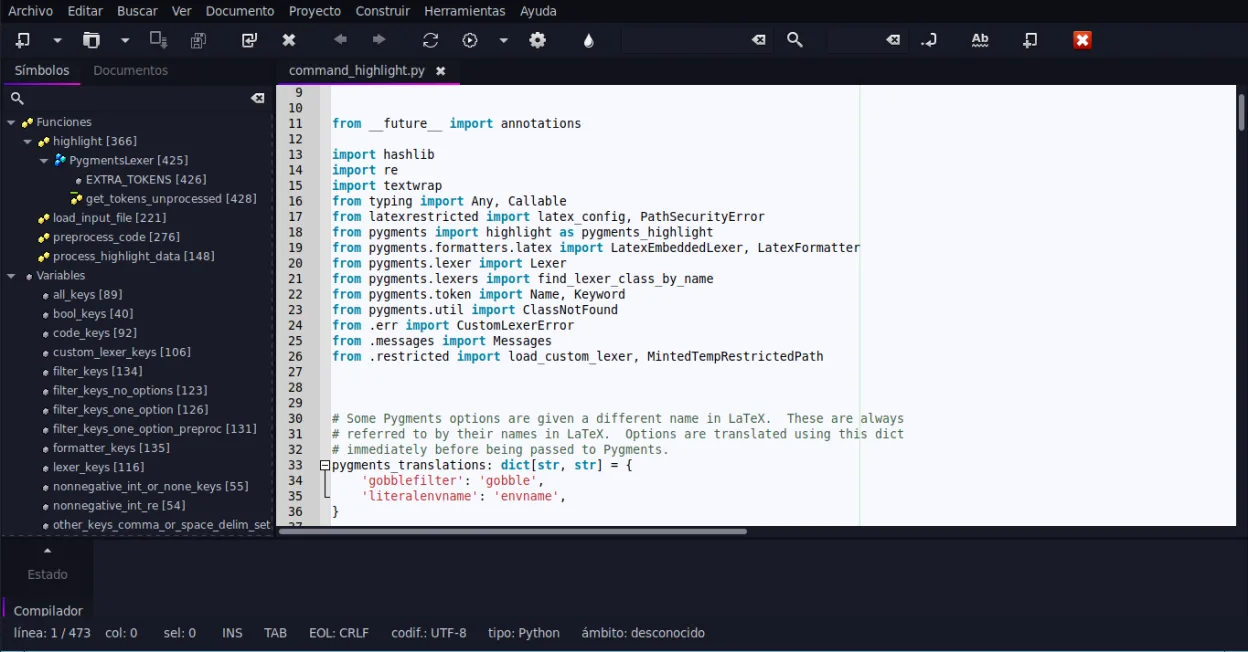
Geany can replace Sublime Text for users who need a lightweight editor with basic IDE features and prefer a free, open‑source solution. It offers syntax highlighting, code folding, regex search/replace, and a built‑in terminal, making it suitable for small to medium projects. However, it lacks the extensive package ecosystem and advanced UI customization that power users rely on in Sublime. It is best for students, hobbyists, or developers working on single‑file scripts or small projects.
- Licence
- GPL-2.0+
- Prix
- Gratuit
- Dernière version
- 2.1.0 (6 juillet 2025)
- Note
- —
Ce qui fonctionne pareil
- Both provide syntax highlighting for many languages
- Both support code folding and regex search/replace
- Both have plugin systems (Python API in Sublime, plugin manager in Geany)
- Both allow theme/customization
Ce qui change
- Geany bundles an IDE‑style interface with build/run buttons, while Sublime is a plain editor
- Geany has a built‑in terminal emulator; Sublime relies on external terminals or plugins
- Geany’s plugin ecosystem is smaller and less mature than Sublime’s Package Control
- Geany’s UI is more traditional; Sublime offers a minimal, distraction‑free interface
- Geany’s auto‑completion is limited to common constructs, whereas Sublime offers extensive context‑aware completion
Ouvrir vos fichiers Sublime Text
Sublime Text files are plain text with optional .sublime‑project or .sublime‑workspace JSON files. Geany can open any plain‑text source file without issue. Exporting or converting the project/workspace files is not supported; users would need to recreate project settings manually in Geany.
Passer de Sublime Text à Geany, étape par étape
- 1. Install Geany from your distribution’s package manager or Flathub.
- 2. Open your source files (.c, .py, .html, etc.) with Geany; syntax highlighting will activate automatically.
- 3. Configure the embedded terminal via Tools → Configure Terminal if you need command‑line access.
- 4. Install desired plugins through Tools → Plugins → Plugin Manager and enable them.
- 5. Set up build commands in Tools → Build System for languages that need compiling.
- 6. Adjust theme and font settings under Edit → Preferences → Interface to match your visual preferences.
Fonctionnalités clés de Geany
- Coloration syntaxique pour plus de 30 langages
- Complétion de code et auto-complétion des structures courantes
- Émulateur de terminal intégré
- Gestionnaire de plugins avec plugins préinstallés
- Fonction de repli de code et listes de symboles
- Prise en charge de la complétion des balises XML/HTML
Installer Geany sous Linux
flatpak install flathub org.geany.Geanysudo apt install geanysudo apt install geanysudo dnf install geanysudo pacman -S geanysudo zypper install geanyQuestions fréquentes
Does Geany support the same regex search/replace as Sublime?
Yes, Geany’s Find/Replace dialog supports regular expressions, just like Sublime’s Find panel.
Can I use Geany for large Python projects?
Geany can open and edit large Python files, but it lacks advanced project management features such as virtual environment integration that Sublime can handle via plugins.
Is Geany free and open source?
Yes, Geany is released under the GPL‑2.0+ license and is available in major Linux distributions and Flathub.
4 autres alternatives à Sublime Text
 KateKate est un éditeur de texte riche en fonctionnalités, axé sur les programmeurs, issu de KDE, prenant en…Open sourceGratuitFlatpakKate ou Sublime Text
 geditgedit est l'éditeur de texte léger et polyvalent de GNOME, idéal pour les notes, les documents et l'édition…Open sourceGratuitFlatpakgedit ou Sublime Text
 NeovimNeovim est une version moderne de Vim qui ajoute extensibilité, support UI avancé et extensions puissantes…Open sourceGratuitFlatpakNeovim ou Sublime Text