
 GeanyLinux
vs
Sublime TextWindows
GeanyLinux
vs
Sublime TextWindows
Geany as a Linux alternative to Sublime Text
Updated
Our verdict
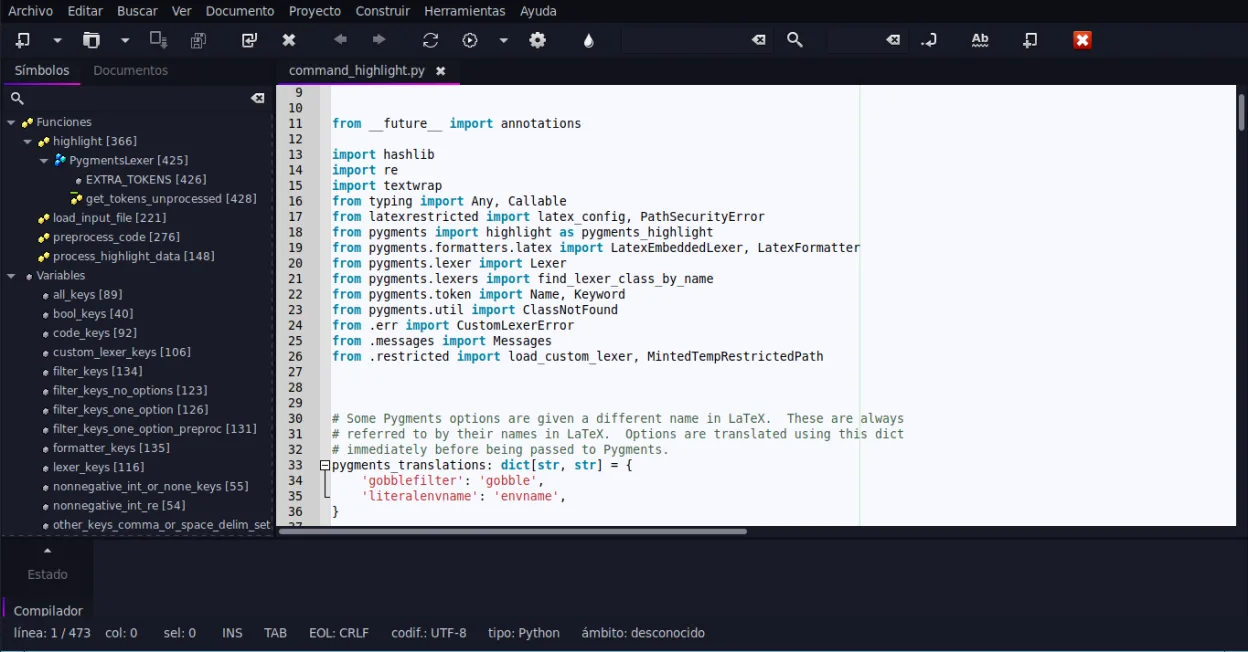
Geany can replace Sublime Text for users who need a lightweight editor with basic IDE features and prefer a free, open‑source solution. It offers syntax highlighting, code folding, regex search/replace, and a built‑in terminal, making it suitable for small to medium projects. However, it lacks the extensive package ecosystem and advanced UI customization that power users rely on in Sublime. It is best for students, hobbyists, or developers working on single‑file scripts or small projects.
- License
- GPL-2.0+
- Price
- Free
- Latest version
- 2.1.0 (July 6, 2025)
- Rating
- —
What works the same
- Both provide syntax highlighting for many languages
- Both support code folding and regex search/replace
- Both have plugin systems (Python API in Sublime, plugin manager in Geany)
- Both allow theme/customization
What is different
- Geany bundles an IDE‑style interface with build/run buttons, while Sublime is a plain editor
- Geany has a built‑in terminal emulator; Sublime relies on external terminals or plugins
- Geany’s plugin ecosystem is smaller and less mature than Sublime’s Package Control
- Geany’s UI is more traditional; Sublime offers a minimal, distraction‑free interface
- Geany’s auto‑completion is limited to common constructs, whereas Sublime offers extensive context‑aware completion
Opening your Sublime Text files
Sublime Text files are plain text with optional .sublime‑project or .sublime‑workspace JSON files. Geany can open any plain‑text source file without issue. Exporting or converting the project/workspace files is not supported; users would need to recreate project settings manually in Geany.
Switching from Sublime Text to Geany, step by step
- 1. Install Geany from your distribution’s package manager or Flathub.
- 2. Open your source files (.c, .py, .html, etc.) with Geany; syntax highlighting will activate automatically.
- 3. Configure the embedded terminal via Tools → Configure Terminal if you need command‑line access.
- 4. Install desired plugins through Tools → Plugins → Plugin Manager and enable them.
- 5. Set up build commands in Tools → Build System for languages that need compiling.
- 6. Adjust theme and font settings under Edit → Preferences → Interface to match your visual preferences.
Key features of Geany
- Syntax highlighting for over 30 languages
- Code completion and auto‑completion of common constructs
- Embedded terminal emulator
- Plugin manager with pre‑installed plugins
- Code folding and symbol lists
- Support for XML/HTML tag completion
How to install Geany on Linux
flatpak install flathub org.geany.Geanysudo apt install geanysudo apt install geanysudo dnf install geanysudo pacman -S geanysudo zypper install geanyFrequently asked questions
Does Geany support the same regex search/replace as Sublime?
Yes, Geany’s Find/Replace dialog supports regular expressions, just like Sublime’s Find panel.
Can I use Geany for large Python projects?
Geany can open and edit large Python files, but it lacks advanced project management features such as virtual environment integration that Sublime can handle via plugins.
Is Geany free and open source?
Yes, Geany is released under the GPL‑2.0+ license and is available in major Linux distributions and Flathub.
4 other alternatives to Sublime Text
 KateKate is a feature-rich, programmer-focused text editor from KDE with support for 300+ languages and advanced…Open sourceFreeFlatpakKate vs Sublime Text
 geditgedit is GNOME's lightweight, general-purpose text editor, suitable for notes, documents, and basic code…Open sourceFreeFlatpakgedit vs Sublime Text
 NeovimNeovim is a modern Vim fork that adds extensibility, advanced UI support, and powerful extensions while…Open sourceFreeFlatpakNeovim vs Sublime Text