
 gThumb Image ViewerLinux
vs
Windows Photo ViewerWindows
gThumb Image ViewerLinux
vs
Windows Photo ViewerWindows
gThumb Image Viewer, alternative Linux à Windows Photo Viewer
Mis à jour le
Notre avis
gThumb is a capable replacement for Windows Photo Viewer if you're comfortable with a slightly heavier app that does more. It opens all common image formats quickly and supports fullscreen viewing, zoom, keyboard navigation, and slideshow—core needs are met. However, it’s part of the GNOME ecosystem and feels more feature-rich than minimal, which may slow startup on older systems. If you want basic viewing with clean controls and don’t need editing or organizing tools, simpler alternatives like Eye of GNOME or Mirage might suit better. For users who occasionally edit or manage small photo sets, gThumb works well.
- Licence
- GPL-2.0+
- Prix
- Gratuit
- Dernière version
- 3.12.10 (10 février 2026)
- Note
- —
Ce qui fonctionne pareil
- Supports JPEG, PNG, BMP, and GIF (including animated) out of the box
- Fast fullscreen mode with zoom using mouse or keyboard
- Keyboard navigation with arrow keys, spacebar for next image
- Basic slideshow functionality with customizable delay
- Clean, single-image view focused on the photo
Ce qui change
- Includes editing tools (crop, rotate, color adjustment) not in Windows Photo Viewer
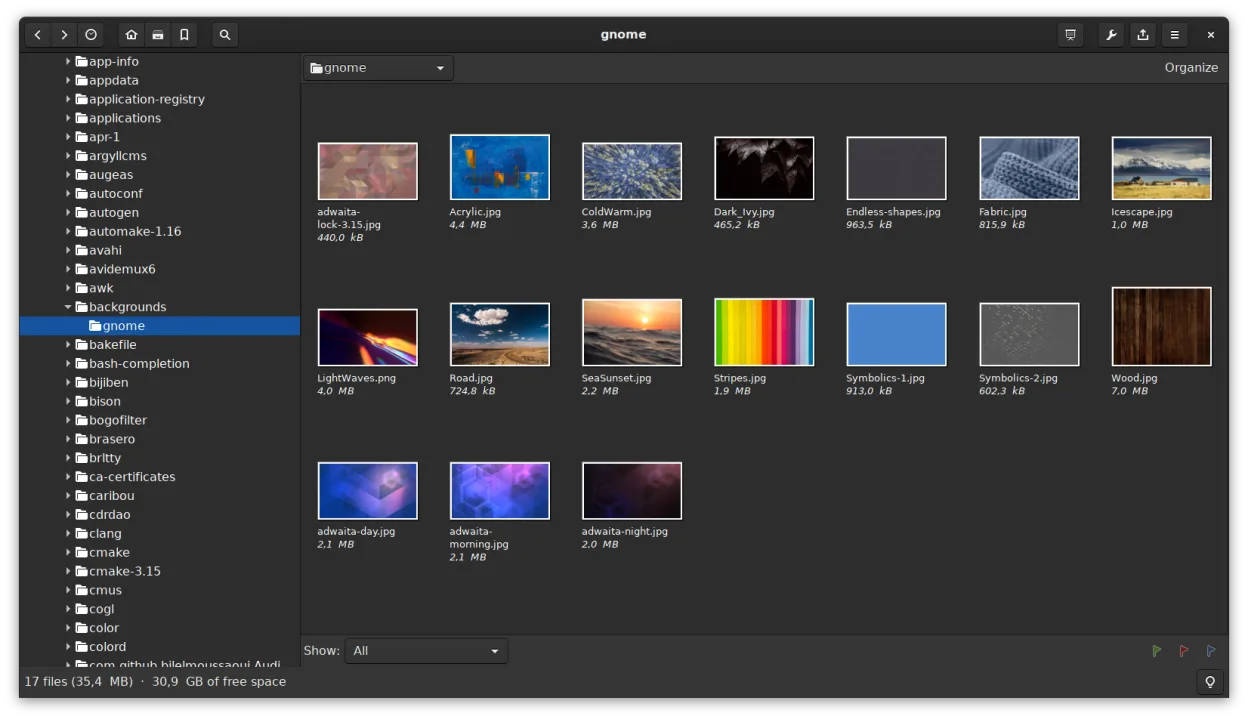
- Offers thumbnail browser and file management (copy, move, delete)
- Supports catalogs and metadata search, adding complexity
- Higher memory use and slower startup than ultra-light viewers
- Missing borderless window mode; interface is more cluttered by default
Ouvrir vos fichiers Windows Photo Viewer
gThumb opens all image formats used by Windows Photo Viewer—JPEG, PNG, BMP, and GIF—without issue. It also supports additional formats like TIFF, RAW, and TGA, which can be helpful. You can view and save changes to these files directly. There's no need for conversion when moving from Windows Photo Viewer, and metadata such as EXIF is preserved. Exporting or saving in different formats is supported through the 'Save As' and batch tools, making format flexibility a plus.
Passer de Windows Photo Viewer à gThumb Image Viewer, étape par étape
- Install gThumb via your distro's package manager (e.g., sudo apt install gthumb on Debian/Ubuntu)
- Open an image folder to browse thumbnails or double-click a file to view
- Use F11 for fullscreen, + and - to zoom, arrow keys to navigate
- Enable 'Single Click to Open' in preferences if desired
- Set gThumb as default for image types in your file manager
Fonctionnalités clés de gThumb Image Viewer
- Prend en charge les formats BMP, JPEG, GIF (y compris l'animation), PNG, TIFF, TGA et RAW
- Affiche les métadonnées EXIF, IPTC et XMP
- Édition de base : rotation, recadrage, redimensionnement, ajustement de la saturation, de la luminosité et du contraste
- Opérations par lot : redimensionnement, conversion de format, transformations JPEG sans perte
- Parcours des vignettes avec des opérations de fichiers similaires à celles des dossiers (copier, déplacer, supprimer)
- Catalogues et bibliothèques pour organiser de grandes collections
- Mode diaporama et possibilité de définir des images comme arrière-plan du bureau
- Recherche par métadonnées et sauvegarde des résultats en tant que catalogue
Installer gThumb Image Viewer sous Linux
flatpak install flathub org.gnome.gThumbsudo apt install gthumbsudo apt install gthumbsudo dnf install gthumbsudo pacman -S gthumbsudo zypper install gthumbQuestions fréquentes
Can gThumb open HEIC or WebP images?
Yes, if the required GStreamer plugins or codecs are installed. WebP is usually supported by default on modern systems. HEIC may require installing additional packages like libheif.
Is gThumb slow to start compared to Windows Photo Viewer?
It can be slightly slower, especially on older hardware, because it loads more features at startup. For pure speed, lightweight viewers like Eye of GNOME or Mirage may feel snappier.
Can I disable the editing and catalog features to make it simpler?
You can't fully remove them, but you can ignore the side panel and avoid catalogs. Use it in fullscreen or simple view mode to keep the experience focused on viewing.
5 autres alternatives à Windows Photo Viewer
 Eye of GNOMEEye of GNOME est un visionneur d'images léger pour GNOME, conçu pour parcourir et faire pivoter des images…Open sourceGratuitFlatpakEye of GNOME ou Windows Photo Viewer
 nomacs - Image LoungeNomacs est un visionneuse d'images gratuite et open source qui prend en charge les vignettes, les…Open sourceGratuitFlatpaknomacs - Image Lounge ou Windows Photo Viewer
 GwenViewGwenView est le visionneur d’images rapide de KDE, doté d’outils d’édition et d’annotation de base, idéal…Open sourceGratuitFlatpakGwenView ou Windows Photo ViewermirageMirage est un visionneur d'images léger pour Linux, conçu pour une navigation rapide avec un minimum de…Open sourceGratuitmirage ou Windows Photo Viewer
 ShotwellShotwell est un gestionnaire de photos GNOME pour l'importation, l'organisation et l'édition légère d'images.Open sourceGratuitFlatpakShotwell ou Windows Photo Viewer