
 KarbonLinux
vs
KarbonLinux
vs
 Adobe IllustratorWindows
Karbon, alternative Linux à Adobe Illustrator
Mis à jour le
Notre avis
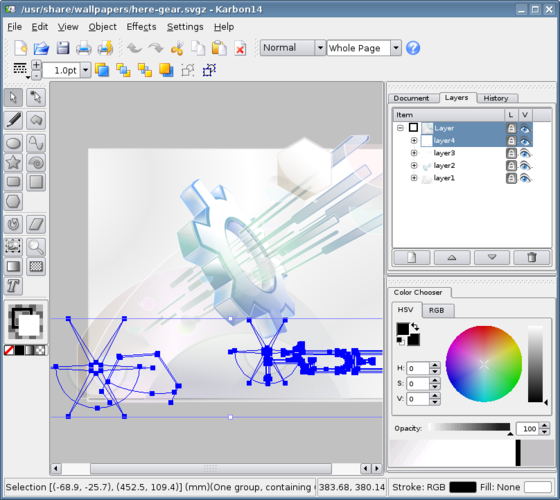
Karbon can serve as a replacement for Adobe Illustrator for users who need basic to moderate vector work on Linux. It offers solid layer handling, SVG/EPS/PDF export and decent path tools, making it suitable for hobbyists, educators, and small‑business designers who don’t rely on the full suite of Illustrator’s advanced typography, CMYK workflows, and extensive plugin ecosystem. Professionals whose daily workflow depends on precise color management, complex brush libraries, or industry‑standard scripting will likely find Karbon lacking, but for many everyday vector tasks it is a functional, free alternative.
- Licence
- GPL-3.0
- Prix
- Gratuit
- Dernière version
- —
- Note
- —
Ce qui fonctionne pareil
- Layer and group management","SVG, PDF and EPS export","Basic path editing and boolean operations","Text handling, including text on paths","Gradient and pattern tools
Ce qui change
- No native CMYK or spot‑color workflow","Limited advanced typographic controls and OpenType features","No extensive third‑party plugin or script ecosystem","Absence of sophisticated brush libraries and live effects","Less refined UI for complex illustration projects
Ouvrir vos fichiers Adobe Illustrator
Karbon can import Adobe Illustrator files saved in the older .ai format that is essentially PDF‑based, but support is limited to simple shapes and text. Export to SVG, PDF or EPS works reliably, so you can round‑trip files for basic artwork. Complex Illustrator documents with advanced effects, CMYK profiles, or newer .ai features may lose fidelity or fail to open.
Passer de Adobe Illustrator à Karbon, étape par étape
- Install the Calligra Suite (or just Karbon) via your distro’s package manager
- Open your .ai file in Karbon to check what elements are preserved
- Recreate any missing effects or color profiles using Karbon’s native tools
- Save the work as SVG or PDF for further use or to send back to Windows users
- Adjust layer structure and export settings to match your workflow
Fonctionnalités clés de Karbon
- Gestion des calques
- Outils de dégradé et de motif
- Export SVG, PDF, EPS
- Pinceaux personnalisables
- Texte sur les tracés
- Import depuis Adobe Illustrator (.ai)
Questions fréquentes
Can Karbon handle CMYK colors for print?
No, Karbon works in RGB only; you would need to convert colors manually or use another tool for proper CMYK output.
Is there a plugin system similar to Illustrator’s?
Karbon does not have a comparable plugin architecture; extensions are limited to what the Calligra Suite provides.
Will my existing Illustrator brushes import into Karbon?
Brushes are not transferable; you will need to recreate any custom brushes using Karbon’s brush editor.
2 autres alternatives à Adobe Illustrator
 InkscapeInkscape est un éditeur de graphiques vectoriels gratuit et open source qui rivalise avec Adobe Illustrator…Open sourceGratuitFlatpakInkscape ou Adobe Illustrator
 sK1sK1 est un éditeur de graphismes vectoriels gratuit et open source destiné aux flux de travail de pré-presse…Open sourceGratuitAbandonnésK1 ou Adobe Illustrator