
 Nextcloud Desktop ClientLinux
vs
iCloud for WindowsWindows
Nextcloud Desktop ClientLinux
vs
iCloud for WindowsWindows
Nextcloud Desktop Client, alternative Linux à iCloud for Windows
Mis à jour le
Notre avis
Nextcloud Desktop Client is a solid replacement for the file-syncing aspects of iCloud for Windows, but only if you are willing to migrate your data to a Nextcloud server. It excels at two-way file synchronization, version history, and selective sync, which covers the core utility of iCloud Drive. However, it does not provide native integration for iCloud Photos, Mail, or Contacts. If your primary need is syncing documents and media files, this is a strong, open-source alternative. If you rely heavily on the unified Apple ecosystem for mail and photo management, this tool alone is insufficient and requires additional services.
- Licence
- GPL-2.0+
- Prix
- Gratuit
- Dernière version
- 35.0.0 (12 octobre 2026)
- Note
- —
Ce qui fonctionne pareil
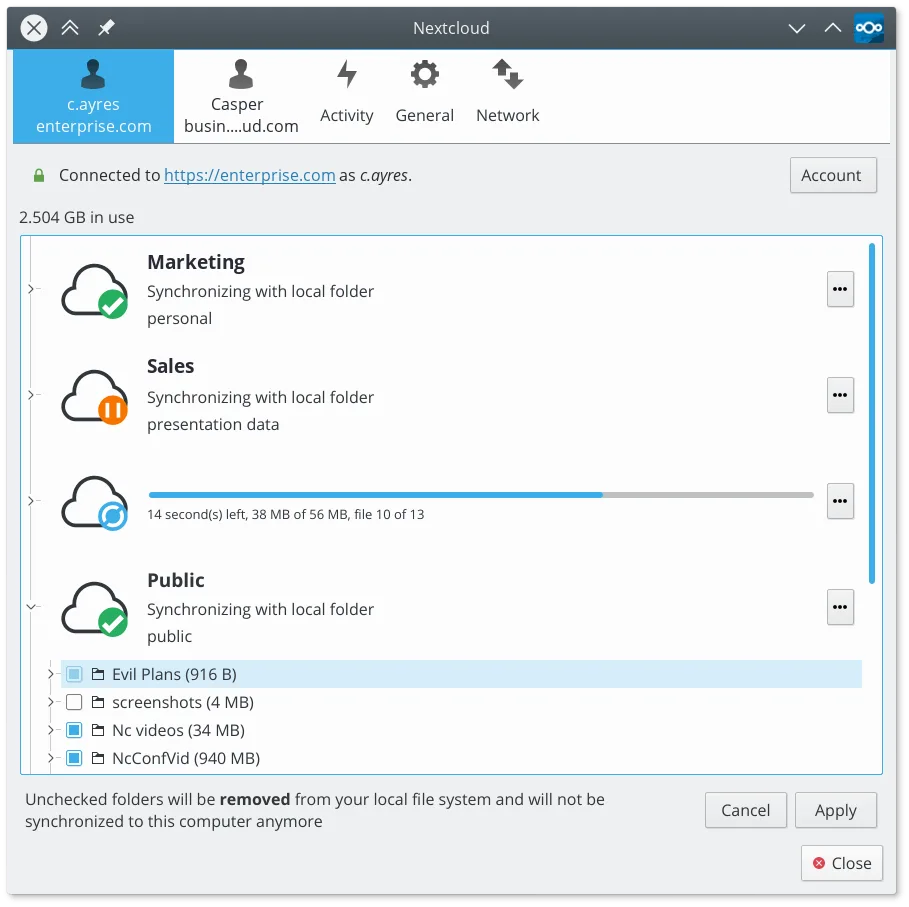
- Two-way synchronization between local folders and a cloud server
- Support for selective sync to manage local disk space
- Background operation with a system tray icon for status monitoring
- File versioning and restoration capabilities
Ce qui change
- Does not sync iCloud Photos; requires separate photo management solutions
- No built-in mail or contacts synchronization features
- Requires a Nextcloud server instance instead of using Apple's proprietary iCloud infrastructure
- File structure is based on standard directories rather than Apple-specific virtual drives
Ouvrir vos fichiers iCloud for Windows
Nextcloud Desktop Client handles standard file formats (PDF, DOCX, JPG, PNG, etc.) without issue, as it treats files as standard data. Since iCloud for Windows simply syncs standard files to a local directory, any file you have in your iCloud Drive folder is compatible with Nextcloud. There is no proprietary file format conversion required. You can copy files from your local iCloud Drive folder directly into your Nextcloud sync folder. Note that metadata specific to iCloud, such as 'Optimize Storage' placeholders, will not be recognized and will be treated as regular files.
Passer de iCloud for Windows à Nextcloud Desktop Client, étape par étape
- Set up a Nextcloud server or subscribe to a Nextcloud hosting provider
- Install the Nextcloud Desktop Client on your Linux system
- Log in to the client and configure the sync folder location
- Copy files from your local iCloud Drive directory to the Nextcloud sync folder
- Enable selective sync for large folders to save local disk space
- Verify that files appear in your Nextcloud web interface and other connected devices
Fonctionnalités clés de Nextcloud Desktop Client
- Synchronisation bidirectionnelle des fichiers et dossiers
- Prise en charge de la synchronisation sélective pour économiser de l’espace disque
- Historique des versions et restauration de fichiers
- Intégration avec les fonctionnalités du serveur Nextcloud comme le partage de liens
- Résolution des conflits pour les modifications simultanées
- Prise en charge des gros fichiers et des données binaires
- Icône de la zone de notification pour un statut rapide et pause/reprise
- Support multiplateforme incluant Linux, Windows et macOS
Installer Nextcloud Desktop Client sous Linux
flatpak install flathub com.nextcloud.desktopclient.nextcloudQuestions fréquentes
Can I keep using iCloud for Windows alongside Nextcloud on Linux?
No, iCloud for Windows is not available for Linux. You must migrate your data to Nextcloud or another Linux-compatible cloud service to continue syncing on your Linux machine.
Does Nextcloud Desktop Client sync photos automatically?
It syncs any files in the designated folder, including photos. However, it does not have the specialized photo library management features of iCloud Photos, such as automatic face recognition or seamless integration with mobile photo apps.
What happens if I edit a file on two devices at the same time?
The client detects conflicts and creates a separate copy of the conflicting file, usually with a timestamp or 'conflict' suffix, allowing you to manually merge or choose which version to keep.
