
 OpenSCADLinux
vs
Paint 3DWindows
OpenSCADLinux
vs
Paint 3DWindows
OpenSCAD, alternative Linux à Paint 3D
Mis à jour le
Notre avis
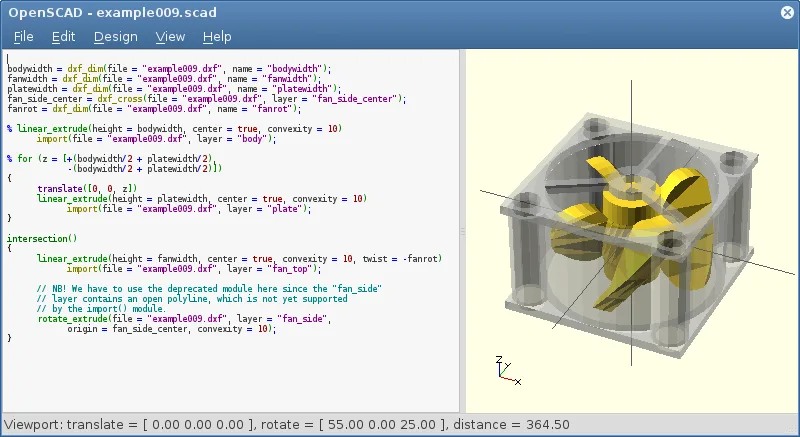
OpenSCAD is not a suitable replacement for Paint 3D. It is a script‑based parametric CAD tool that focuses on solid modeling, not on quick raster drawing or simple 3‑D object creation. Paint 3D users who need a touch‑and‑drag interface, brush tools, and layer compositing will find OpenSCAD too complex and lacking those features. It may serve advanced users who want precise, parameter‑driven models, but it does not match Paint 3D’s casual workflow.
- Licence
- GPL-3.0+
- Prix
- Gratuit
- Dernière version
- 2021.01 (31 janvier 2021)
- Note
- —
Ce qui fonctionne pareil
- Both can export to STL and OBJ formats
- Both run natively on Linux
- Both support basic 3‑D geometry creation
- Both are free and open source
- Both allow creation of low‑poly 3‑D objects
Ce qui change
- OpenSCAD requires writing code; Paint 3D uses a GUI
- OpenSCAD has no raster drawing or brush tools; Paint 3D does
- OpenSCAD lacks layers and compositing; Paint 3D supports them
- OpenSCAD is non‑interactive; Paint 3D is real‑time interactive
- OpenSCAD does not support PNG/JPEG export; Paint 3D does
Ouvrir vos fichiers Paint 3D
Paint 3D saves projects in a proprietary .mspaint3d format that OpenSCAD cannot read. OpenSCAD can import STL, OFF, and DXF files, but there is no direct path to open a Paint 3D file. Exporting from Paint 3D to STL or OBJ would allow OpenSCAD to read the geometry, but the original paint layers and 2‑D drawings would be lost.
Passer de Paint 3D à OpenSCAD, étape par étape
- Export your Paint 3D model to STL or OBJ.
- Open the exported file in OpenSCAD using the "import()" command.
- If you need 2‑D sketches, export them as DXF and import them with "import()".
- Adjust parameters or add CSG operations in the script.
- Render the model with the Render button to confirm geometry.
- Export the final model as STL for 3‑D printing or further use.
Fonctionnalités clés de OpenSCAD
- Modélisation paramétrique via conception scriptée
- Opérations de géométrie solide constructive (CSG)
- Extrusion d'outlines 2D DXF
- Support des formats de fichiers STL et OFF
- Import de fichiers DXF pour chemins 2D et paramètres
- Processus de rendu non interactif
- Disponible sur Arch, Debian, Fedora, openSUSE et Ubuntu
Installer OpenSCAD sous Linux
flatpak install flathub org.openscad.OpenSCADsudo apt install openscadsudo apt install openscadsudo dnf install openscadsudo pacman -S openscadsudo zypper install openscadQuestions fréquentes
Can I use OpenSCAD for quick sketches like Paint 3D?
No. OpenSCAD is designed for precise, script‑based modeling and has no quick‑draw tools.
Does OpenSCAD support PNG or JPEG export?
No, it only exports 3‑D formats such as STL, OFF, and DXF.
Is OpenSCAD suitable for beginners?
It is more suitable for users comfortable with coding and parametric design; beginners may find it steep.
6 autres alternatives à Paint 3D
 KritaKrita est un programme de peinture numérique et d'illustration open‑source complet.Open sourceGratuitFlatpakKrita ou Paint 3D
 GIMPGIMP est un éditeur de graphiques raster gratuit et open source, conçu pour la retouche photo, la peinture…Open sourceGratuitFlatpakGIMP ou Paint 3D
 InkscapeInkscape est un éditeur de graphiques vectoriels gratuit et open source qui rivalise avec Adobe Illustrator…Open sourceGratuitFlatpakInkscape ou Paint 3D
 BlenderBlender est une suite 3D libre et open-source pour la modélisation, l’animation, le rendu et le montage vidéo.Open sourceGratuitFlatpakBlender ou Paint 3D
 FreeCADFreeCAD est un modélisateur 3D paramétrique open‑source pour la conception, l’ingénierie et l’impression 3D.Open sourceGratuitFlatpakFreeCAD ou Paint 3D
 Tux PaintTux Paint est un programme de dessin gratuit, adapté aux enfants, doté d'une interface simple, d'effets…Open sourceGratuitFlatpakTux Paint ou Paint 3D