
 QCADLinux
vs
AutoCAD LTWindows
QCAD, alternative Linux à AutoCAD LT
Mis à jour le
Notre avis
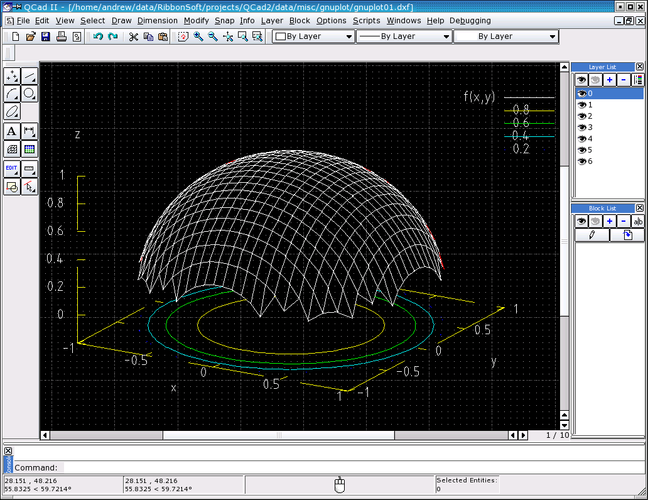
QCAD can serve as a practical replacement for AutoCAD LT for users whose work stays within pure 2D drafting and who are comfortable with DXF as the main exchange format. It offers the essential drawing, layering, dimensioning and block tools needed for floor plans, schematics and mechanical layouts. Professionals who rely heavily on native DWG workflows, extensive custom tool palettes, or advanced annotation standards may find it lacking, while hobbyists, educators and small‑shop engineers will likely be satisfied.
- Licence
- GPL-3.0
- Prix
- Gratuit
- Dernière version
- 27.0.5.0
- Note
- —
Ce qui fonctionne pareil
- Line, arc, circle and polyline drawing primitives
- Layer management with visibility and lock controls
- Block creation and insertion
- Dimensioning and text annotation tools
- DXF import and export
Ce qui change
- No native DWG read/write; relies on DXF for most interoperability
- Fewer built‑in industry libraries and standard symbol sets
- Limited automation compared to AutoCAD LT's LISP/Script support
- No advanced plotter configuration wizard found in LT
- Less extensive help and training resources
Ouvrir vos fichiers AutoCAD LT
QCAD can open and save DXF files without issue, which covers the majority of AutoCAD LT exchanges. Direct DWG handling is not built in; you can try opening DWG files via the optional import filter, but results may vary and complex drawings can lose data. Exporting back to DWG is not supported, so you would need to convert DXF to DWG with a third‑party tool if that format is required.
Passer de AutoCAD LT à QCAD, étape par étape
- Install QCAD from your distribution's repository (e.g., pacman or dnf).
- Export existing AutoCAD LT drawings to DXF (Version R14 or 2000).
- Open the DXF files in QCAD and verify geometry, layers and dimensions.
- Recreate any missing blocks or custom symbols using QCAD's block editor.
- Adjust plot settings in QCAD to match your printer or plotter requirements.
- Save final drawings as DXF for continued exchange with LT users.
Fonctionnalités clés de QCAD
- Gestion des calques avec basculement de visibilité
- Import/export DXF étendu
- Outils de dimensionnement et d’annotation de base
- Styles de lignes et hachures personnalisables
- Scriptable via ECMAScript (JavaScript)
- Impression en PDF et formats raster
- Options d’accrochage et de grille pour une rédaction précise
Installer QCAD sous Linux
sudo dnf install qcadsudo pacman -S qcadQuestions fréquentes
Can QCAD read native DWG files from AutoCAD LT?
Only through an optional import filter; support is limited and not guaranteed for complex files.
Is there a cost to use QCAD on Linux?
QCAD Community Edition is free and open source under GPL‑3.0; a commercial Professional edition exists with extra features, but the free version covers basic 2D drafting.
Will my existing layer names and block definitions survive the migration?
When you export to DXF, layer names and block definitions are preserved, so they appear unchanged in QCAD.
2 autres alternatives à AutoCAD LT
 LibreCADLibreCAD est un programme CAO 2D gratuit et open source pour créer des plans précis sur Linux.Open sourceGratuitFlatpakLibreCAD ou AutoCAD LT
 FreeCADFreeCAD est un modélisateur 3D paramétrique open‑source pour la conception, l’ingénierie et l’impression 3D.Open sourceGratuitFlatpakFreeCAD ou AutoCAD LT