
 QCADLinux
vs
QCADLinux
vs
 Autodesk AutoCADWindows
QCAD, alternative Linux à Autodesk AutoCAD
Mis à jour le
Notre avis
QCAD is a solid replacement for AutoCAD if your work is strictly 2D drafting. It handles layers, dimensions, and DXF files well, making it suitable for mechanical or architectural 2D plans. However, it is not a drop-in replacement for 3D modeling tasks, as QCAD lacks 3D capabilities entirely. If you rely on AutoCAD’s 3D solid or surface modeling, QCAD will not work for you. For pure 2D users who need a free, open-source tool with decent scripting support, QCAD is a viable and capable alternative that runs natively on Linux.
- Licence
- GPL-3.0
- Prix
- Gratuit
- Dernière version
- 3.33.1
- Note
- —
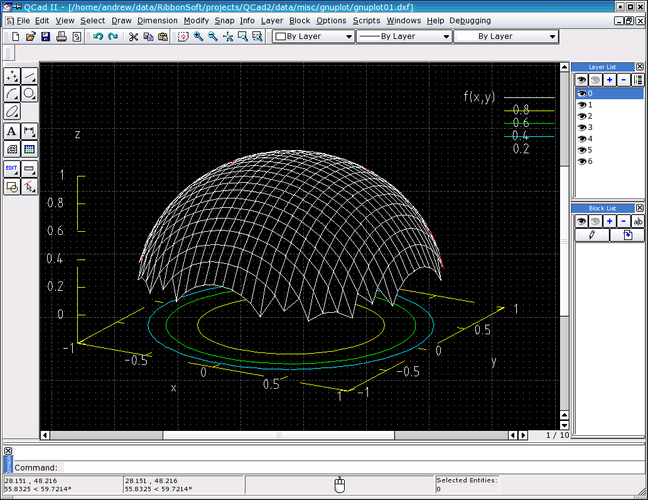
Ce qui fonctionne pareil
- Supports 2D drafting and technical drawing creation
- Offers layer management with visibility controls
- Includes dimensioning and annotation tools
- Supports DXF file import and export
- Allows scripting for automation tasks
Ce qui change
- QCAD is strictly 2D; it lacks all 3D modeling features found in AutoCAD
- QCAD uses ECMAScript for scripting, whereas AutoCAD uses AutoLISP or .NET
- QCAD is open-source and free, while AutoCAD is commercial and subscription-based
- QCAD has limited native DWG support compared to AutoCAD's full native implementation
Ouvrir vos fichiers Autodesk AutoCAD
QCAD has extensive support for DXF files, which is the standard interchange format for CAD data. You can import and export DXF files reliably. Native DWG support is more limited; while QCAD can often read DWG files, it may not preserve all proprietary AutoCAD-specific entities or complex blocks perfectly. For best compatibility, converting AutoCAD DWG files to DXF before importing into QCAD is recommended to avoid data loss or rendering issues.
Passer de Autodesk AutoCAD à QCAD, étape par étape
- Install QCAD via your distribution's package manager (e.g., dnf install qcad on Fedora).
- Convert existing AutoCAD DWG files to DXF format using AutoCAD or a converter tool.
- Import the DXF files into QCAD and verify layer structures and annotations.
- Review and re-apply custom line styles and hatches if they did not import correctly.
- Test your workflow by creating a sample drawing to ensure precision and snapping work as expected.
- Set up any necessary ECMAScript scripts to replace previous AutoLISP macros.
Fonctionnalités clés de QCAD
- Gestion des calques avec basculement de visibilité
- Import/export DXF étendu
- Outils de dimensionnement et d’annotation de base
- Styles de lignes et hachures personnalisables
- Scriptable via ECMAScript (JavaScript)
- Impression en PDF et formats raster
- Options d’accrochage et de grille pour une rédaction précise
Installer QCAD sous Linux
sudo dnf install qcadsudo pacman -S qcadQuestions fréquentes
Can QCAD open AutoCAD DWG files directly?
QCAD can often open DWG files, but support is not as robust as DXF. For critical projects, converting DWG to DXF first is safer to ensure all geometry and layers are preserved correctly.
Does QCAD support 3D modeling?
No. QCAD is a 2D-only application. If your workflow requires 3D solids or surfaces, you will need a different tool like FreeCAD or OpenSCAD.
Is QCAD available as a native Linux package?
Yes. QCAD is packaged in major distributions like Fedora and Arch Linux, so you can install it directly without relying on external binaries or Wine.
5 autres alternatives à Autodesk AutoCAD
 BricscadBricsCAD is a commercial CAD application for Linux that reads and writes DWG files, aiming to replace AutoCAD.Bricscad ou Autodesk AutoCAD
 Open CASCADEOpen CASCADE is an open‑source C++ kernel for 3‑D CAD, CAM and CAE applications.Open sourceGratuitOpen CASCADE ou Autodesk AutoCAD
 CYCASCYCAS is a legacy Linux CAD application for structural and mechanical design, often cited as an AutoCAD…Open sourceGratuitAbandonnéCYCAS ou Autodesk AutoCAD
 VariCADVariCAD is a commercial 3D/2D CAD package for mechanical engineering that runs on Linux and Windows.AbandonnéVariCAD ou Autodesk AutoCAD
 VARKONVARKON is an open‑source CAD system for parametric geometry modeling, originally from Swedish academic…Open sourceGratuitAbandonnéVARKON ou Autodesk AutoCAD