
 QtractorLinux
vs
CubaseWindows
QtractorLinux
vs
CubaseWindows
Qtractor, alternative Linux à Cubase
Mis à jour le
Notre avis
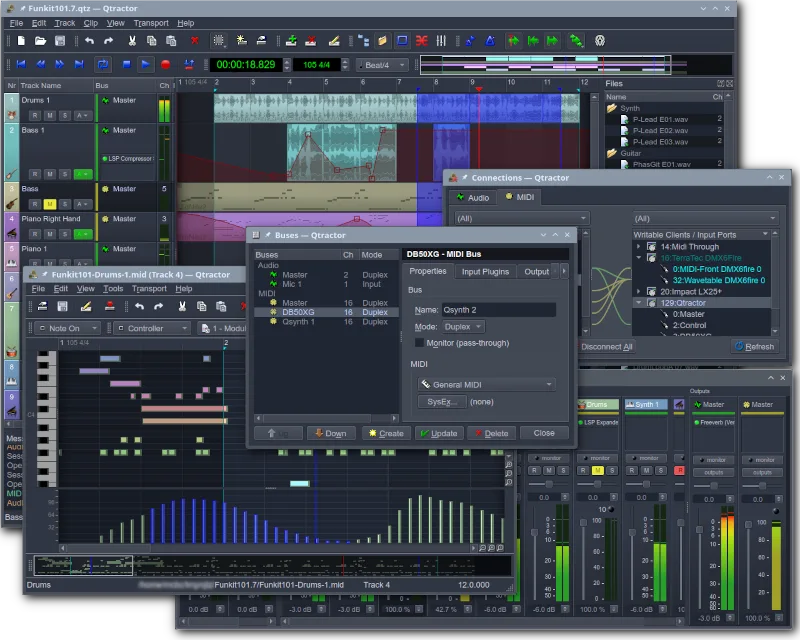
Qtractor is a solid, free alternative for basic to intermediate music production on Linux. It handles multi-track audio and MIDI recording, mixing, and VST plugin support effectively. However, it lacks the advanced scoring features, comprehensive MIDI editing tools, and polished workflow of Cubase. If you rely heavily on complex MIDI composition or professional scoring, you will feel the gap. For home studio users needing a reliable, open-source DAW for tracking, mixing, and simple MIDI sequencing, Qtractor is a capable and honest choice.
- Licence
- GPL-2.0+
- Prix
- Gratuit
- Dernière version
- 1.6.5 (31 octobre 2026)
- Note
- —
Ce qui fonctionne pareil
- Multi-track audio and MIDI recording capabilities
- Support for VST and LADSPA plugins
- Non-destructive editing and mixing workflow
- Session management and project saving
- Integration with hardware interfaces via ALSA/JACK
Ce qui change
- Lacks advanced MIDI scoring and notation features
- No built-in virtual instruments (Cubase has Halion, etc.)
- Smaller plugin ecosystem compared to Cubase's native suite
- Interface is functional but less polished and intuitive
- Limited automation and advanced editing tools
Ouvrir vos fichiers Cubase
Qtractor does not natively open or export Cubase project files (.cpr). You will need to export audio stems and MIDI data from Cubase as standard formats (WAV/AIFF for audio, Standard MIDI Files for MIDI) and import them into Qtractor. There is no direct project file conversion tool available.
Passer de Cubase à Qtractor, étape par étape
- Install Qtractor and a JACK audio server on your Linux system
- Export all audio tracks from your Cubase project as WAV or AIFF files
- Export all MIDI data as Standard MIDI Files (SMF)
- Create a new project in Qtractor and import the audio and MIDI files
- Reassign VST plugins and adjust mixer settings to match your original mix
- Test playback and verify routing through JACK and ALSA
Fonctionnalités clés de Qtractor
- Enregistrement audio et MIDI multi-pistes
- Intégration avec le serveur audio JACK
- Prise en charge d'ALSA pour les périphériques MIDI
- Prise en charge des plugins VST et LADSPA
- Édition et mixage non destructifs
- Effets et traitement intégrés
- Gestion des sessions et sauvegarde des projets
- Compatibilité multiplateforme via Qt
Installer Qtractor sous Linux
flatpak install flathub org.rncbc.qtractorsudo apt install qtractorsudo apt install qtractorsudo dnf install qtractorsudo pacman -S qtractorsudo zypper install qtractorQuestions fréquentes
Does Qtractor support VST plugins?
Yes, Qtractor supports VST and LADSPA plugins, allowing you to use many of the same third-party effects and instruments you might have used in Cubase.
Is Qtractor suitable for professional scoring?
No, Qtractor is not designed for professional scoring. It lacks the advanced notation and orchestral features found in Cubase or dedicated scoring software.
Can I open Cubase project files directly?
No, Qtractor cannot open .cpr files. You must export audio and MIDI data from Cubase and import them into Qtractor as separate files.
2 autres alternatives à Cubase
 ArdourArdour est une station de travail audio numérique professionnelle et open source pour l'enregistrement…Open sourceGratuitFlatpakArdour ou Cubase
 LMMSLMMS est une station de travail audio numérique gratuite pour composer, séquencer et mixer de la musique à…Open sourceGratuitFlatpakLMMS ou Cubase