
 SpyderLinux
vs
JetBrains PyCharmWindows
Spyder, alternative Linux à JetBrains PyCharm
Mis à jour le
Notre avis
Spyder can replace PyCharm for users who focus on scientific work, data analysis, and interactive debugging. It offers solid code completion, a powerful debugger, and version‑control integration, plus a variable explorer and rich console that PyCharm lacks. However, it is not as feature‑rich for general software development: refactoring tools, advanced testing frameworks, and extensive plugin ecosystem are weaker. For researchers, data scientists, or students who need an all‑in‑one scientific IDE, Spyder is a good fit; for larger projects or teams that rely on PyCharm’s full feature set, it may fall short.
- Licence
- MIT
- Prix
- Gratuit
- Dernière version
- v6.1.6 (28 juillet 2026)
- Note
- —
Ce qui fonctionne pareil
- Python syntax highlighting and autocompletion
- Integrated graphical debugger
- Unit testing framework support (pytest, unittest)
- Version control system integration (Git, Mercurial)
- Virtual environment management
Ce qui change
- Spyder focuses on scientific libraries; lacks advanced refactoring and code navigation features of PyCharm
- PyCharm has a richer plugin ecosystem and more mature testing UI
- Spyder’s debugging is tied to the IPython console, while PyCharm offers a more traditional IDE debugger
- PyCharm provides better support for web frameworks and multi‑language projects
- Spyder’s UI is lighter but offers less customization for complex project structures
Ouvrir vos fichiers JetBrains PyCharm
Spyder does not open PyCharm project files (.idea). You can import Python files directly, but project settings, run configurations, and VCS mappings must be recreated manually.
Passer de JetBrains PyCharm à Spyder, étape par étape
- Export your virtual environment or list of packages from PyCharm (pip freeze > requirements.txt).
- Create a new Spyder project and add the same source directories.
- Install the listed packages into a new virtual environment and activate it in Spyder’s preferences.
- Re‑create VCS mappings in Spyder’s version control settings.
- Re‑implement any custom run configurations using Spyder’s run settings.
- Verify that tests run by configuring the test runner in Spyder’s preferences.
Fonctionnalités clés de Spyder
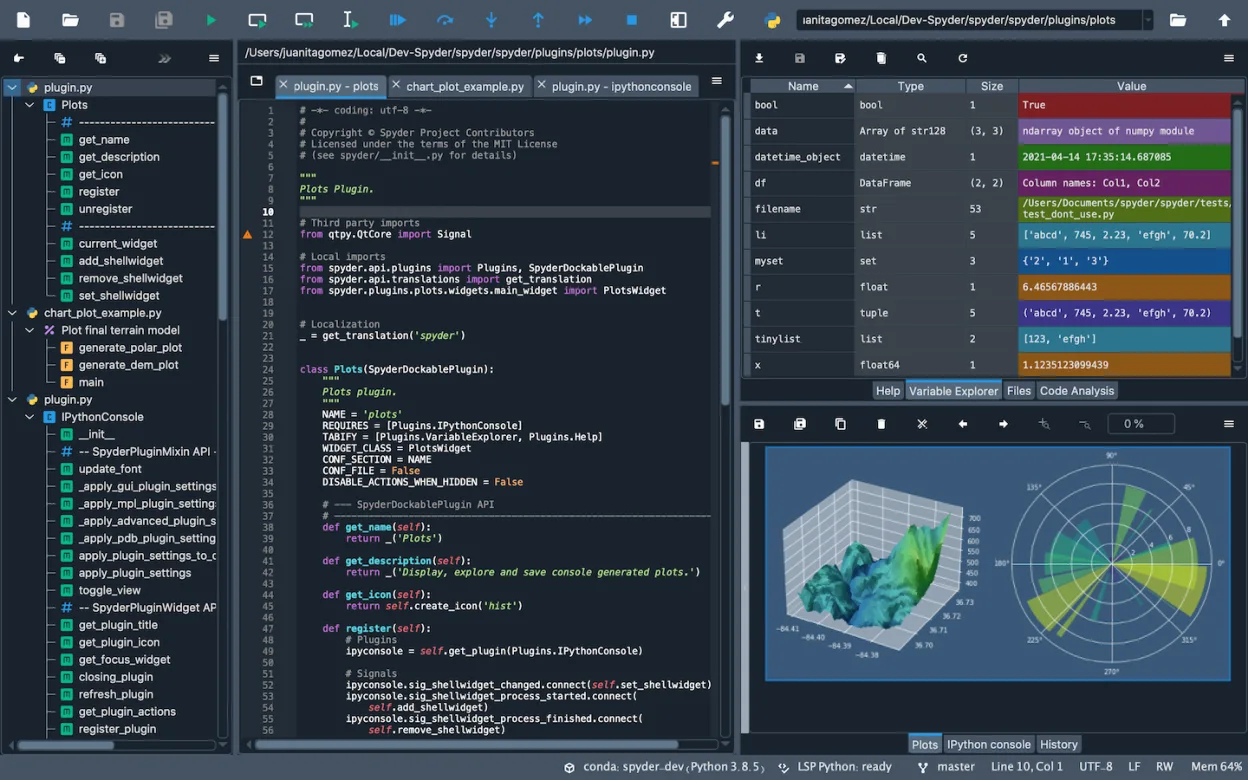
- Console IPython interactive avec rendu riche des sorties
- Explorateur de variables pour inspecter de grands tableaux NumPy et DataFrames Pandas
- Débogage intégré avec exécution pas à pas et gestion des points d'arrêt
- Prise en charge intégrée de la visualisation Matplotlib, SymPy et SciPy
- Architecture de plugins pour étendre les fonctionnalités avec des outils personnalisés
- Gestionnaire de projets pour organiser plusieurs fichiers et configurations
- Analyse et linting du code via l'intégration de Pylint et PEP8
Installer Spyder sous Linux
flatpak install flathub org.spyder_ide.spydersudo apt install spydersudo apt install spydersudo dnf install spydersudo pacman -S spydersudo zypper install spyderQuestions fréquentes
Does Spyder support virtual environments?
Yes, Spyder can use any Python interpreter, including virtual environments created with venv, conda, or virtualenv. Set the interpreter in Preferences → Python interpreter.
Can I use Spyder for non‑scientific projects?
Spyder works fine for general Python development, but it lacks some advanced refactoring and multi‑language features that PyCharm offers. It’s suitable for small to medium projects.
Is Spyder free for commercial use?
Spyder is released under the MIT license, so it can be used freely in commercial environments without licensing fees.
5 autres alternatives à JetBrains PyCharm
 Visual Studio CodeUn éditeur de code léger et extensible qui prend en charge le débogage, Git et de nombreux langages.GratuitFlatpakVisual Studio Code ou JetBrains PyCharm
 ThonnyThonny est un IDE Python léger destiné aux débutants, offrant un débogueur intégré et un gestionnaire de…Open sourceGratuitFlatpakThonny ou JetBrains PyCharm
 GeanyGeany est un IDE léger et rapide qui prend en charge de nombreux langages et plugins dès l'installation.Open sourceGratuitFlatpakGeany ou JetBrains PyCharm
 KateKate est un éditeur de texte riche en fonctionnalités, axé sur les programmeurs, issu de KDE, prenant en…Open sourceGratuitFlatpakKate ou JetBrains PyCharm
 VimVim est un éditeur de texte modal hautement configurable pour une édition efficace sous Linux.Open sourceGratuitFlatpakVim ou JetBrains PyCharm