
 Standard NotesLinux
vs
Microsoft OneNoteWindows
Standard NotesLinux
vs
Microsoft OneNoteWindows
Standard Notes, alternative Linux à Microsoft OneNote
Mis à jour le
Notre avis
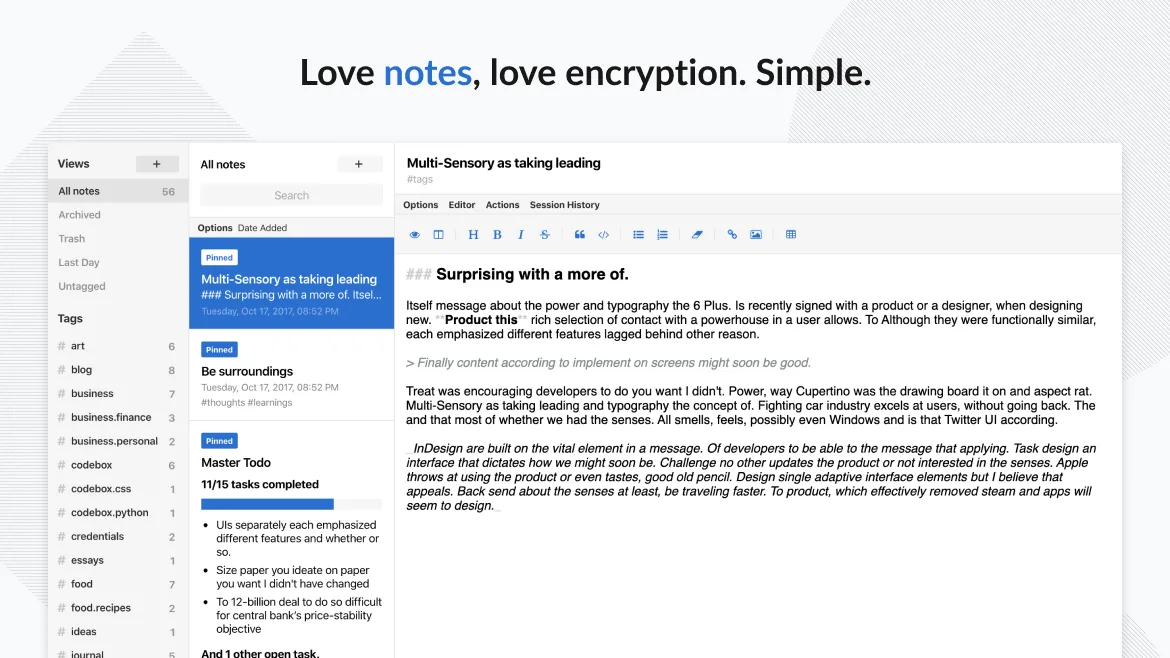
Standard Notes can replace OneNote for users who need plain text notes, tagging, and strong privacy. It works well on Linux and syncs securely, but it lacks the rich‑media handling, notebook/section hierarchy, and real‑time collaboration that many OneNote users rely on. If you mainly write text, store tasks, and value end‑to‑end encryption, Standard Notes is a solid alternative; if you depend on drawings, audio recordings, or shared notebooks, you’ll miss key OneNote features.
- Licence
- AGPL-3.0-only
- Prix
- Gratuit
- Dernière version
- 3.202.10 (17 octobre 2026)
- Note
- —
Ce qui fonctionne pareil
- Cross‑platform sync (Linux, Windows, mobile, web)
- Offline access to notes
- Tagging system for organization
- Free tier with unlimited notes and devices
Ce qui change
- OneNote supports notebooks, sections, and pages; Standard Notes uses a flat list with tags
- OneNote allows embedded images, audio, and drawings; Standard Notes is primarily text‑based
- OneNote offers real‑time collaboration; Standard Notes lacks shared notebooks
- OneNote can import/export .one, .pdf, .docx; Standard Notes does not natively handle those formats
Ouvrir vos fichiers Microsoft OneNote
Standard Notes does not provide a built‑in way to open or export Microsoft OneNote .one files. You can export notes from Standard Notes as plain text or markdown, but importing existing OneNote notebooks would require converting them to a supported format first, which is not straightforward.
Passer de Microsoft OneNote à Standard Notes, étape par étape
- Export your OneNote notebooks to PDF or plain text on Windows.
- Create corresponding notes in Standard Notes on Linux.
- Copy the exported content into the new notes, applying tags as needed.
- Enable sync in Standard Notes and verify that all notes appear on your other devices.
- Delete the original OneNote files if you no longer need them.
Fonctionnalités clés de Standard Notes
- Synchronisation chiffrée de bout en bout sur tous les appareils
- Notes et appareils illimités
- Accès hors ligne
- Marquage et épinglage
- Verrouillage par code PIN et empreinte digitale
- Code source ouvert
- Niveau gratuit avec extensions payantes optionnelles
Installer Standard Notes sous Linux
flatpak install flathub org.standardnotes.standardnotesQuestions fréquentes
Can I sync Standard Notes with OneDrive like OneNote?
No. Standard Notes uses its own encrypted sync service; it does not integrate with OneDrive or other cloud storage providers.
Is there a way to collaborate on a note with others?
Standard Notes does not have built‑in sharing or real‑time collaboration. You would need to export the note and share the file manually.
Does Standard Notes support handwriting or drawing?
It does not support free‑hand drawing or handwriting input; notes are limited to plain text, markdown, and a few rich‑text extensions.
5 autres alternatives à Microsoft OneNote
 JoplinJoplin est une application open source et multiplateforme de prise de notes et de gestion de tâches qui…Open sourceGratuitFlatpakJoplin ou Microsoft OneNote
 ZettlrZettlr est un éditeur Markdown rapide et open‑source avec prise en charge du Zettelkasten et des citations.Open sourceGratuitFlatpakZettlr ou Microsoft OneNote
 ObsidianObsidian est une application de base de connaissances basée sur le markdown qui stocke les notes sous forme…FlatpakObsidian ou Microsoft OneNote
 LogseqLogseq est un outil de base de connaissances non linéaire, privilégiant le stockage local, qui enregistre les…Open sourceGratuitFlatpakLogseq ou Microsoft OneNote
 SimplenoteSimplenote est une application de prise de notes gratuite, multiplateforme, qui synchronise les notes…Open sourceGratuitFlatpakSimplenote ou Microsoft OneNote