
 StremioLinux
vs
StremioLinux
vs
 VLC media playerWindows
Stremio, alternative Linux à VLC media player
Mis à jour le
Notre avis
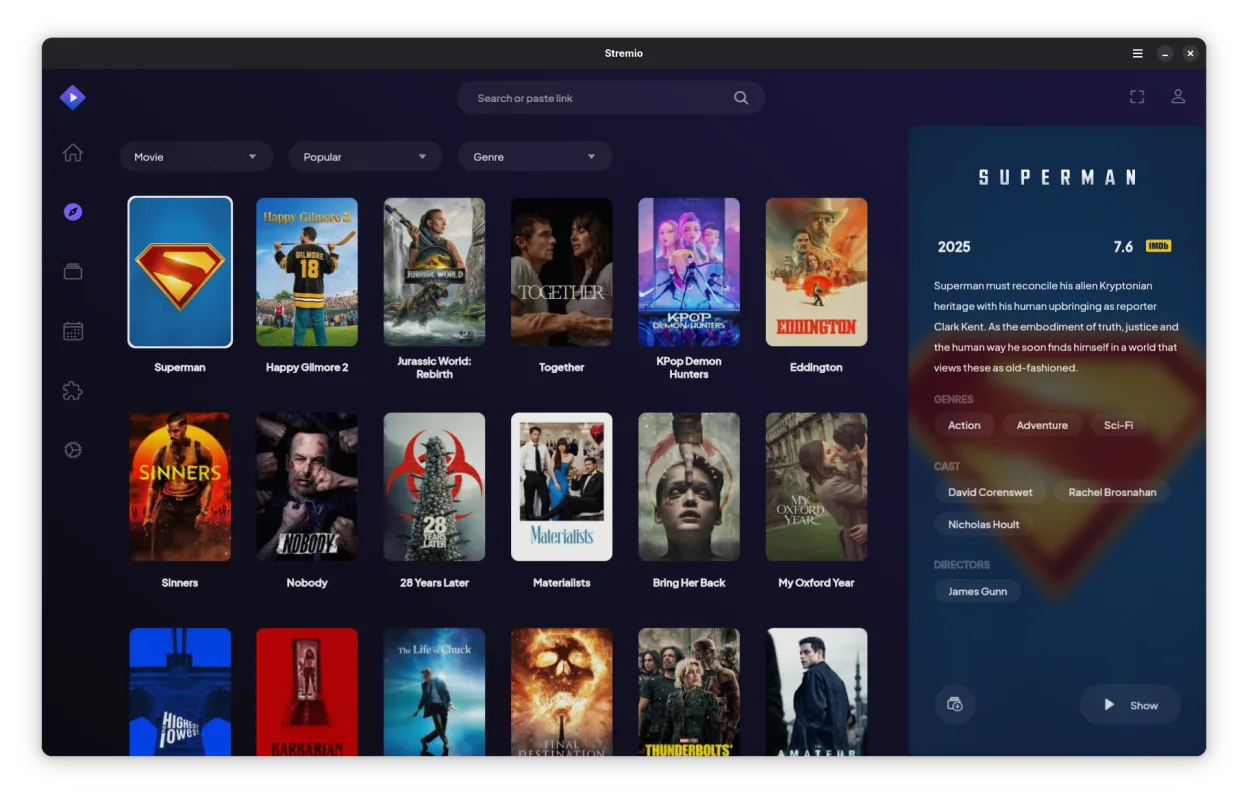
Stremio is not a direct drop-in replacement for VLC media player. While both play video, VLC is a general-purpose codec monster that handles obscure formats and raw streams without fuss. Stremio is a media center interface focused on library management and streaming addons. If you just need to open a random MKV file or stream a live RTSP feed with zero configuration, VLC is still the right tool. If you want a Netflix-style interface for your local files and online content, Stremio is excellent, but you will likely keep VLC installed as a fallback for tricky files.
- Licence
- GPL-3.0-only
- Prix
- Gratuit
- Dernière version
- 1.2.2 (7 octobre 2026)
- Note
- —
Ce qui fonctionne pareil
- Open-source and free to use
- Supports standard video containers like MP4 and MKV
- Available natively on Linux
- Handles local file playback
Ce qui change
- Lacks the extensive codec coverage of VLC for obscure or corrupted files
- No native support for raw network streams like RTSP or direct YouTube playback without addons
- Focuses on library management and metadata rather than raw media decoding
- Requires addon configuration for online streaming, unlike VLC's direct URL input
- Does not support hardware acceleration in the same granular, low-level way VLC does
Ouvrir vos fichiers VLC media player
Stremio does not use a proprietary playlist format that conflicts with VLC. You can open standard playlist files (M3U, M3U8) in both applications without conversion. However, Stremio primarily indexes your local file system rather than importing specific VLC library databases. If you have complex VLC playlist configurations with specific stream URLs, you may need to recreate those as M3U files or use addons in Stremio, as it does not directly import VLC's internal configuration or history.
Passer de VLC media player à Stremio, étape par étape
- Install Stremio via your package manager or Flathub
- Configure your local media library paths in Stremio settings
- Install necessary addons for any online streaming sources you used in VLC
- Test playback of your most common video files to ensure codec support
- Keep VLC installed for handling obscure formats or direct RTSP streams
Fonctionnalités clés de Stremio
- Bibliothèque multimédia locale avec récupération automatique des métadonnées
- Système d’addons pour accéder aux sources de streaming en ligne
- Prise en charge du contenu 4K HDR
- Disponibilité multiplateforme incluant Linux, Windows et mobile
- Interface propre et minimale axée sur la découverte
- Intégration avec les systèmes de fichiers locaux pour la lecture directe
Installer Stremio sous Linux
flatpak install flathub com.stremio.StremioQuestions fréquentes
Can Stremio play any video file VLC can?
No. Stremio relies on standard codecs and may struggle with obscure, corrupted, or highly specialized formats that VLC handles effortlessly. For general MP4/MKV files, it works fine.
Does Stremio support RTSP streams directly?
Not natively. Stremio is designed for VOD and library-based content. For live RTSP streams, you should use VLC or a dedicated stream player.
Is Stremio better for watching movies?
If you want a curated library with metadata and poster art, yes. If you just want to double-click a file and watch it immediately without a UI, VLC is faster and simpler.
3 autres alternatives à VLC media player
 TotemTotem (GNOME Videos) est le lecteur vidéo par défaut de GNOME, construit sur GStreamer.Open sourceGratuitTotem ou VLC media player
 MplayerMPlayer est un lecteur multimédia gratuit en ligne de commande qui prend en charge un large éventail de…Open sourceGratuitMplayer ou VLC media player
 Gnome MPlayerGnome MPlayer est une interface légère pour MPlayer, conçue pour les bureaux GNOME.Open sourceGratuitAbandonnéGnome MPlayer ou VLC media player