
 ThonnyLinux
vs
JetBrains PyCharmWindows
Thonny, alternative Linux à JetBrains PyCharm
Mis à jour le
Notre avis
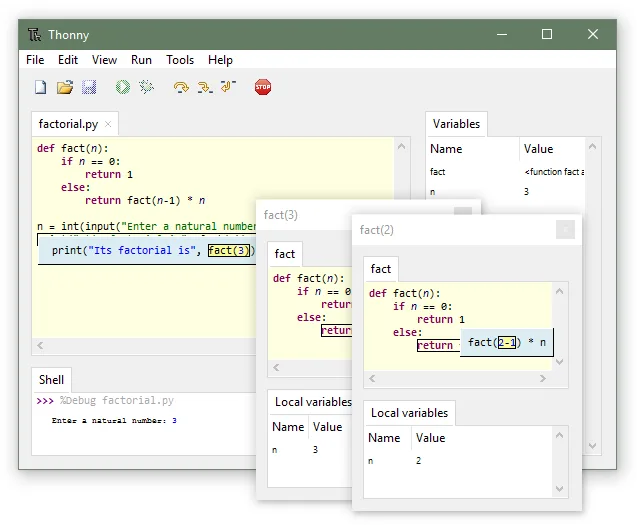
Thonny is not a full replacement for JetBrains PyCharm. It works well for beginners and small scripts, offering syntax highlighting, autocompletion, a visual debugger, and a simple package manager. Advanced users who need sophisticated refactoring, multi‑project management, or deep VCS integration will find it lacking. PyCharm remains the better choice for medium‑to‑large projects or professional development.
- Licence
- MIT
- Prix
- Gratuit
- Dernière version
- 5.0.1 (26 octobre 2026)
- Note
- —
Ce qui fonctionne pareil
- Python syntax highlighting and autocompletion
- Integrated graphical debugger
- Support for virtual environments
- Cross‑platform packaging (deb, rpm, Flatpak)
- Basic REPL console
Ce qui change
- Thonny lacks advanced refactoring tools (e.g., rename, extract method)
- No built‑in unit test runner or test explorer
- Limited VCS integration (no Git GUI, only basic commands)
- No support for multi‑project workspaces
- No advanced profiling or performance tools
Ouvrir vos fichiers JetBrains PyCharm
Thonny does not open PyCharm project files (.idea) or settings. To migrate, you would need to recreate the project structure manually in Thonny, importing any external modules via its package manager.
Passer de JetBrains PyCharm à Thonny, étape par étape
- Create a new Thonny project folder
- Copy your Python scripts into the folder
- Use Thonny's package manager to install any required third‑party modules
- Reconfigure virtual environments via Thonny's settings
- Set up any needed test scripts manually
Fonctionnalités clés de Thonny
- Débogueur intégré avec visualisation étape par étape
- Installateur de paquets par interface graphique
- Mode de référence spécial pour l'apprentissage de la gestion de la mémoire
- Disposition simple à fenêtre unique
- Prise en charge de Python 3.10+
- Multiplateforme (Linux, Windows, macOS)
- Open source (MIT)
Installer Thonny sous Linux
flatpak install flathub org.thonny.Thonnysudo apt install thonnysudo apt install thonnysudo dnf install thonnysudo zypper install thonnyQuestions fréquentes
Can I use Thonny with a virtual environment created by PyCharm?
Yes, point Thonny to the same virtual environment by selecting it in the interpreter settings.
Does Thonny support Git?
It has basic Git command integration via the terminal, but no graphical Git interface.
Is Thonny suitable for large codebases?
It can open large files, but features like code navigation, refactoring, and performance profiling are limited, making it less suitable for large projects.
5 autres alternatives à JetBrains PyCharm
 Visual Studio CodeUn éditeur de code léger et extensible qui prend en charge le débogage, Git et de nombreux langages.GratuitFlatpakVisual Studio Code ou JetBrains PyCharm
 SpyderSpyder est un IDE Python gratuit et open source, conçu spécifiquement pour le calcul scientifique, l'analyse…Open sourceGratuitFlatpakSpyder ou JetBrains PyCharm
 GeanyGeany est un IDE léger et rapide qui prend en charge de nombreux langages et plugins dès l'installation.Open sourceGratuitFlatpakGeany ou JetBrains PyCharm
 KateKate est un éditeur de texte riche en fonctionnalités, axé sur les programmeurs, issu de KDE, prenant en…Open sourceGratuitFlatpakKate ou JetBrains PyCharm
 VimVim est un éditeur de texte modal hautement configurable pour une édition efficace sous Linux.Open sourceGratuitFlatpakVim ou JetBrains PyCharm