
 ThonnyLinux
vs
JetBrains PyCharmWindows
Thonny as a Linux alternative to JetBrains PyCharm
Updated
Our verdict
Thonny is not a full replacement for JetBrains PyCharm. It works well for beginners and small scripts, offering syntax highlighting, autocompletion, a visual debugger, and a simple package manager. Advanced users who need sophisticated refactoring, multi‑project management, or deep VCS integration will find it lacking. PyCharm remains the better choice for medium‑to‑large projects or professional development.
- License
- MIT
- Price
- Free
- Latest version
- 5.0.1 (October 26, 2026)
- Rating
- —
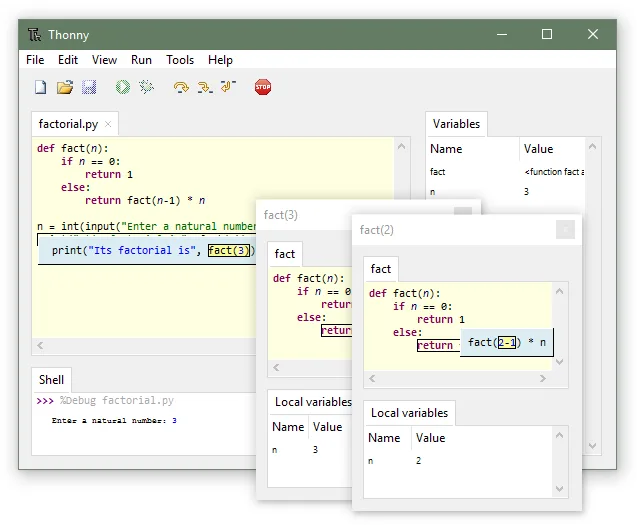
What works the same
- Python syntax highlighting and autocompletion
- Integrated graphical debugger
- Support for virtual environments
- Cross‑platform packaging (deb, rpm, Flatpak)
- Basic REPL console
What is different
- Thonny lacks advanced refactoring tools (e.g., rename, extract method)
- No built‑in unit test runner or test explorer
- Limited VCS integration (no Git GUI, only basic commands)
- No support for multi‑project workspaces
- No advanced profiling or performance tools
Opening your JetBrains PyCharm files
Thonny does not open PyCharm project files (.idea) or settings. To migrate, you would need to recreate the project structure manually in Thonny, importing any external modules via its package manager.
Switching from JetBrains PyCharm to Thonny, step by step
- Create a new Thonny project folder
- Copy your Python scripts into the folder
- Use Thonny's package manager to install any required third‑party modules
- Reconfigure virtual environments via Thonny's settings
- Set up any needed test scripts manually
Key features of Thonny
- One‑window interface with code, console and variable view
- Step‑by‑step visual debugger showing execution and call stack
- GUI package manager for installing third‑party modules
- Mode that highlights variable references for teaching
- Syntax highlighting and auto‑completion for Python
- Integrated REPL console
- Cross‑platform packages (deb, rpm, Flatpak)
- Supports virtual environments
How to install Thonny on Linux
flatpak install flathub org.thonny.Thonnysudo apt install thonnysudo apt install thonnysudo dnf install thonnysudo zypper install thonnyFrequently asked questions
Can I use Thonny with a virtual environment created by PyCharm?
Yes, point Thonny to the same virtual environment by selecting it in the interpreter settings.
Does Thonny support Git?
It has basic Git command integration via the terminal, but no graphical Git interface.
Is Thonny suitable for large codebases?
It can open large files, but features like code navigation, refactoring, and performance profiling are limited, making it less suitable for large projects.
5 other alternatives to JetBrains PyCharm
 Visual Studio CodeA lightweight, extensible code editor that supports debugging, Git, and many languages.FreeFlatpakVisual Studio Code vs JetBrains PyCharm
 SpyderSpyder is a free, open-source Python IDE built specifically for scientific computing, data analysis, and…Open sourceFreeFlatpakSpyder vs JetBrains PyCharm
 GeanyGeany is a lightweight, fast IDE that supports many languages and plugins out of the box.Open sourceFreeFlatpakGeany vs JetBrains PyCharm
 KateKate is a feature-rich, programmer-focused text editor from KDE with support for 300+ languages and advanced…Open sourceFreeFlatpakKate vs JetBrains PyCharm
 VimVim is a highly configurable, modal text editor for efficient editing on Linux.Open sourceFreeFlatpakVim vs JetBrains PyCharm