
 WineZGUILinux
vs
ProtonWindows
WineZGUI, alternative Linux à Proton
Mis à jour le
Notre avis
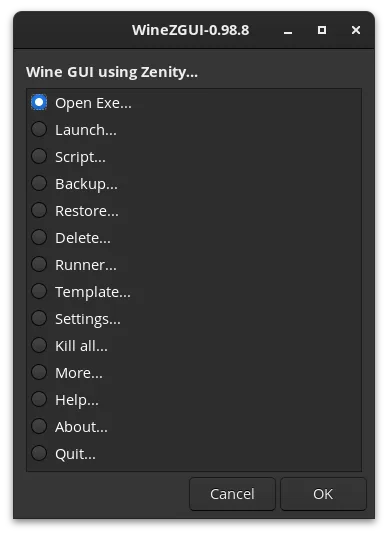
WineZGUI is not a direct replacement for Proton, but a complementary tool. Proton is a compatibility layer that translates DirectX to Vulkan, while WineZGUI is a management frontend that organizes how you run games using various backends, including Proton-GE. If you need the underlying translation layer, WineZGUI does not provide it; it relies on you installing Wine or Proton builds. It is a good choice for users who want a simple, file-manager-integrated way to manage multiple game prefixes without using a heavy suite like Lutris, provided they are comfortable installing the necessary runners manually.
- Licence
- GPL-3.0-or-later
- Prix
- Gratuit
- Dernière version
- 0.99.16 (16 janvier 2026)
- Note
- —
Ce qui fonctionne pareil
- Both allow running Windows executables on Linux
- Both support managing isolated Wine prefixes
- Both can utilize Proton builds (Proton natively, WineZGUI via custom runners)
- Both aim to simplify the process of playing Windows games
Ce qui change
- Proton is a compatibility layer; WineZGUI is a GUI frontend that does not translate DirectX itself
- Proton is deeply integrated with Steam; WineZGUI works with any .exe via file manager
- Proton handles driver and library dependencies automatically; WineZGUI requires manual installation of DXVK and VKD3D via Winetricks
- WineZGUI offers prefix backup, restore, and bundle creation features that Proton lacks
- WineZGUI is a Bash script collection; Proton is a complex C++ codebase maintained by Valve
Ouvrir vos fichiers Proton
WineZGUI can import existing Wine prefix directories from other sources, which includes the structure used by Proton if you have extracted or copied them. However, it does not natively read Steam's specific Proton configuration files to automatically map your Steam library. You would likely need to manually point WineZGUI at the prefix directories or use its import feature for standalone prefixes. It does not directly open Steam's internal database files to migrate your entire Steam library configuration automatically.
Passer de Proton à WineZGUI, étape par étape
- Install WineZGUI from your package manager or Flathub
- Install a compatible runner like Proton-GE or standard Wine with DXVK/VKD3D
- Locate your existing Wine or Proton prefix directories
- Use WineZGUI's import feature to bring in the prefix
- Create a desktop shortcut for the game executable
- Test the game to ensure all dependencies are present
Fonctionnalités clés de WineZGUI
- Exécute directement des fichiers .exe Windows depuis le gestionnaire de fichiers
- Crée des raccourcis sur le bureau pour les jeux
- Gère des préfixes Wine séparés par exécutable
- Importe des préfixes Wine existants depuis Lutris, Bottles ou Heroic
- Prend en charge des lanceurs Wine personnalisés comme Proton-GE
- Sauvegarde et restaure les préfixes de jeu
- Crée des paquets de jeu partageables (préfixe + jeu + lanceur)
- Inclut un accès au terminal pour le débogage
Installer WineZGUI sous Linux
flatpak install flathub io.github.fastrizwaan.WineZGUIsudo apt install winesudo apt install winesudo dnf install winesudo pacman -S wine-stagingsudo zypper install mingw32-cross-wineQuestions fréquentes
Does WineZGUI replace the need to install Proton?
No. WineZGUI is a manager. You still need to install a runner, such as Proton-GE or a standard Wine build with DXVK, to actually run the games. WineZGUI just makes it easier to launch and manage them.
Can I use WineZGUI with my Steam library?
WineZGUI is not integrated with Steam. You would run games via WineZGUI from your file manager. If you want Steam integration, you should use Steam's built-in Proton support or a launcher like Heroic that supports Proton.
What is the main advantage of WineZGUI over Lutris?
WineZGUI is lighter and simpler, relying on Bash and Zenity. It focuses specifically on prefix management and desktop integration without the overhead of a full application suite. It is ideal if you prefer a minimal, script-based approach.
